 Tendrl
Custom vision models on OpenMV
The vision extension ships detectors for what OpenMV already has in flash — person, face, palm, hands — plus classical detectors that need no model at all. This page is for the case those do not cover: a classifier you trained yourself, running on the camera, with its verdicts (not its frames) going to Contact — and, when you retrain it, pushed to every camera over the air.
The running example is a station camera: is the person at this bench wearing eye protection? Every rule below was learned building that, on an OpenMV N6.
What the board can run
OpenMV's ml module runs int8-quantized TensorFlow Lite models. Small image classifiers (128×128, MobileNetV2 α≈0.35) are comfortable on the N6 (~24 MB heap) and fine on the AE3 (~3.9 MB) as long as you keep the tensor arena in mind — see Memory.
OpenMV N6: the N6 runs models on ST's Neural-ART NPU and its ml.Model loads only binaries compiled for it by ST Edge AI (they start with NBIN, not TFL3). A plain .tflite fails with Failed to load network. See Compile for the N6. Everything else on this page is the same on every board.
The loop#
capture crops on the camera  →  train on your computer  →  export int8 .tflite + model.json
        ↑                                                            │
        └──── verify on the fleet (state.model, heartbeat deploy_id) ←┘  deploy as one OTA bundle
Two things make this work and both are about alignment, not model size:
- Train on exactly what the camera will see. Capture your training crops on the same board, same placement, same framesize, with the same crop rule the runtime will use. A model trained on phone photos will not survive the shop's lighting.
- Ship a sidecar with the model. A small
model.jsoncarries the labels, which label is "positive", the confidence floor, the crop rule, the normalization, and the output type. The runtime reads it; the trainer writes it; the two never disagree.
And one thing that decides whether the model learns the thing or learns your afternoon: never let the label be correlated with time. Captured as "all positives, then all negatives", a dataset scores 99 % on a shuffled split and 51–63 % — chance — across sessions, because auto exposure, white balance and posture drift over minutes and that drift separates the classes perfectly. Capture in short alternating bursts (25 on, 25 off, repeat) so both classes see the same conditions, and validate across sessions, never on shuffled frames.
1. Capture crops on the camera#
Write a small capture script (dev-only — never in a classroom, never in a deploy) that runs the same detector you will use at run time and saves the crop it produces to /sd/dataset/<label>/ (or /flash/dataset with no card):
- Crop what changes. For eye protection that is an eye band: a square centered between BlazeFace's two eye keypoints (
face_boxes()returns them), side ≈ 2.6× the inter-eye distance — brow, eyes, nose bridge and temples, and none of the hair, clothing or background a head crop carries. Fewer ways for the classifier to cheat. - Save 128×128, not 96. On N6 firmware 5.0, JPEG-compressing a 96×96 or 112×112 RGB565 image produces a 1-byte file; and, measured, an int8 MobileNetV2 lost ~10 points against its float twin at 96×96 and almost nothing at 128×128 — thin frames survive the extra pixels. Check the size of every file you write.
- Stop when nobody is there. A capture loop that waits forever for a face is a loop you cannot tell has stalled; time out after ~30 s without one.
- Aim for 400+ per class, across people, head angles, lighting and eyewear types, in the alternating bursts described above. Decide up front whether prescription glasses count as eye protection for your station and label consistently — the model can only learn the distinction you draw.
2. Train locally#
Any Keras/TensorFlow setup works (Python 3.9+, tensorflow, numpy, pillow — no account anywhere). What matters:
- Backbone: MobileNetV2 α=0.35 with ImageNet weights, input 128×128×3, a global-average-pool and a 2-way head. Train the head first on a frozen backbone (it is stable on small sets), then fine-tune the last blocks at a low learning rate — and keep the fine-tuned weights only if validation loss improved. Use balanced class weights and a fixed seed.
- Normalize brightness, and record it. Scale every image so its mean luma is ~110 before training and before calibration, and write
"norm": {"type": "gain", "target_luma": 110}intomodel.jsonso the board does the identical thing. Measured on dim shop crops (mean pixel ≈ 50): without this the int8 model collapsed to 67–73 % against a 96 % float model; with it the two matched. - Output logits, not softmax. Build the last layer with no activation and train with
from_logits=True; do the two-number softmax on the board. On the N6 a softmax layer becomes a software epoch inside the NPU binary and its output came back stale for a RAM-loaded model. Record"output": "logits". - Quantize with your own images (post-training int8, uint8 in and out) and evaluate the quantized model next to the float one on a held-out split so a quantization loss is visible, not hidden. Publish the confusion matrix. It is the honest number.
- Validate across capture sessions (leave one session or condition out), never on a shuffled split — see above.
Write the sidecar with everything the runtime needs:
{"name": "glasses-v3", "labels": ["no_glasses", "glasses"], "positive": "glasses",
 "min_conf": 0.6, "input": [128, 128, 3], "crop": "eyes", "crop_scale": 2.6,
 "norm": {"type": "gain", "target_luma": 110}, "output": "logits",
 "files": {"default": "glasses.tflite", "N6": "glasses_n6.tflite"},
 "val_accuracy": 1.0, "confusion": [[66, 0], [1, 74]]}
A run takes about two minutes on a laptop for a few hundred crops.
Compile for the N6#
The N6 compile is exactly what OpenMV's own firmware build and the IDE's ROMFS editor run:
stedgeai generate --target stm32n6 --model glasses.tflite --relocatable \
         --st-neural-art [email protected] --workspace ws --output gen
gen/network_rel.bin is what ml.Model loads — copy it next to the .tflite (as glasses_n6.tflite, say) and name it in the sidecar's files map. The compiler, an arm-none-eabi-gcc and the N6 memory-pool file ship inside the OpenMV IDE (≥ 5.0): on macOS under OpenMV IDE.app/Contents/Resources/ (stedgeai/Utilities/<platform>/stedgeai, arm/bin/, firmware/OPENMV_N6/stm32n6.mpool). Use the firmware's default Neural-ART profile options with --optimization 3; the IDE's copy of neuralart.json carries a % placeholder the IDE fills in, so write your own copy of the profile pointing at the same .mpool. The result runs on stock N6 firmware; if you rebuild the firmware with a different memory pool, rebuild the model too.
Sizes measured: MobileNetV2 α0.35 → 610 KB .tflite, ~511 KB N6 binary. Well under the 2 MB deployment asset cap.
3. Load it on the board#
tendrl.vision.load_model(path, **kw) (SDK ≥ 0.2.8) is ml.Model for a model file — /flash, an SD card, or /app after an OTA deploy — and is what you should call instead of ml.Model for anything not in /rom (why: the N6 note below). Pick the file from the sidecar's files map by omv.board_type(). For a binary verdict the SDK's model_detect is enough; it loads through load_model for you:
from tendrl.vision import Camera, Watch, model_detect
clf = model_detect("glasses.tflite", min_conf=0.6, states=("no_glasses", "glasses"))
watch = Watch(client, clf, debounce=8, tags=["ppe"])
For more than two states — ok | violation | unknown | nobody, say — write the detector yourself. Watch accepts any detect(img) -> (state, conf); it never inspects the detector:
from tendrl.vision import face_boxes, load_model

faces = face_boxes(min_conf=0.5)          # BlazeFace from /rom: boxes + eye keypoints
clf = load_model(MODEL_FILE)              # from model.json "files"; /app/... after an OTA deploy

def detect(img):
    dets = faces(img)
    if not dets:
        return "nobody", 1.0
    det = max(dets, key=lambda d: d[2] * d[3])           # largest face = operator
    crop = img.copy(roi=eye_band(det, CROP_SCALE))        # square between the eyes
    normalize_gain(crop, TARGET_LUMA)                     # same rule as training
    logits = clf.predict([crop])[0].flatten().tolist()    # ndarray (1, 2) -> [l0, l1]
    m = max(logits); ex = [math.exp(v - m) for v in logits]; p = [e / sum(ex) for e in ex]
    i = 1 if p[1] > p[0] else 0
    if p[i] < MIN_CONF:
        return "unknown", p[i]
    return ("ok" if LABELS[i] == POSITIVE else "violation"), p[i]
Notes that cost real time to learn:
predict()returns a list with one ulabndarrayof shape(1, N), already dequantized to floats — flatten it before indexing.- The gain normalization on the board is
crop.gamma_corr(gamma=1.0, contrast=k)withk = target / mean_luma(crop)(mean luma from a grayscale copy'sget_statistics().mean); it is a per-channel multiply within RGB565 rounding, ~1 ms. Never normalize on one side only. - Read the frame size back from a captured image rather than assuming it. The N6 sensor returns 640×400 at
"VGA"and the AE3 320×200 at"QVGA"— not 4:3. Clamp any ROI to the real frame. - Add hysteresis where a one-frame
unknowncould defeat the debounce (hold the last certain verdict for a few frames), and make tags mutually exclusive (ppe-violationvsppe) if a workflow downstream matches tags as a superset.
OpenMV N6, firmware 5.0 — three things measured on RAM-loaded models
- Model files on /flash must land in external RAM.
ml.Model("/flash/…")can raiseFailed to load networkeven for a byte-identical copy of a factory/rommodel: the firmware parks small buffers in internal SRAM and the ST reloc runtime refuses weights below0x60000000.load_modelfills the internal part of the heap first so the buffer lands in PSRAM, then releases the filler. - Export logits, not softmax (see training above) — a software softmax epoch returned stale output.
- Load once per boot. Re-loading a model in the same session (Device Console "Run" twice, REPL experiments) can hand the NPU stale cache lines from the previous instance; only a hard reset clears them. A deployment loads its model once at boot and is fine; when iterating in the console, hard-reset the board between runs.
All three are written up for OpenMV (issue draft in hand; check the OpenMV firmware changelog before assuming they still apply).
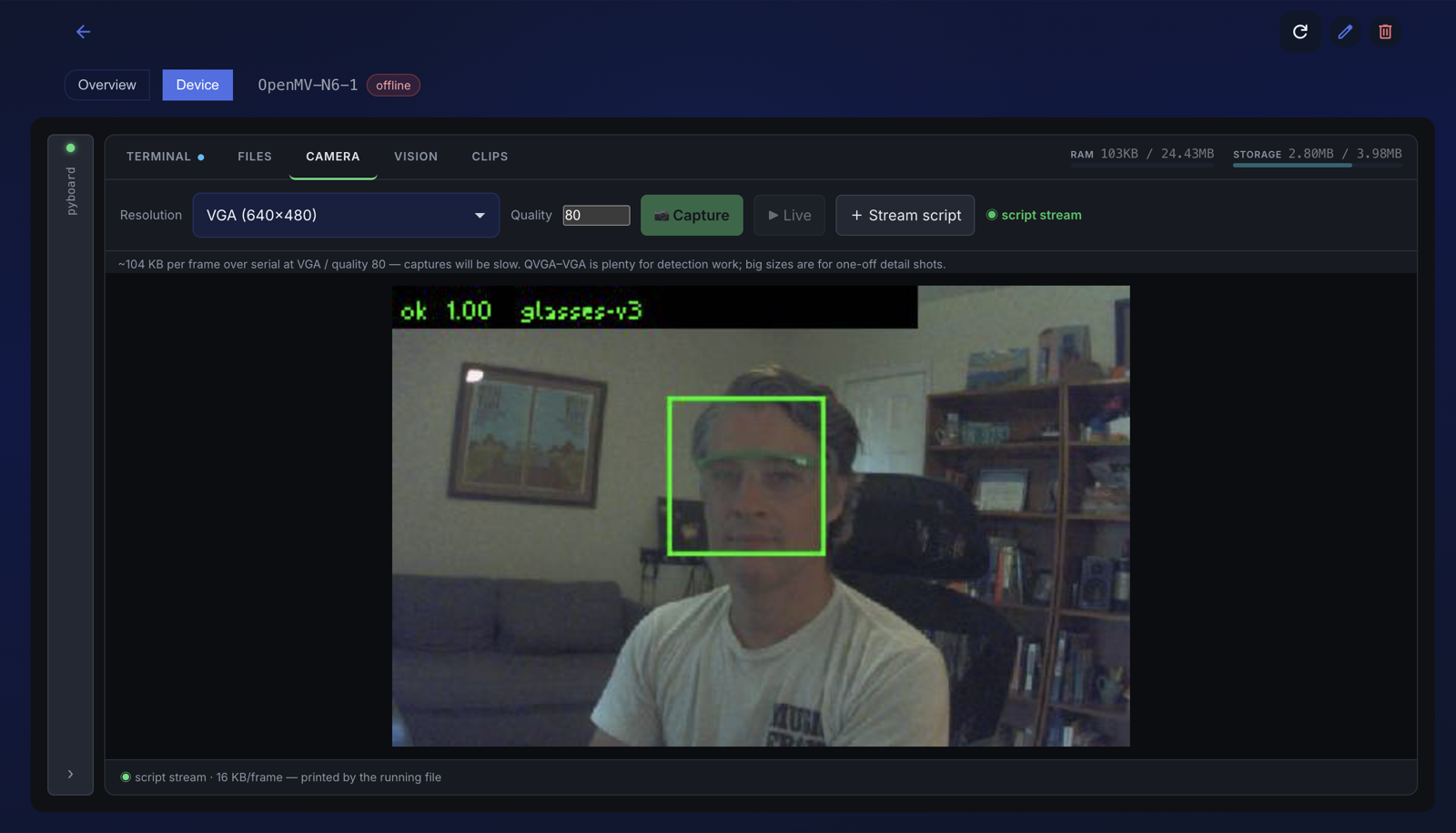
Run your script from the Device Console's Files tab with a preview flag that draws the box and verdict on a downscaled frame and calls tendrl.preview.frame() — draw the label after downscaling or it will not be readable — and you get the board's own view back:
4. Deploy the model over the air#
Deployments carry assets as well as code: .tflite, .json and .bin files up to 2 MB each (code stays at 256 KB; 4 MB per bundle). Deploy the files together with your entry module:
station.py glasses.tflite glasses_n6.tflite model.json
(One bundle serves a mixed fleet: each board loads the file its files entry names and ignores the other.)
They land in /app/ on every target; the updater verifies each file's SHA-256, stages the whole bundle, swaps, and rolls back on any failure exactly as it does for code. Because the entry runs with /app as the working directory, load_model("glasses_n6.tflite") and open("model.json") just resolve.
Retrain → redeploy is the same files with a new name in model.json. Ship the (unchanged) code again on purpose: a bundle is the whole /app that should be live, and the redeploy is what makes the device re-import with the new model. Assets are malware-scanned like code (a .tflite is presented to the scanner as a binary).
5. Verify it took#
- The deployment's target row goes to
appliedand the device's heartbeat carries the newdeploy_id. - Publish
update_state({"model": "glasses-v3", ...})at boot, so the fleet view (and any dashboard status tile bound tostate.model) shows which cameras run which model. - Put the model name in every verdict — a service rule
model startsWith "glasses-"keeps stray payloads out of the charts.
A deliberately bad bundle (wrong SHA, missing entry) rolls back to the previous /app, model included, and reports rolled_back with the reason.
Memory#
| N6 (measured, fw 5.0.0) | AE3 | |
|---|---|---|
| Free heap at boot / with client connected | 24.35 MB / 24.31 MB | ~3.8 MB |
| BlazeFace resident (arena) | 96 KB | measure |
| Classifier resident: MobileNetV2 α0.35 | 613 KB | prefer a smaller net |
| BlazeFace on a 320×320 zone | 11–14 ms | measure |
| Classifier per crop | 4–5 ms (NPU) | measure |
| Frame (RGB565) | 640×400 ≈ 512 KB | 320×200 ≈ 128 KB |
Every heap figure is gc.collect() then gc.mem_free() (measure the same way; skipping the collect under-reports by tens of KB). A camera loop churns a few MB/s of short-lived image copies on the N6 — a sawtooth in the free-heap print, not a leak; gc reclaims it. Avoid copying the whole frame when your zone is the whole frame.
Classroom use#
The verdict-only design is what makes the same setup acceptable in a school or lab: the model runs on the camera, only station / running / ppe / conf / model leave it, no frames by default, teacher-owned account, nothing per student. Do not ship the capture script, tell people what the camera publishes, and describe it as a reminder — never as a safety interlock (a few seconds pass between the camera's decision and anything downstream). Get the school's sign-off before a board goes on a bench; the payload above is what you show them.
