 Tendrl
Connecting a Board
Plug the board into USB and click Connect Device. The browser shows its own port picker. Pick your board, and that's the whole handshake. Contact remembers the grant, so on a later reload it reconnects to the same port without asking again.
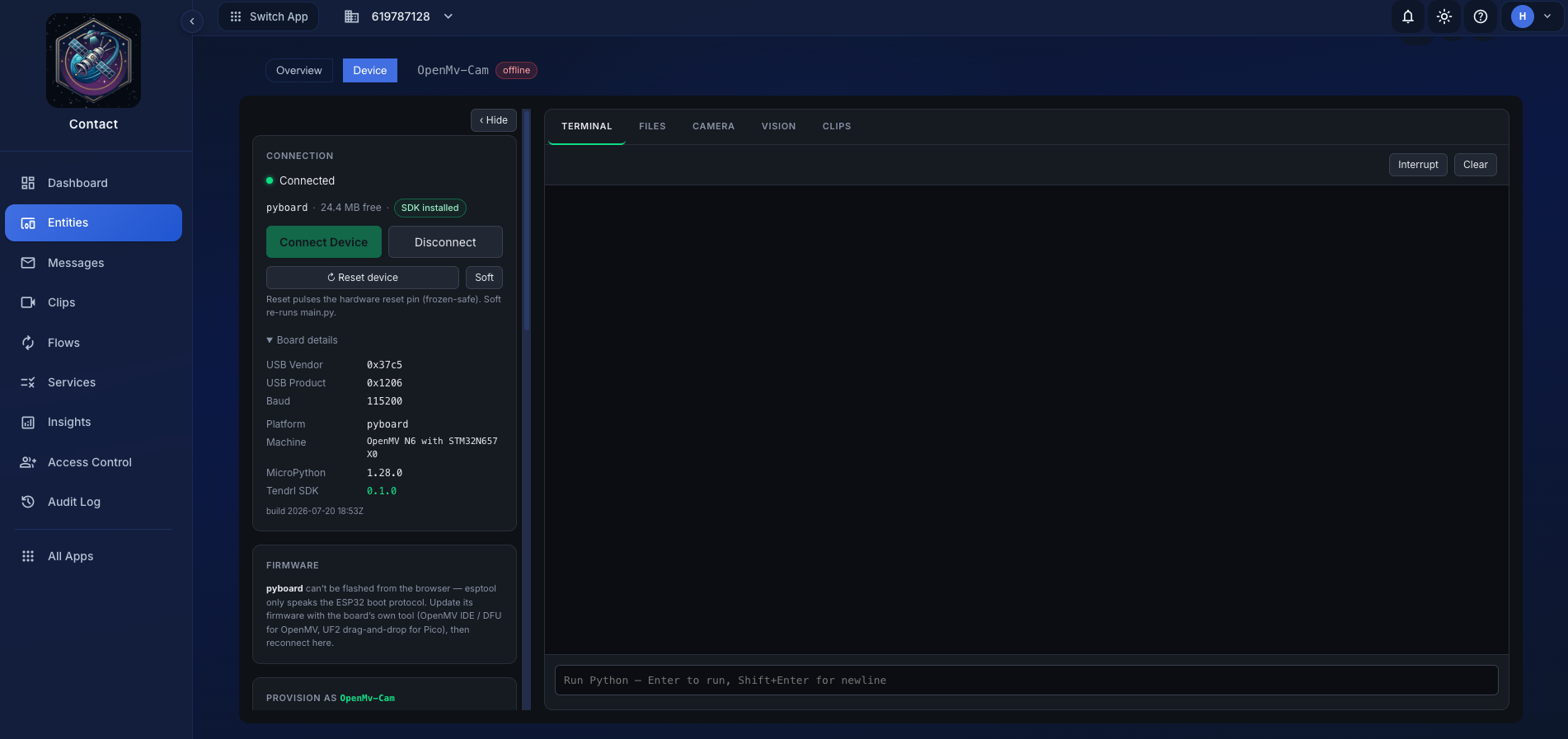 Connect, and the board identifies itself.
The serial link opens at 115200 baud, 8-N-1, no flow control, which is MicroPython's REPL default. There is nothing to configure.
What gets detected#
As soon as the port opens, the tab enters MicroPython's raw REPL and asks the board about itself. Everything below is read from the device, not guessed from the USB descriptor:
| Field | Where it comes from | Used for |
|---|---|---|
| Platform | sys.platform |
Matching a board profile (esp32, mimxrt, rp2, …) |
| Machine | sys.implementation._machine |
The human-readable board string, and OpenMV detection |
| USB Vendor / Product | The WebSerial port descriptor | Identifying look-alike boards |
| Free heap | gc.mem_free() after a collect |
Recommending an install tier |
| Installed SDK | Reading lib/tendrl on the board |
Showing what's already there instead of what's recommended |
| Camera sensor | sensor.get_id() on camera boards |
Capping the resolution list to what the sensor can actually do |
The tier recommendation#
The badge next to the board name is a recommendation based on free heap, not a description of what's installed:
- Full recommended: the board has comfortable headroom (roughly 300 KB free heap or more).
- Minimal recommended: it will run the MQTT core, but not the local database.
- Unsupported (low memory): there isn't enough RAM for the client at all. The ESP8266 lands here: 80 KB total, ~40–50 KB usable. It is also unusable for a second, independent reason: its
sslmodule cannot verify certificates, so the client fails closed rather than connecting insecurely. An ESP32-C3 costs the same and has roughly 3x the usable heap.
Once the SDK is actually on the board, the badge switches to reporting the real installed state. The recommendation is only ever a starting point for the provisioning form; see Provisioning.
Supported boards#
Boards with a profile are recognized by name and get firmware/streaming metadata:
| Profile | Matches | Notes |
|---|---|---|
| ESP32 | esp32 |
Recommended for production with PSRAM. Flashable. |
| ESP32-S2 | esp32 / S2 |
Flashable. |
| ESP32-S3 | esp32 / S3 |
Newer architecture, more memory. Flashable. |
| ESP32-C3 | esp32 / C3 |
Flashable. |
| Raspberry Pi Pico W | rp2 |
WiFi capable, lightweight. Not flashable here (use UF2). No btree or frozen umqtt; see Supported boards. |
| OpenMV (IMXRT) | mimxrt |
Purpose-built camera boards. Camera, clips, and vision available. |
A board without a profile still connects and works. You get the raw platform/machine strings instead of a friendly name, and no firmware download. For the full hardware compatibility picture including memory, see Supported boards.
Reset controls#
Two resets, for two different situations:
- Reset pulses the hardware reset pin over the serial control lines. It works even when the board is wedged in a tight loop and stops answering the REPL.
- Soft sends Ctrl-D, which re-runs
boot.pyandmain.pywithout cutting power. Use this after editing a script.
Disconnecting#
Click Disconnect, or just unplug the board; the read loop notices and the tab drops back to the disconnected state cleanly. Anything holding the REPL exclusively (a live camera loop, a running script) is stopped first.
If the board has stopped responding, releasing the port can fail: the browser is waiting on a device that will never answer. When that happens the tab says so explicitly rather than pretending it disconnected. Close the browser tab to free the port. Until you do, nothing else can open it, and other tools will report the port as busy.
Reset device#
Reset device pulses the serial control lines to reboot the board. This relies on the ESP32 auto-reset circuit, so it only works on ESP32-family boards; on OpenMV (STM32, Alif, N6) the pins aren't wired that way and the pulse does nothing. The button is disabled with an explanation on boards that can't use it.
Soft re-runs main.py via Ctrl-D. It needs a board that is still answering.
If a board is genuinely frozen (no response to either), press the reset button on the board itself, or unplug and replug it. A frozen board can also take the serial port down with it, in which case close the tab as above.
main.py looks exactly like dead hardware If main.py hard-faults at boot, the board can drop off USB moments after it appears, so nothing can connect and it looks bricked. Boot it without main.py (OpenMV skips it in safe mode: hold the USER button while powering on), or delete the file from the board's USB drive, then reconnect.
One conflict worth knowing about: only one thing can own the port at a time. If you have mpremote, Thonny, the OpenMV IDE, or a screen session attached to the same board, Connect will fail. Close the other tool first. The same applies in reverse while flashing firmware, which takes the port over entirely.
