 Tendrl
Files and Terminal
The right-hand workspace is where you actually work on the device. Panes stay mounted as you switch tabs, so your terminal scrollback, editor state, and captured clips all survive flipping between them.
The file browser#
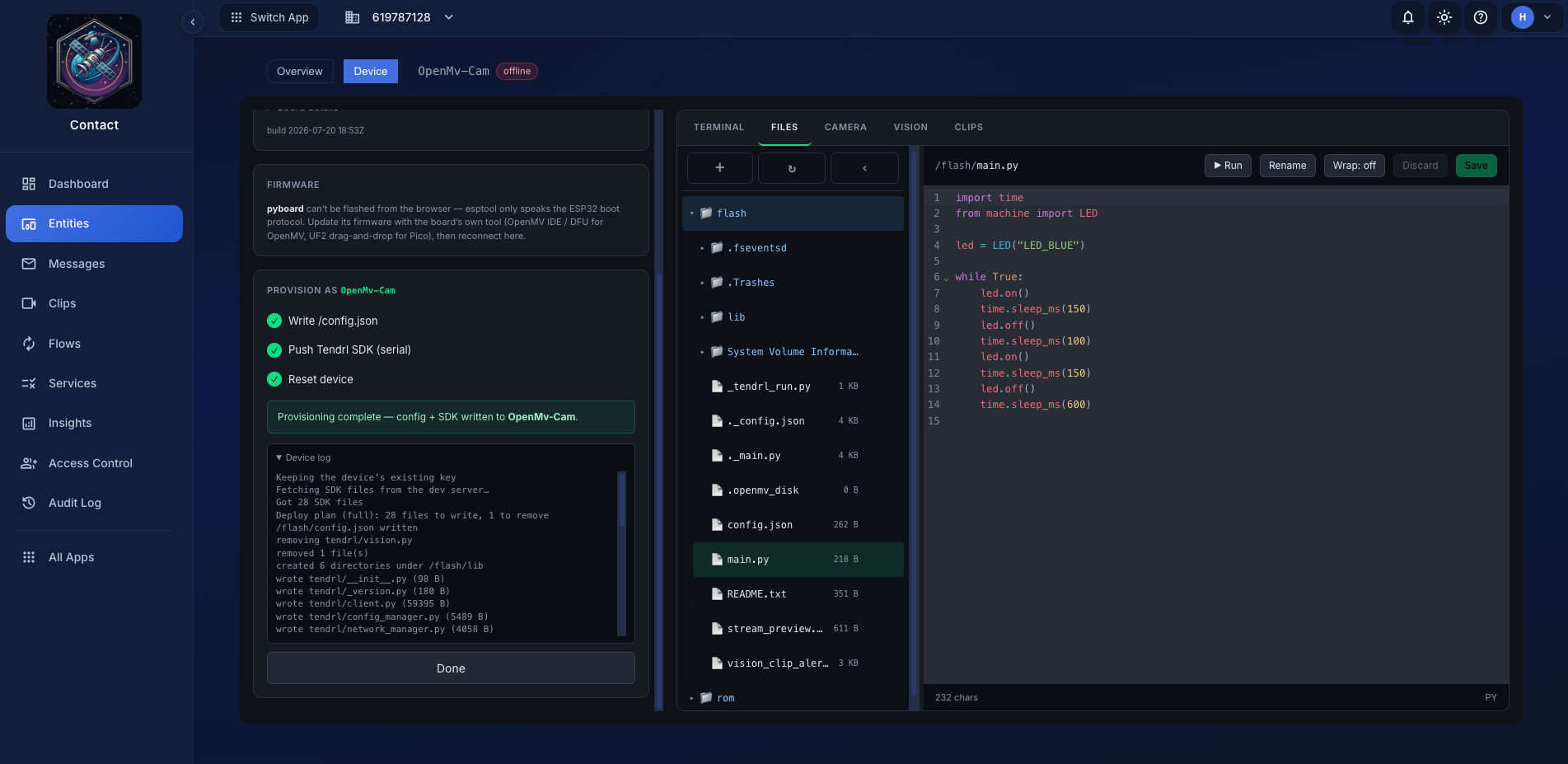 The device filesystem, live, with an editor attached.
A lazy tree of the board's filesystem, with a syntax-highlighting editor beside it (Python and JSON). Everything is read from and written to the device over the raw REPL; there is no local copy and no sync step.
What you can do:
- Open and edit any file.
⌘S/Ctrl-Ssaves it back to the board. Unsaved changes are marked. - Create a file or folder anywhere in the tree.
- Move or rename: double-click a name, or drag a node onto a directory.
- Upload by dragging files or whole folders from your desktop onto a directory. There's also an upload button that targets the current directory.
- Run the selected script with
▶ Run. Output streams live to the Terminal, which the workspace switches to automatically.Stopsends Ctrl-C.
Read-only SDK files#
Anything inside the installed tendrl package is read-only: client.py, config_manager.py, its own config.json, and everything else under lib/tendrl, at whatever path the board uses. Hand-editing the client's code or its config is the fastest way to brick a provisioned device, and there's no good reason to do it from a console. Re-provision instead.
Uploads into a protected path are refused rather than silently dropped.
Secrets are masked by default#
config.json and .env files hold the entity's API key and Wi-Fi password in plaintext (a MicroPython constraint; there's no keystore on the device). The workspace won't put them on screen unless you ask:
- Values under keys like
api_key,wifi_pw,password,secret, andtokenare masked in the editor and in terminal output. - The mask is a fixed width, so it doesn't leak the value's length either.
- Show secrets reveals them. Masking is display-only; the raw text is kept in state, so toggling doesn't re-read the device.
The threat this defends against is screen shares, screenshots, and shoulder-surfing, not a determined attacker with physical access. Anyone who can plug in a cable can read the file with mpremote.
The terminal#
A live view of the board's serial output, with the REPL attached.
- Type to interact with the REPL directly.
- Stop sends Ctrl-C to interrupt a running loop.
- Soft reset sends Ctrl-D, which re-runs
boot.pyandmain.py. Use it after saving a script. - Clear (
Ctrl-L) empties the scrollback.
On a board with the OTA add-on, once it has taken a deployment /main.py becomes a small Tendrl-managed shim (don't edit it) and your code lives in /app/. On a board without OTA, main.py is your own boot script as usual, so edit it here freely.
- Secret masking applies here too, so a stray
print(open('/config.json').read())doesn't put your API key in a screen recording.
Output is buffered and flushed at most once per animation frame. A chatty device, such as a client printing every heartbeat or a tight print loop, can otherwise force fifty-plus re-renders a second, which the editor does not enjoy.
Protocol traffic is hidden. When the tab is doing something over the raw REPL (listing a directory, reading a file, capturing a frame), those exchanges are muted so they don't pollute what you see.
One REPL, shared carefully#
The board has a single REPL and everything here shares it: the file tree, the editor, a running script, the camera loop. Calls are serialized rather than raced, so a directory listing that lands mid-capture queues instead of corrupting the stream.
The visible consequence is that exclusive activities yield to each other. A live camera preview stops when you start a script; a script stream takes precedence over browser-driven capture; both stop on disconnect.
