Tendrl Contact

Your data layer.
Connect anything, validate everything.
Register devices and APIs, send data over MQTT or REST, and validate every message as it arrives — each one tagged pass or fail so bad data is caught and routable. Four SDKs, built-in security, zero broker management, plus OpenMV cameras with prebuilt detection models, ready out of the box.
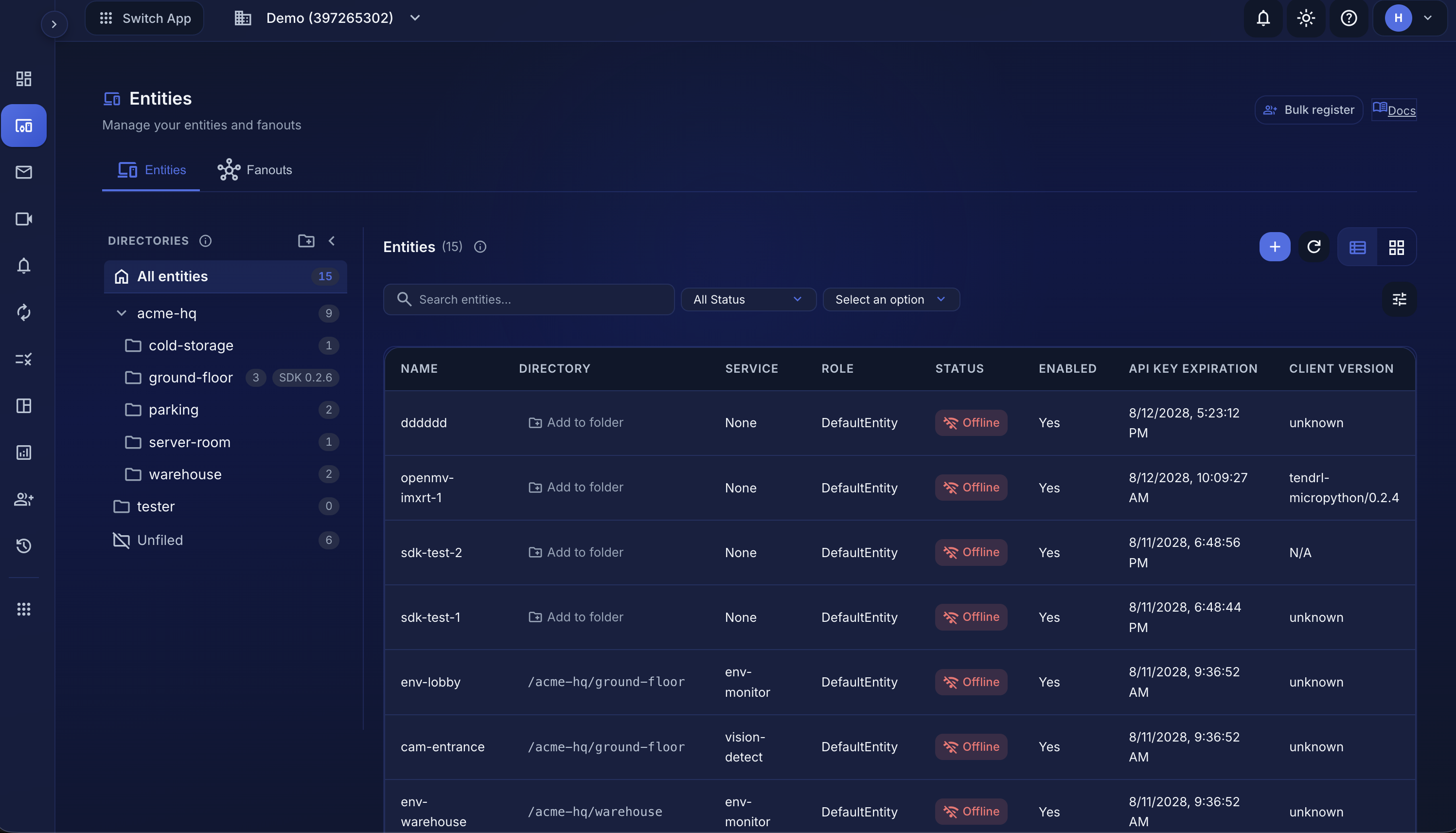
Manage entities, view real-time messages, configure validation rules
How it works
Four steps from zero to streaming data
Create an entity: a device, service, or API endpoint. Get an API key instantly.
Install an SDK or send data via REST. MQTT and HTTP both supported out of the box.
Add rules and every message is checked and tagged pass or fail at ingress.
Send validated data to Strand workflows, cloud storage, or external services.
Developer experience
Pick your language, start shipping data
Every SDK handles connection management, batching, retries, and offline storage. You write application logic; the SDKs handle the rest without sacrificing throughput.
from tendrl import Client

client = Client(callback=lambda msg: print(msg))
client.start()

# Publish validated data
client.publish({"temp": 22.4, "humidity": 61})import TendrlClient from '@tendrl/contact';
const client = new TendrlClient({ apiKey });
client.start();
// Publish with automatic batching
client.publish({ temp: 22.4, humidity: 61 });client, _ := tendrl.NewClient(true)
defer client.Stop()
// Thread-safe with BoltDB persistence
client.Publish(map[string]any{
"temp": 22.4, "humidity": 61,
}, nil, "", false, 5)from tendrl import Client
# Built for ESP32 and Pico W
client = Client()
client.start()
# MQTT messaging + HTTP video streaming
client.publish({"temp": 22.4}, tags=["sensor"])
# Route inbound messages by tag
@client.on(tag="ai-response")
def on_ai(msg): print(msg["data"])Data quality
15+ validation rules, checked at ingress
Declare rules once. Every message is validated and tagged as it arrives, so you can catch, route, and alert on bad data instead of discovering it downstream.
Range & bounds
Between, greater-than, less-than checks on numeric fields. Flag outliers the moment they arrive.
Enum constraints
Restrict fields to allowed values with in/notIn. Prevent typos and invalid states.
Required fields
Ensure critical fields are always present. No more silent nulls.
String rules
Prefix, suffix, and contains checks for IDs and naming conventions. Catch malformed data early.
Array rules
Require all or any of a set of values in list fields: tags, capabilities, states.
Timestamp checks
Validate timestamps and time windows so out-of-sequence data never slips through.
Dashboards
Dashboards that already know your data
No query language to learn. Widgets bind to your services, and because a service declares what each field should look like, the builder offers the right chart before you pick one. Your validation rules become the visualization: a range rule renders as an expected band, an enum rule becomes a live status tile.
- Numeric rules → line charts with expected-range bands
- Enum rules → status tiles and value distributions
- Validation health: pass/fail trend per service
- Fleet liveness and per-device memory/disk health
- Bad data shows as a gap, never a broken chart
- Live refresh, shared with your whole team
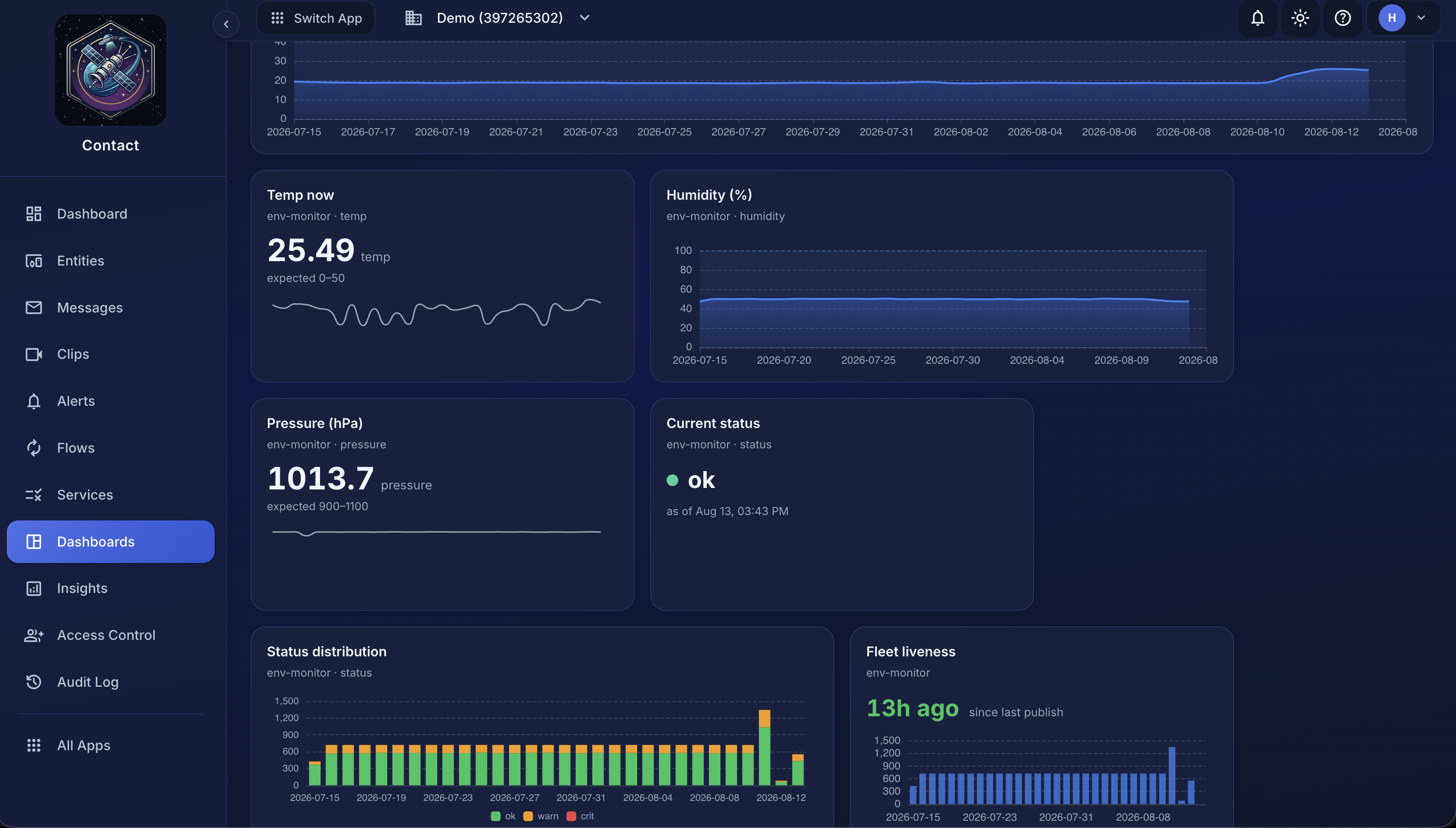
Line charts with rule-derived expected bands, status tiles, and validation health, built by picking fields, not writing queries
Cold-chain monitoring
A between [2, 8] rule on temperature gives you the safe band on every chart. Excursions are visible the second a sensor drifts, and validation failures alert your flows.
Fleet operations
Liveness tiles show which lines went quiet and when. Device-health widgets watch memory and disk on the boxes you can't walk to.
Data quality SLAs
Validation-health widgets turn your service rules into a live success-rate number, the first thing to look at when a firmware rollout changes what devices send.
Protocols
MQTT, REST, and a local agent
Use MQTT for real-time streaming from devices, REST for request-response from services, or the Nano Agent for high-performance local messaging over a Unix socket, in any language, with no SDK. All paths converge on the same validated data pipeline.
- MQTT over TLS with auto-reconnect
- REST API with batch endpoints
- Language-agnostic Nano Agent via Unix socket
- Server-Sent Events streaming for browsers, plus MQTT over WebSocket
- Same validation rules on every path
- Unified message history and traces
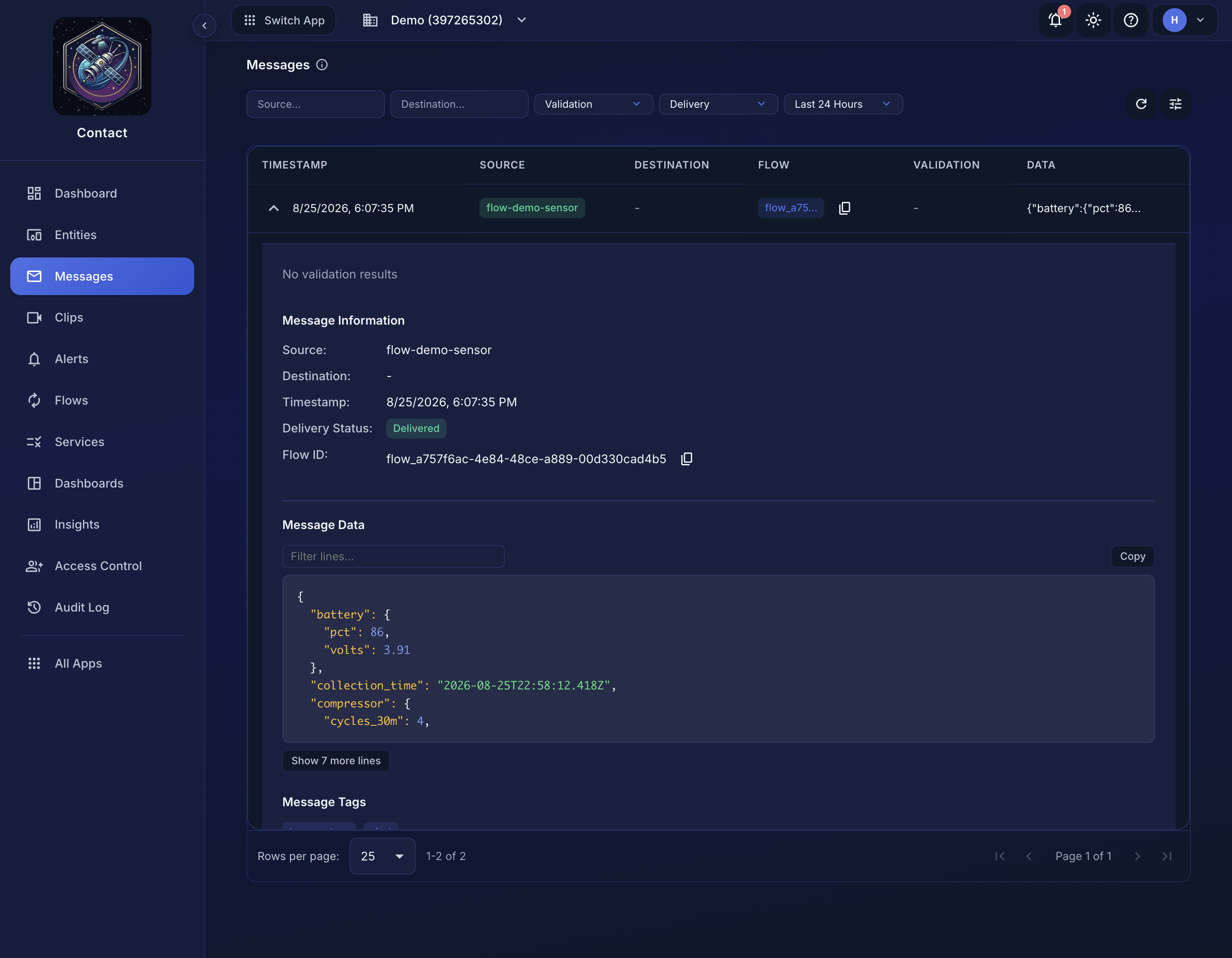
Real-time message feed with validation status, latency, and payload inspection
Device tab
The browser is the toolchain
Plug a MicroPython board into USB and open the entity's Device tab.
Contact flashes MicroPython onto a bare ESP32, writes the entity's key and
Wi-Fi, installs the SDK, and hands you a live terminal and file editor, with
no esptool, no drivers, no serial monitor, and nothing to install.
- Flash MicroPython from the live micropython.org build list, or your own
.bin - Auto-detect the board and size the install to its free heap
- Edit and run files on the device with output streaming back live
- Preview the camera and assemble a clip offline, before any cloud is involved
- Tune an on-device detector by eye, then export the deployable file
It runs on WebSerial, so it is genuinely local: your API key and Wi-Fi password travel from the form down the USB cable, never through our servers. Works in Chrome, Edge, Opera, and Firefox 151+.
Explore the Device tab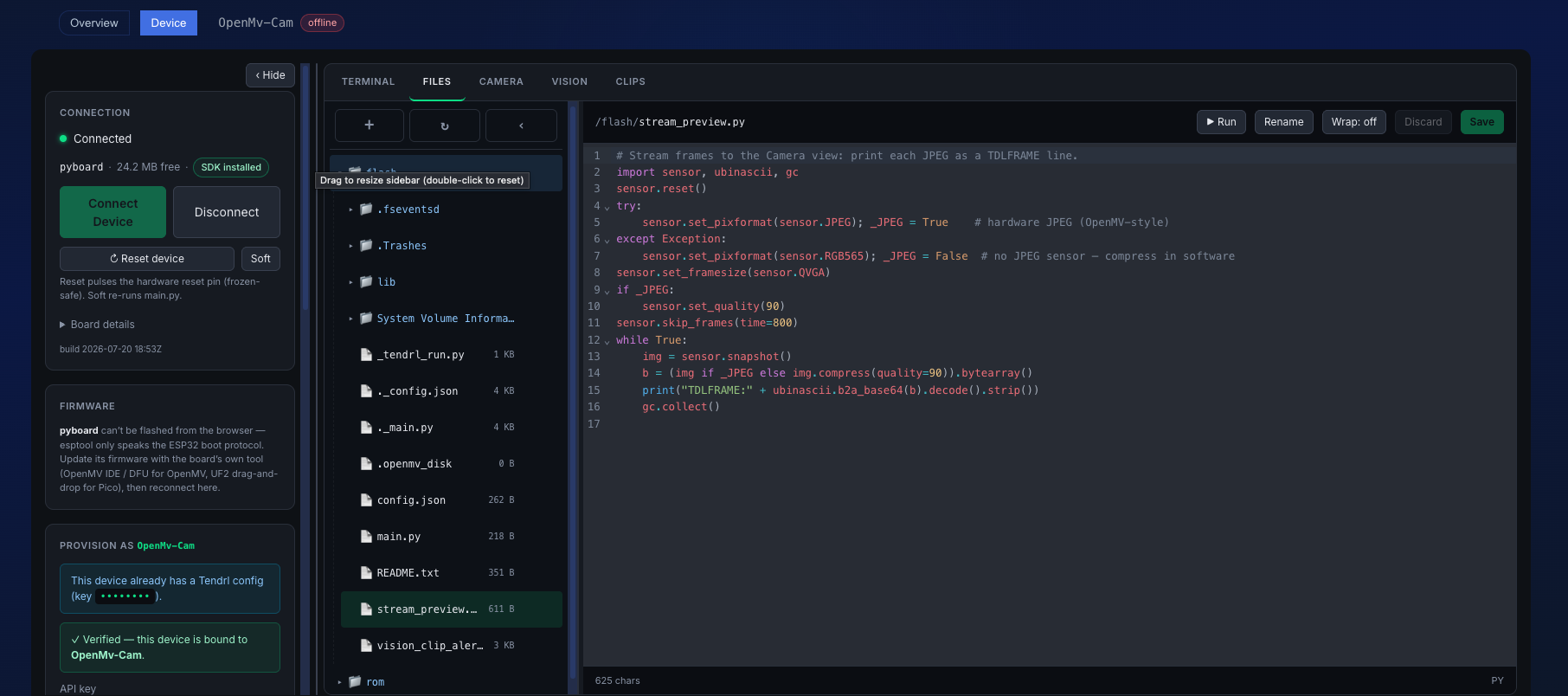
Flash, provision, edit files, run scripts, and preview the camera, all from a browser tab
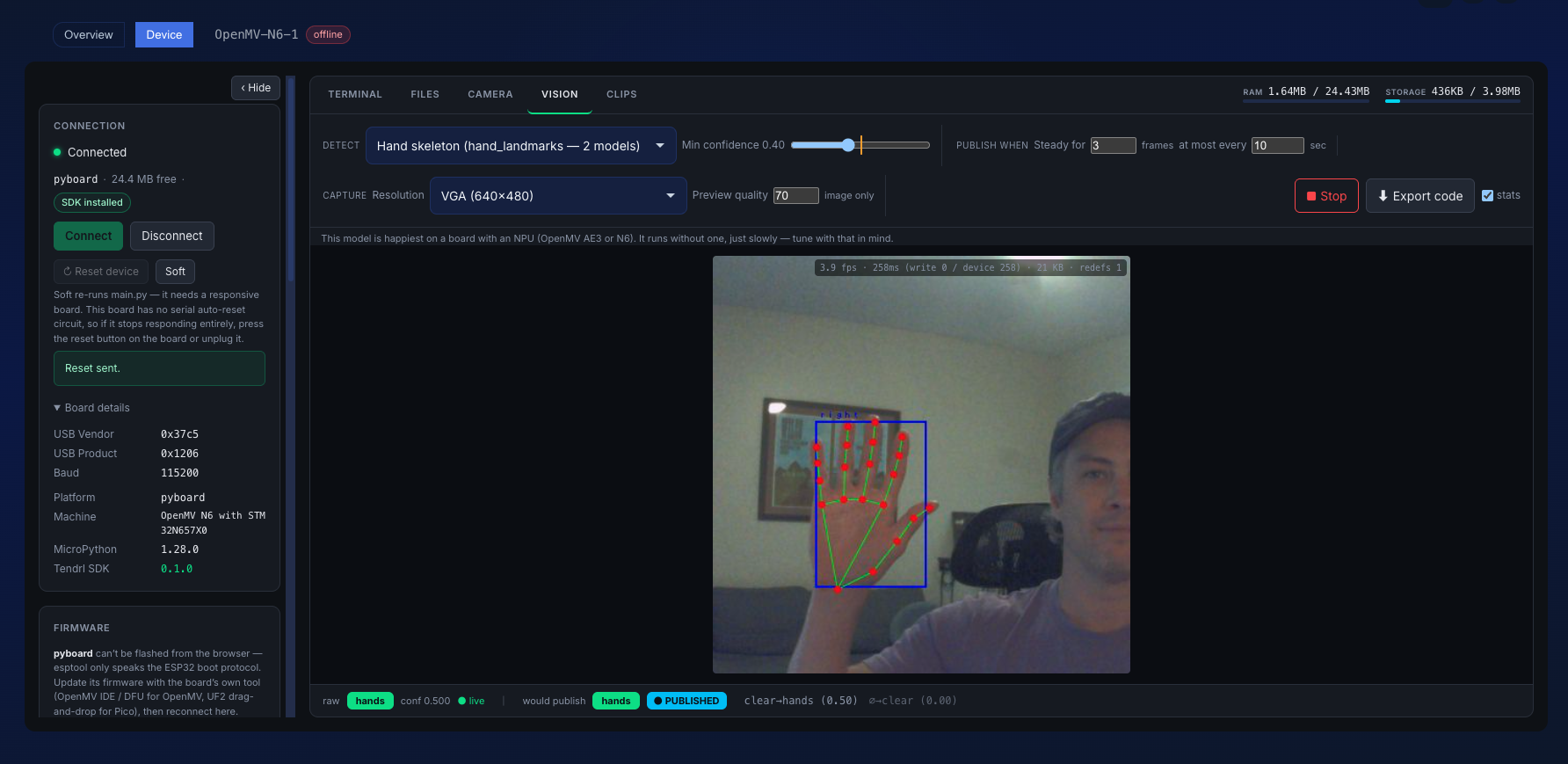
Live JPEG frames from an OpenMV camera, streamed through Contact alongside MQTT messaging
Computer vision, batteries included

Prebuilt detectors. Tune by eye. Ship today.
OpenMV cameras come with a model playground built in: person, face, hand, and hand-skeleton detectors already trained and running on the board. Drag an ROI, move a threshold slider, and watch a live simulator show exactly when it would publish. Then export the deployable file. No dataset, no training run, no separate ML toolchain, and JPEG streaming still runs alongside MQTT on the same device.
- Person, face, hand, and hand-skeleton models ship in the firmware on AE3 and N6
- Tune thresholds and ROIs live in the browser, not in code
- Debounce and cooldown simulator: see it fire before you deploy
- JPEG streaming over HTTP with MQTT messaging in parallel
- Trigger Strand workflows on detection events
- Streaming and the classical detectors work on any OpenMV; the in-flash models need an AE3 or N6
Native integration
Contact + Strand: built to work together
Every Contact message can trigger a Strand workflow automatically. Validate at ingress, then route to visual automations: no glue code, no webhooks, no polling. Data flows from device to action in one platform.
- Trigger workflows from any entity message
- Pass validated payloads directly to nodes
- Use Strand connectors to fan out to 30+ services
- Monitor the full pipeline from ingress to action
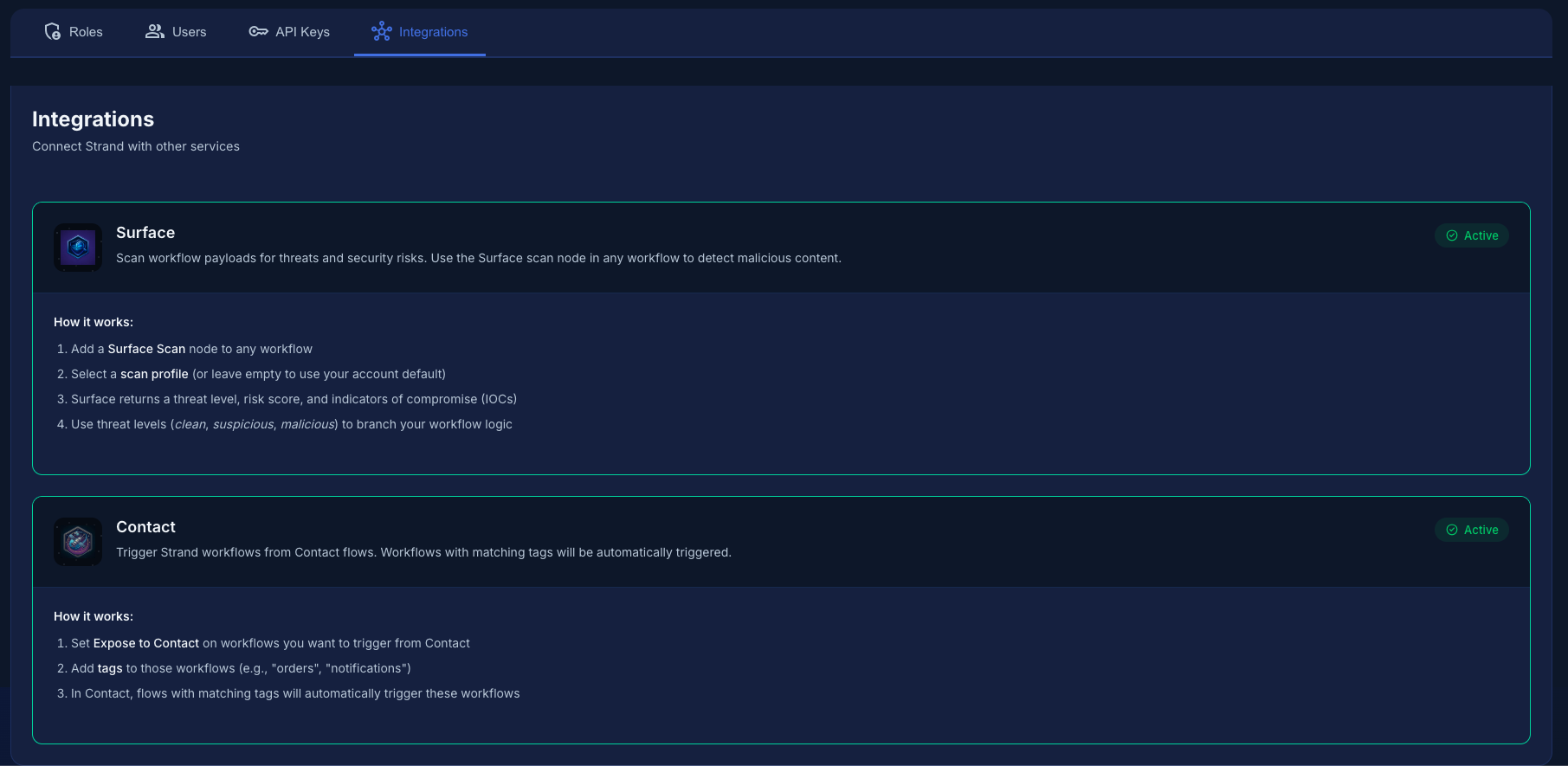
Validated data flows directly into visual workflows with zero configuration
Flows
Route validated data anywhere
Configure where your data goes after validation. Cloud storage, event buses, serverless functions, and external MQTT brokers, all built in.
AWS
 S3
S3  SQS
SQS  SNS
SNS  EventBridge
  Lambda
 Azure
 Blob Storage
  Service Bus
  Event Grid
  Queue Storage
 Google Cloud
 Cloud Storage
  Pub/Sub
  Firebase
  Firestore
 Protocols
 MQTT
MQTT  Nano Agent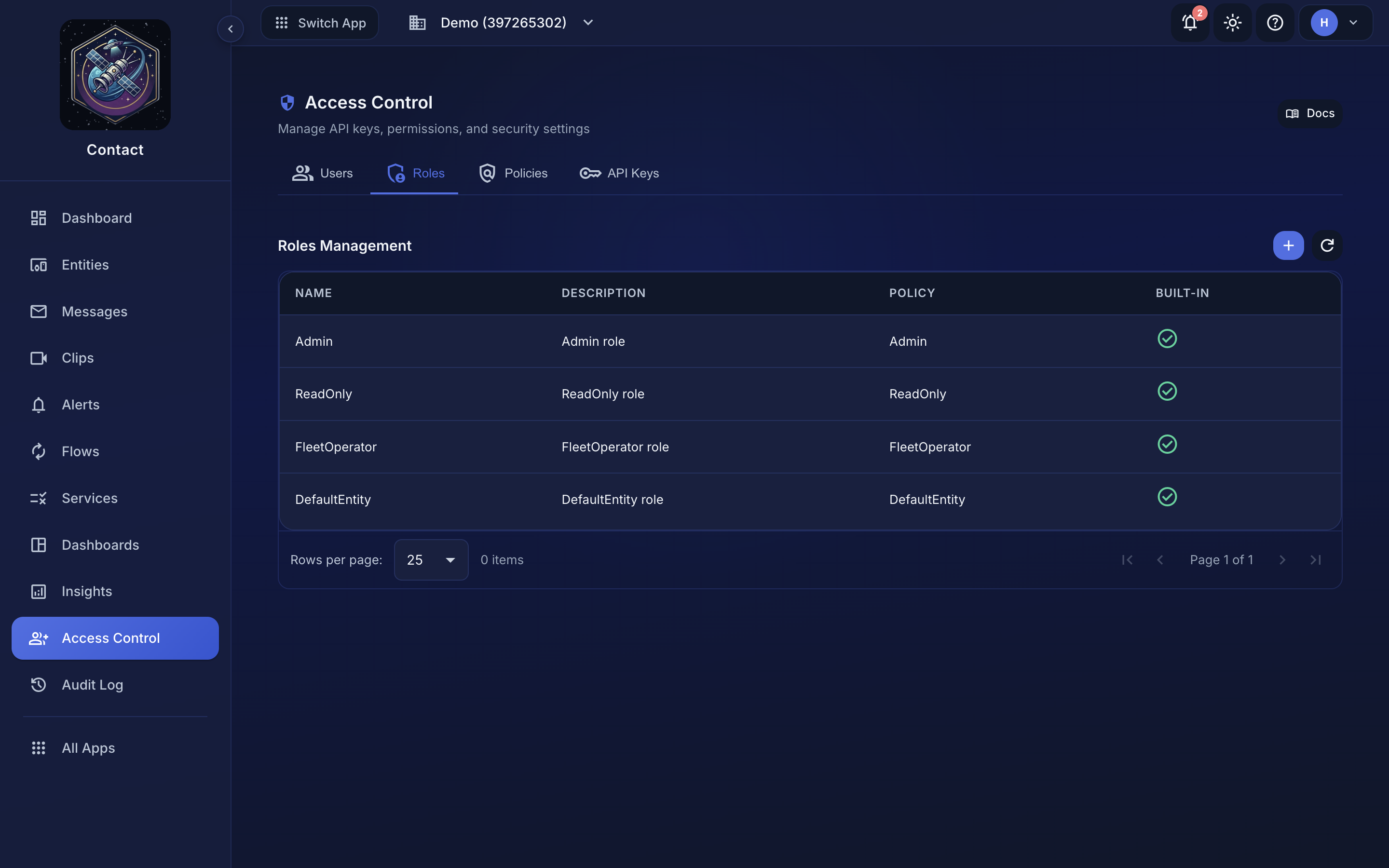
Roles, permissions, and team management for your data workspace
Governance
Role-based access control
Control who can manage entities, view messages, and configure flows with granular role-based permissions. Assign roles per team member and enforce least-privilege access across your data layer.
- Built-in roles: Admin, ReadOnly, FleetOperator, DefaultEntity
- Granular permissions per resource type
- Team member management and invitations
- API key scoping with role-based limits
Compliance
Full audit trail
Every action is logged: who did what, when, and from where. Audit logs give you complete visibility into changes across entities, flows, team settings, and access control.
- Timestamped logs for every create, update, and delete
- User attribution with IP and session context
- Filter by action type, user, or resource
- Exportable for compliance and incident review
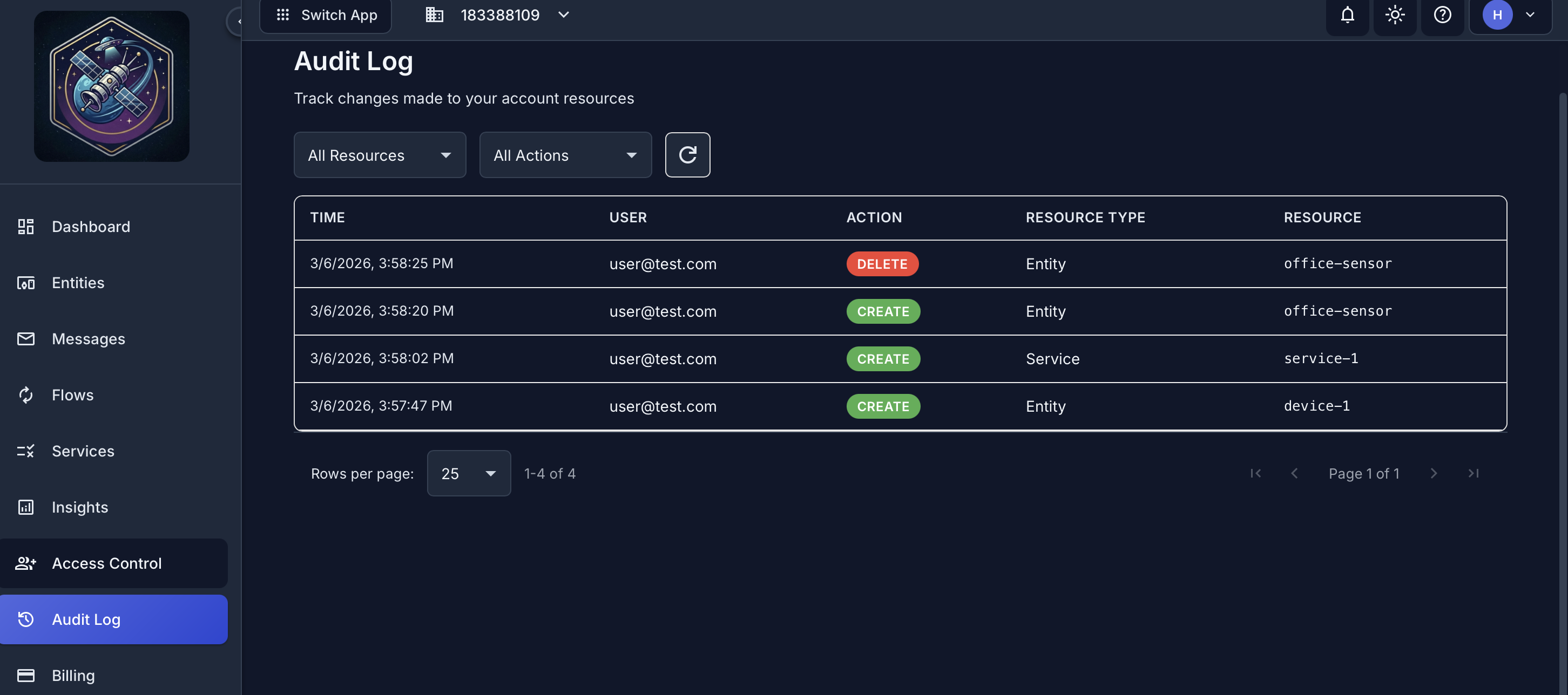
Complete audit trail of every action across your workspace
Security
Production-ready from day one
Every connection is encrypted. Credentials are stored securely. Auth endpoints are rate-limited with automatic lockout. You get production security without configuring it yourself.
Start collecting data in 5 minutes.
Free tier includes 5 entities, unlimited alert rules routed to 2 connectors, 3 dashboards, 250 MB of data per month, and 7-day message history. No credit card required.
