 Tendrl
Tendrl CLI: Getting Started
tendrl-cli is the command-line interface for the whole Tendrl platform — Contact, Strand, and Surface from one terminal. Where the SDKs connect devices to the platform, the CLI is for you: register and manage entities, read and export messages, run workflows, submit scans, manage API keys and team access, and script any of it with --json.
Requirements: Python 3.10+
tendrl-cli is not the tendrl Nano Agent CLI. The Nano Agent's tendrl binary talks to a local agent socket on a device; tendrl-cli talks to the platform APIs with your account credentials.
Install#
Installs straight from GitHub — with uv (recommended):
uv tool install git+https://github.com/tendrl-inc-labs/tendrl-cli
or with pipx:
pipx install git+https://github.com/tendrl-inc-labs/tendrl-cli
Pin a release for reproducible installs:
uv tool install "git+https://github.com/tendrl-inc-labs/[email protected]"
Verify it landed:
tendrl-cli --version
Two kinds of credentials#
The CLI uses the same authentication the platform does, and it helps to know which credential does what:
| Credential | Commands it powers | Where it comes from |
|---|---|---|
| Session (browser or password) | whoami, accounts, billing plans |
tendrl-cli login |
| Account API keys (one per product) | everything else — contact, strand, surface |
Access Control in each product's console, or minted from the CLI |
Device/entity keys (TENDRL_KEY in the SDKs) are deliberately not used: the CLI is an account tool, and entity keys can't call account endpoints anyway.
Sign in#
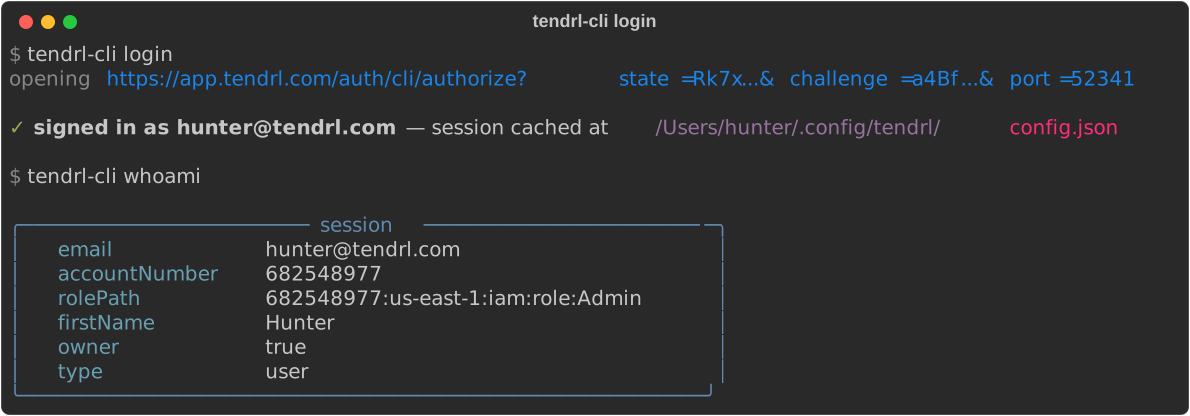
tendrl-cli login
Your browser opens to an approval page — sign in there if you aren't already (email + password or GitHub/Google, so OAuth accounts work), click Approve sign-in, and the CLI receives its session. No password ever touches the terminal, and the CLI gets its own 14-day session, revocable independently of your browser's.
The approval page shows which account is signing in and gives you a single Approve sign-in button. The authorization code is single-use, expires in 60 seconds, and the exchange is PKCE-protected — the code alone is useless without the verifier that stays in the CLI process.
Over SSH or without a browser, tendrl-cli login --no-browser prints the approval URL and asks for the code the page shows. tendrl-cli login --password keeps the old email + password prompt. The session is cached in ~/.config/tendrl/config.json (file mode 0600); tendrl-cli logout revokes it.
Set your API keys#
Each product reads its own key, from a flag, an environment variable, or the config file — in that order:
| Product | Environment variable | Stored alternative |
|---|---|---|
| Contact | TENDRL_API_KEY (or CONTACT_API_KEY) |
tendrl-cli config set-key contact |
| Strand | STRAND_API_KEY |
tendrl-cli config set-key strand |
| Surface | SURFACE_KEY (or SURFACE_API_KEY) |
tendrl-cli config set-key surface |
After tendrl-cli login, you can mint your first Contact account key with the CLI itself — the session token works as the bearer credential:
tendrl-cli --json --key "$(python3 -c "import json;print(json.load(open('$HOME/.config/tendrl/config.json'))['session_token'])")" \
  contact keys create --data '{"name":"my-cli-key","role":"Admin"}'
The token in the response is shown once — save it as TENDRL_API_KEY.
First commands#
# who am I, which account?
tendrl-cli whoami

# fleet at a glance
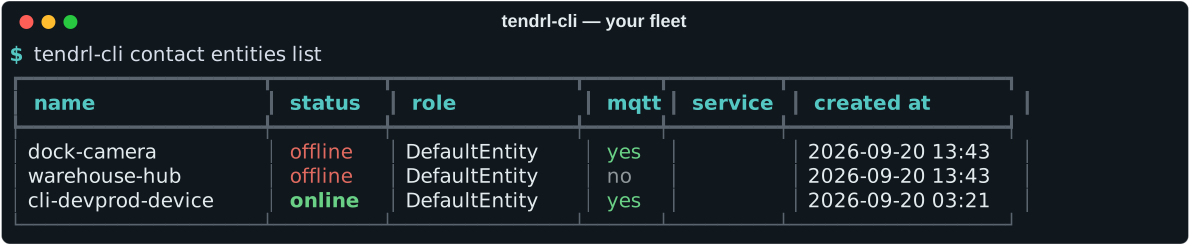
tendrl-cli contact entities list

# data usage against your plan
tendrl-cli contact insights usage

# run a workflow and watch it
tendrl-cli strand workflows run <workflow-id> --data '{"temp": 71.2}'
tendrl-cli strand runs list --limit 10

# scan a file with Surface
tendrl-cli surface scan file ./firmware.bin
Scripting with --json#
Every command accepts a global --json flag that prints the raw API response to stdout (tables and status messages go to stderr, so pipes stay clean either way):
tendrl-cli --json contact entities list | jq -r '.data[].name'
The platform URL#
The CLI talks to https://app.tendrl.com. TENDRL_APP_URL, --app-url, or tendrl-cli config set-url override it, should you ever need to point it elsewhere.
Troubleshooting#
- 401 unauthorized — the credential was rejected: re-run
tendrl-cli login, or check the API key env var for that product. - 403 forbidden — the key is valid but its role lacks the action, or the feature is not on your plan. The error message says which.
- "no API key for \<product\>" — set the environment variable from the table above, pass
--key, or store one withconfig set-key. - Destructive commands (
delete,remove) prompt before acting; pass--yesin scripts.
Next#
- Command reference — the map of every command group
- Contact commands, Strand commands, Surface commands — request bodies and worked examples per command
- Options Reference — the complete generated list of every argument and flag
- API keys and roles — account keys vs entity keys, roles, rotation
