 Tendrl
Messages Overview
Messages are the core data units in Contact. Every piece of data that flows through the platform -- sensor readings, application events, state updates, heartbeats -- is a message sent by an authenticated entity.
Message Structure#
A message sent to Contact has three top-level sections: the data payload, optional context for routing and loop-prevention metadata, and a msg_type that controls how the message is processed.
{
  "msg_type": "publish",
  "data": {
    "temperature": 23.5,
    "humidity": 65,
    "location": "Building A"
  },
  "context": {
    "tags": ["sensor-data", "building-a"]
  }
}
Fields#
| Field | Type | Required | Description |
|---|---|---|---|
msg_type |
string | Yes | Controls processing behavior. See Message Types below. |
data |
object | Yes | Arbitrary key-value payload. This is your application data. |
context |
object | No | Routing metadata -- primarily tags for connector and workflow matching. |
context.tags |
string[] | No | Array of tag strings. Tags determine which connectors and Strand workflows receive the message. |
dest |
string | No | Destination entity resource path for entity-to-entity messaging. |
timestamp |
string | No | ISO 8601 / RFC 3339 timestamp. Set automatically by the server if omitted. |
The source field is always set from the authenticated entity's resource path. Client-provided values are overridden as a security measure. You cannot spoof the sender.
Reading a stored message#
A message read back from the API is a flat object, not an envelope. Field names are mostly snake_case; note that validationStatus and updatedAt are not.
{
  "id": "6614abcd1234ef5678901234",
  "account_number": "482910365",
  "source": "100:us-east:entity:weather-station-1",
  "destination": "control-panel-01",
  "msg_type": "publish",
  "data": {
    "temperature": 23.5,
    "humidity": 65
  },
  "context_tags": ["sensor"],
  "action_results": [],
  "validationStatus": "passed",
  "flow_id": "6789abcdef012345",
  "request_id": "req_abc123",
  "sender_path": "100:us-east:entity:weather-station-1",
  "recipient_path": "100:us-east:entity:control-panel-01",
  "state": "processed",
  "processed_time": "2025-01-15T10:30:01Z",
  "status": "delivered",
  "result": null,
  "timestamp": "2025-01-15T10:30:00Z",
  "updatedAt": "2025-01-15T10:30:01Z",
  "service": "climate-monitor"
}
Inside a Strand workflow triggered by Contact, the template root is payload, and your message body arrives at payload.data. Reach a field with {{ payload.data.temperature }}, or with a JSONPath filter as {{ payload | jsonpath('$.data.temperature') }}.
Message Types#
The msg_type field controls how Contact processes a message:
| Type | Description |
|---|---|
publish |
The default type. Validated against service rules, stored, and routed to connectors and Strand workflows via tag matching. |
heartbeat |
System health metrics. mem_free, mem_total, disk_free, and disk_size are all required and must be non-negative. sdk_version and deploy_id are optional. Skips service validation rules. Updates entity online/offline status, client version, and deployed-app id. |
Heartbeat metric placement
For heartbeat messages, the metric fields (mem_free, mem_total, disk_free, disk_size), along with the optional sdk_version / deploy_id fields, may be sent either inside data or at the root of the message body. Minimal embedded and MQTT clients that omit a nested data object can put them at the top level, and Contact merges them into data automatically:
{ "msg_type": "heartbeat", "mem_free": 81920, "mem_total": 262144, "disk_free": 1048576, "disk_size": 4194304, "sdk_version": "0.2.5" }
| state_new | Replaces the entity's entire state table with the contents of data. Not stored as a regular message unless triggerFlowsOnStateUpdate is enabled on the entity. | | state_update | Merges data into the entity's existing state table. Like state_new, only triggers flows when explicitly enabled. |
Sending Messages#
Messages are sent via HTTP POST using an entity's API key for authentication:
curl -X POST https://app.tendrl.com/api/entities/message \
  -H "Content-Type: application/json" \
  -H "Authorization: Bearer ENTITY_API_KEY" \
  -d '{
    "msg_type": "publish",
    "data": {
      "temperature": 23.5,
      "humidity": 65
    },
    "context": {
      "tags": ["sensor-data"]
    }
  }'
Use POST /api/entities/messages (plural) to send multiple messages in a single request. The body should be an array of message objects.
Endpoints#
| Method | Path | Description |
|---|---|---|
POST |
/api/entities/message |
Send a single message |
POST |
/api/entities/messages |
Send a batch of messages |
GET |
/api/entities/check_messages |
Retrieve messages addressed to the authenticated entity |
GET |
/api/entities/messages |
List messages (paginated) |
GET |
/api/entities/messages/:id |
Get a specific message |
POST |
/api/entities/messages/search |
Search messages with filters |
Messages can also be sent over MQTT for real-time, low-latency use cases. See Protocols for MQTT details.
Receiving Messages#
When a message targets an entity (via dest, or fanned out from a fanout), it is queued for that entity with a pending state. The recipient retrieves it by polling:
GET /api/entities/check_messages?limit=10
Authenticated with the recipient entity's API key. The response is an object with a messages array of pending messages (msg_type, data, tags, source, timestamp).
limit(default1) caps how many messages a single call returns.- Delivery is once-only. Each returned message is atomically moved from
pendingtoprocessed, so concurrent pollers never receive a duplicate. Nothing pending comes back asmessages: null, not an empty array. - For real-time push instead of polling, use MQTT.
Stored messages are browsable on the Messages page, which is the quickest way to confirm what a device actually sent and how it was routed.
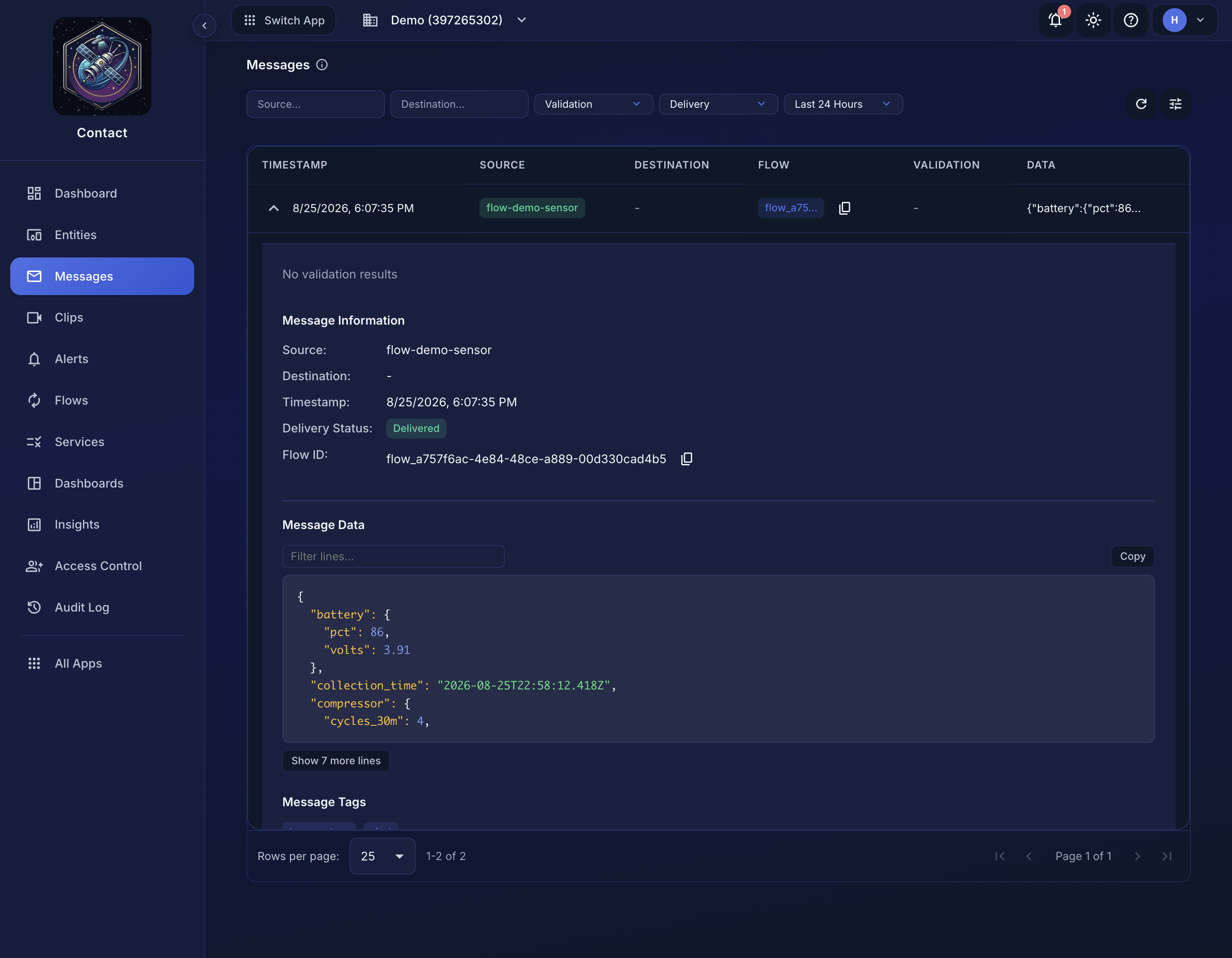 Expanding a message shows its delivery status, flow ID, and the payload as stored.
How Tags Drive Routing#
Tags are the primary routing mechanism in Contact. When a message includes context.tags, Contact uses those tags to determine what happens next:
Connector matching
- Contact queries all connectors on the account whose tags overlap with the message tags. Each matching connector receives the message payload via its configured integration (HTTP webhook, email, Slack, etc.).
Strand workflow triggering
- If the Strand integration is enabled, Contact also fires an async trigger to Strand with the same tags. Strand matches those tags against workflows that have been exposed to the Contact integration layer. See Strand Integration for details.
Flow creation
- When connectors match, Contact creates a Flow document that tracks the delivery of the message to each connector as individual steps. Flow status is visible in the dashboard.
Entity sends message with tags: ["alert", "critical"]
          |
          v
   Contact receives message
          |
          +---> Connectors with tag "alert" or "critical" receive the payload
          |
          +---> Strand workflows exposed with tag "alert" or "critical" are triggered
          |
          v
   Flow document tracks delivery status per connector
Messages that have no context.tags (or an empty tags array) are stored but will not trigger any connectors or Strand workflows. Tags are required for routing.
Message Context#
The context object carries routing and control metadata alongside a message:
| Field | Type | Description |
|---|---|---|
tags |
string[] | Routing tags for connector and Strand workflow matching. |
strandTriggerDepth |
int | Tracks how many times a message has bounced between Contact and Strand. Used for loop prevention. Not persisted to the database. |
The strandTriggerDepth field is incremented each time a Strand workflow sends a message back to Contact that re-triggers Strand. When the depth exceeds 3, Strand rejects the trigger to prevent infinite loops. See Strand Integration for the full loop-prevention mechanism.
Validation#
When an entity's service has validation rules (dynamic actions) configured, incoming publish messages are validated against those rules before storage. Validation results are attached to the message as actionResults:
{
  "message": { ... },
  "actionResults": [
    {
      "name": "temperature_range",
      "valid": false,
      "ruleName": "range_check",
      "field": "temperature",
      "actual": 150,
      "expected": "between -50 and 100",
      "message": "Value out of range"
    }
  ]
}
Messages that fail validation are still stored but are marked with a validationStatus of "failed". Validation failures can also inject additional tags (from the dynamic action definition), which allows you to route failed messages to different connectors or workflows.
Message Metadata#
Each stored message carries metadata used for delivery tracking and flow association:
sender_path-- Full resource path of the sending entity (e.g.,100:us-east:entity:sensor-1)recipient_path-- Resource path of the destination entity (for entity-to-entity messages)state-- Delivery state:"pending","processed", or"failed"flow_id-- Reference to the flow document created when connectors matchedprocessed_time-- When the message was marked as processed
This metadata is visible in the API response for messages that have a destination entity.
Message Retention#
Message retention depends on your account plan: 7 days on Free through 180 days on Pro. Each account's messages are stored in isolation from other accounts. See Data Retention for what the window covers, what is exempt from it, and what happens when you change plan.
Sending files#
To send a file (rather than a JSON message) between entities, use File Transfer. Files are malware-scanned by Surface before delivery and are deleted once the recipient downloads them.
