 Tendrl
Node Types Overview
Complete overview of all available node types in Strand workflows.
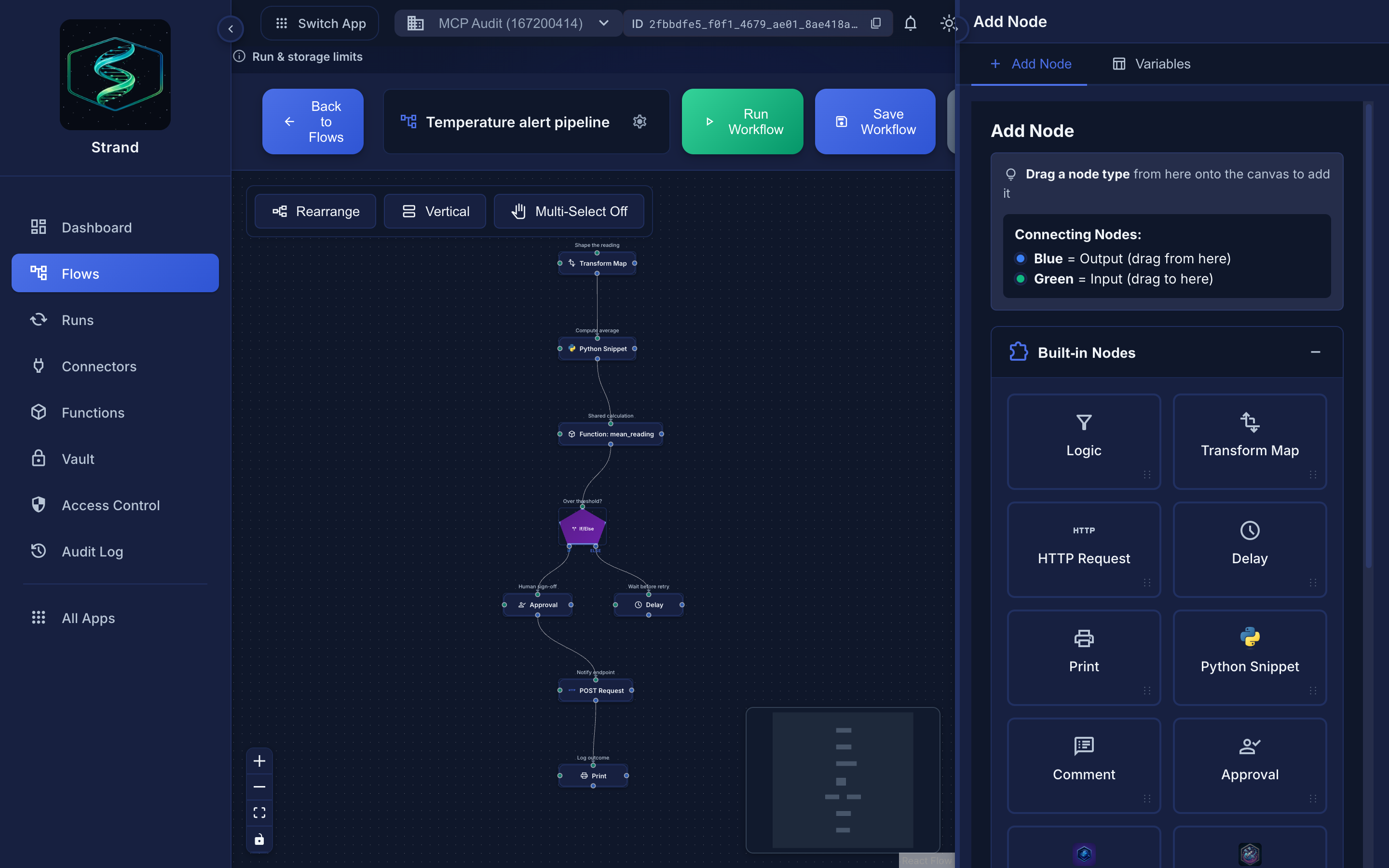 Selecting a node opens the Node Inspector, where its type-specific configuration lives.
Built-in Node Types#
| Node | Type ID | Purpose |
|---|---|---|
| Logic | logic |
Filter, If/Else branching, Foreach loops |
| Transform | transform.map |
Map and reshape event data |
| HTTP Request | http.request |
Call external APIs |
| Flow Call | flow.call |
Execute another workflow |
| Function Call | function.call |
Execute a reusable Python function |
| Python Snippet | python.snippet |
Run custom Python code in a sandbox |
| Delay | delay.ms |
Add a timed delay |
print |
Log a message for debugging | |
| Approval | approval |
Pause for human approval before continuing |
| Comment | comment |
Add a text note to document your workflow |
| Surface: Scan Payload | platform.surface.scan |
Scan a payload for threats |
| Contact: Send Message | platform.contact.send |
Send a message via Contact |
| Contact: Send File | platform.contact.send_file |
Send a file into Contact (file transfer) |
| Contact: Fetch File | platform.contact.fetch_file |
Fetch a tag-routed file's bytes from Contact (base64) |
| Contact: Update State | platform.contact.update_state |
Update an entity's state table in Contact |
Logic (logic)#
Multi-mode control flow node for filtering, branching, and iteration.
Modes:
- Filter - Allow/block events based on Python conditions
- If/Else - Branch to "if" or "else" outputs based on Jinja2 condition
- Foreach - Iterate over arrays with batched execution and result aggregation
Transform (transform.map)#
Transforms event data by mapping fields. Creates new payloads from existing data.
Example:
{
  "full_name": "{{ payload.first_name }} {{ payload.last_name }}",
  "email": "{{ payload.email }}"
}
See: Transform Node Documentation
HTTP Request (http.request)#
Makes HTTP requests to external APIs. Supports templating in URLs, headers, body, query params, and path params. Configurable retry with exponential/linear/fixed backoff.
See: HTTP Request Node Documentation
Flow Call (flow.call)#
Executes another workflow as a step in the current workflow. Supports passing custom data with Jinja2 templating. Max 10 levels of nesting.
See: Flow Call Node Documentation
Function Call (function.call)#
Executes a reusable Python function from your function library.
See: Function Call Node Documentation
Python Snippet (python.snippet)#
Run custom Python code in a secure sandbox. Access payload, meta, and set output.
See: Python Snippet Node Documentation
Delay (delay.ms)#
Adds a delay (in milliseconds) before continuing to the next node.
Print (print)#
Logs a message for debugging. Supports Jinja2 templating. Automatically redacts vault values.
Approval (approval)#
Pauses workflow execution until a human approves or rejects. Supports Jinja2 templating in the approval message, optional reviewer instructions, external notifications via connectors, and approve-from-link with signed URLs.
See: Approval Node Documentation
Comment (comment)#
A no-op documentation node for annotating your workflow canvas. The event passes through unchanged; Comment nodes do not modify data. Use them to label sections, explain logic, or leave notes for collaborators.
Configuration:
- Text: Comment text content
- Font Size: Text size (
0.75rem,0.875rem,1rem,1.25rem)
Platform Nodes#
Platform nodes are always available in the node selector; they don't require a saved connector instance. See Connector Nodes for full field and output details.
Surface: Scan Payload (platform.surface.scan)#
Scans payload content for threats using Surface. Required field: content. Optional: reject_on, profile_id, label, timeout. Scan results are written flat onto the payload (threat_level, score, iocs, primary_threat, recommended_action, safe).
Contact: Send Message (platform.contact.send)#
Sends a message via Contact using an entity API key. Required field: api_key. Optional: dest, tags, data, timeout.
Contact: Send File (platform.contact.send_file)#
Sends a file into Contact using an entity API key (Contact file transfer). Required fields: api_key and content_base64 (the file bytes, base64-encoded; it chains directly from an upstream Contact: Fetch File or HTTP node). Set exactly one delivery target: dest (a recipient entity, for direct/group/cross-account delivery), tags (route to subscribing Strand workflows/connectors), or kind: clip (motion gallery, no recipient). Optional: file_name, content_type, meta (≤8 KB), timeout. The sending entity needs the entity:SendFiles permission and pays storage until the file is consumed. On success the node adds transfer_id, sha256, size, and mode to the payload; any Contact rejection (missing permission, over quota/size limit, or a file flagged by Surface) fails the node.
Contact: Fetch File (platform.contact.fetch_file)#
Fetches a tag-routed file's bytes from Contact, base64-encoded, using the platform internal token (no entity key needed). Required: transfer_id (defaults to {{ payload.data.transfer_id }} from the trigger). Optional: size (defaults to the trigger's {{ payload.data.size }}, used to refuse oversized files before fetching), max_inline_bytes (1 KB – 10 MB, default 10 MB), and timeout. Single-consume: a successful fetch reclaims the file and its sender's storage, so fetch each file exactly once. On success the node adds content_base64 and size to the payload — ready to chain into a Contact: Send File node, an HTTP upload, or a Surface scan.
Contact: Update State (platform.contact.update_state)#
Updates an entity's state table in Contact. Required fields: api_key, entity, state. Optional: replace (default merges; true replaces the whole table), timeout.
Connector Nodes#
Connector nodes use saved connectors to interact with external services. They are dynamically created from your configured connectors.
Available Connector Types#
| Category | Services |
|---|---|
| AI / LLM | OpenAI, Anthropic, Google Gemini |
| HTTP | REST APIs, webhooks |
| MQTT | Publish messages to MQTT brokers |
| MCP Server | Model Context Protocol tool access for AI nodes |
| AWS | S3, SQS, SNS, EventBridge, Lambda, DynamoDB, Kinesis, CloudWatch |
| Azure | Blob Storage, Service Bus, Event Grid, Queue Storage |
| Google Cloud | Cloud Storage, Pub/Sub, Firebase, Firestore |
| Google Sheets | Read, write, and manage spreadsheet data |
| Databases | Redis, Kafka |
| Messaging | Slack, Discord, Telegram, Twilio |
| Enterprise | Home Assistant |
| Tendrl Email, SMTP | |
| Contact Message | Send messages and files to contact entities |
See: Connector Nodes Documentation
Node Selection Guide#
Choosing the Right Node
- Logic (Filter) - Allow/block events conditionally
- Logic (If/Else) - Branch into two paths
- Logic (Foreach) - Process each item in an array
- Transform - Simple data mapping and reshaping
- HTTP Request - Direct API calls (with or without connectors)
- AI / LLM Connector - AI text generation, classification, extraction
- Python Snippet - Complex data processing and calculations
- Function Call - Reusable logic shared across workflows
- Flow Call - Reusable workflow components
- Approval - Human review checkpoint before proceeding
- Delay - Rate limiting or scheduling
- Print - Debugging
- Comment - Annotate and document your workflow
Related#
- Creating Workflows - Step-by-step workflow creation
- Connecting Nodes - How to connect nodes
- Conditional Logic - Branching, filtering, and iteration with the Logic node
- Templating Overview - Data access and transformation
- External Approval Links - Approve/reject from email or Slack
