 Tendrl
HTTP Request Node
The HTTP Request node makes HTTP requests to external APIs.
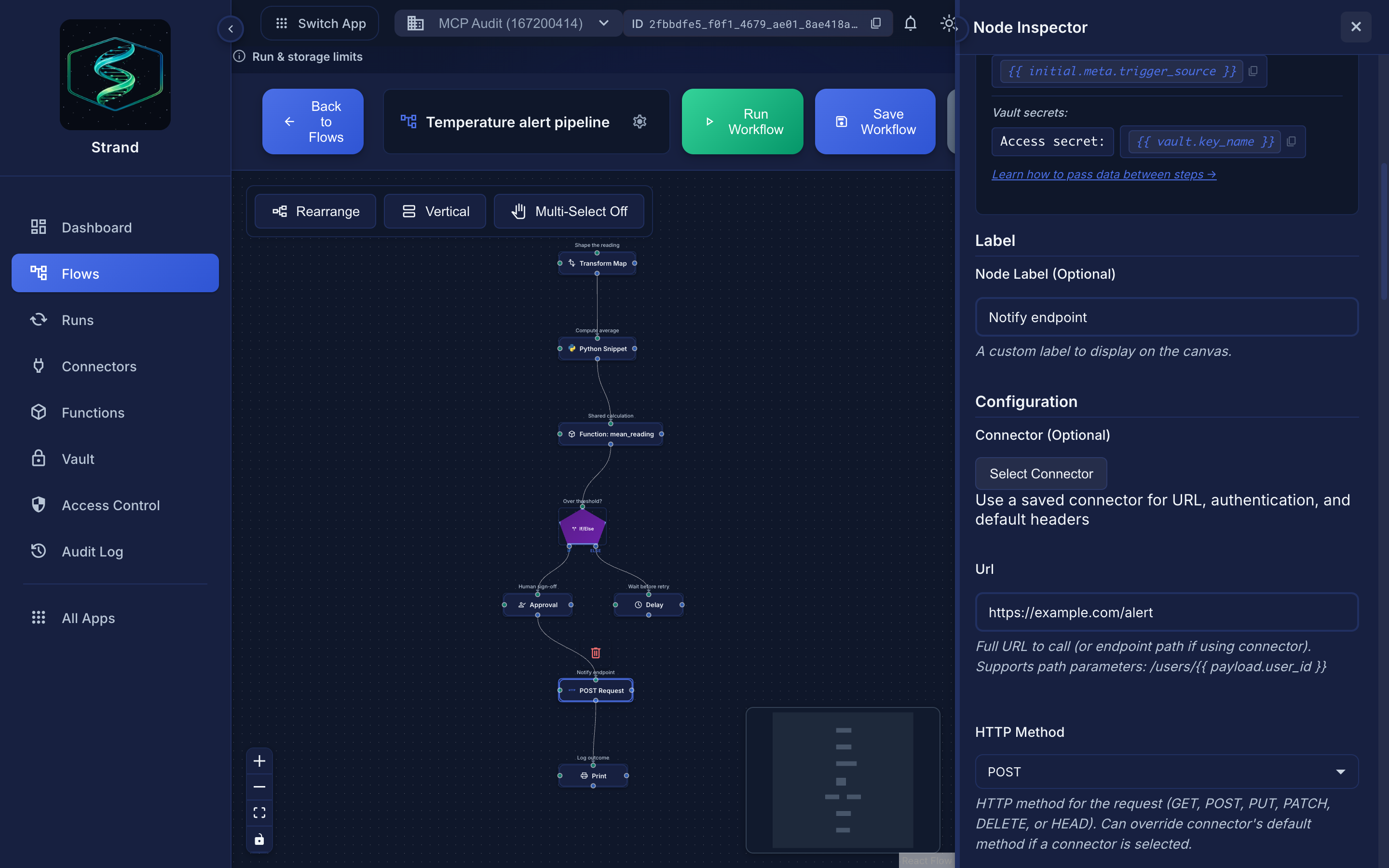 Any field here accepts Jinja, so
 {{ vault.api_token }} in a header keeps the secret out of the node.
Overview#
HTTP Request nodes allow you to call external APIs, webhooks, and HTTP endpoints from your workflows.
- Call REST APIs
- Send webhooks
- Fetch data from external services
- Integrate with third-party services
Configuration#
| Field | Type | Required | Description |
|---|---|---|---|
url |
string | Yes* | Full request URL (supports templating) |
endpoint |
string | No | Path appended to connector base URL |
method |
string | No | HTTP method (default: POST) |
headers |
object | No | Request headers (values support templating) |
body |
string/object | No | Request body (supports templating) |
body_type |
string | No | Body format: json, form_data, form_urlencoded, raw, xml, binary (default: json) |
query_params |
object | No | URL query parameters (supports templating) |
path_params |
object | No | URL path parameter replacements |
connector_id |
string | No | Use a saved HTTP connector |
timeout |
number | No | Request timeout in seconds, 1-300 (default: 30) |
follow_redirects |
boolean | No | Follow HTTP redirects (default: true) |
verify_ssl |
boolean | No | Verify SSL certificates (default: true) |
retry |
object | No | Retry configuration (see below) |
- Use
urlfor direct API calls - Use
connector_id+endpointfor saved connectors with authentication
URL Configuration#
Direct URL#
https://api.example.com/users/{{ payload.user_id }}
Using Connector#
When using a connector, specify the endpoint instead of full URL:
/users/{{ payload.user_id }}/profile
The connector provides the base URL and authentication.
HTTP Methods#
| Method | Use Case | Body Required? |
|---|---|---|
GET |
Retrieve data | No |
POST |
Create resources | Usually |
PUT |
Update resources | Usually |
PATCH |
Partial updates | Usually |
DELETE |
Delete resources | No |
Headers#
Headers support templating in their values:
{
  "Authorization": "Bearer {{ vault.api_token }}",
  "Content-Type": "application/json",
  "X-User-ID": "{{ payload.user_id }}"
}
For sensitive values like API tokens, use the Global Vault instead of Workflow Variables. Headers are also automatically encrypted when using connectors.
Request Body#
JSON Body#
{
  "user_id": "{{ steps.user_lookup.output_payload.id }}",
  "message": "{{ payload.message }}",
  "timestamp": "{{ meta.received_at }}"
}
String Body#
{{ payload | tojson }}
Using Previous Steps (Direct Connection)#
When directly connected, use payload:
{
  "data": {{ payload | tojson }},
  "metadata": {
    "source": "{{ initial.meta.trigger_source }}"
  }
}
Using Non-Direct Steps#
When accessing data from a non-directly connected node:
{
  "data": {{ steps.process.output_payload | tojson }},
  "metadata": {
    "source": "{{ initial.meta.trigger_source }}"
  }
}
Query Parameters#
Add query parameters to the URL:
{
  "page": "{{ payload.page | default(1) }}",
  "limit": "50",
  "filter": "{{ payload.status }}"
}
Results in: ?page=1&limit=50&filter=active
Path Parameters#
Replace placeholders in the URL with dynamic values:
- URL:
https://api.example.com/users/{user_id}/orders/{order_id} - Path Params:
  {
    "user_id": "{{ payload.user_id }}",
    "order_id": "{{ payload.order_id }}"
  }
Body Types#
The body_type field controls how the request body is formatted:
| Body Type | Content-Type | Use Case |
|---|---|---|
json |
application/json |
REST APIs (default) |
form_urlencoded |
application/x-www-form-urlencoded |
Form submissions |
form_data |
multipart/form-data |
File uploads |
raw |
Custom | Raw text or custom formats |
xml |
application/xml |
SOAP/XML APIs |
binary |
Custom / caller-set | Raw bytes (e.g. base64-decoded payloads) |
Retry Configuration#
Configure automatic retries for transient failures:
{
  "retry": {
    "enabled": true,
    "max_attempts": 3,
    "backoff_type": "exponential",
    "backoff_delay": 1,
    "backoff_max": 30,
    "retryable_status_codes": [429, 500, 502, 503, 504]
  }
}
| Field | Type | Description |
|---|---|---|
enabled |
boolean | Enable retries |
max_attempts |
number | Max retry attempts (default: 3). Accepts 1-10 in config, but the runtime caps effective attempts at 5 and reduces further so attempts × timeout fits the run deadline — see Limits. |
backoff_type |
string | exponential, linear, or fixed |
backoff_delay |
number | Initial delay between retries in seconds |
backoff_max |
number | Maximum delay between retries in seconds |
retryable_status_codes |
array | HTTP status codes that trigger a retry |
Response#
The HTTP Request node outputs:
output_payload- Response body (parsed JSON if possible, otherwise string)output_meta- Response metadata:status_code- HTTP status codeurl- Final request URL
Accessing Response#
{{ steps.api_call.output_payload.data }}
{{ steps.api_call.output_meta.status_code }}
Response options#
A response object on the node tunes how the reply is judged and parsed:
| Field | What it does |
|---|---|
expected_status_codes |
Which statuses count as success. Defaults to 200-299, which is what sets success in the envelope |
error_on_status |
Statuses that should raise a hard node failure instead of returning an envelope. Empty by default, which is why a 4xx never halts a branch on its own |
parse_as |
How to read the body: auto (default), json, text |
extract_fields |
Pull named fields out of the parsed body instead of returning the whole thing |
{
  "response": {
    "expected_status_codes": [200, 201],
    "error_on_status": [500, 502, 503]
  }
}
Error Handling#
A 4xx or 5xx response is not a node failure. The node returns the same { success, status, data } envelope a connector does (see Connector Output Structure), with success set to false, and downstream edges are traversed normally. Route on the envelope with an If/Else Logic node:
{{ payload.success }}
The if handle handles success; the else handle handles failure. See Conditional Logic.
Examples#
GET Request#
Configuration:
- URL:
https://api.example.com/users/{{ payload.user_id }} - Method:
GET
POST Request with Body (Direct Connection)#
Configuration:
- URL:
https://api.example.com/send-email - Method:
POST - Body:
  {
    "to": "{{ payload.email }}",
    "subject": "Welcome!",
    "body": "Hello {{ payload.name }}"
  }
Since this HTTP Request node is directly connected to the previous node, use payload instead of steps.node_id.output_payload.
Using Connector#
Configuration:
- Connector:
my-api-connector - Endpoint:
/users/{{ payload.user_id }} - Method:
GET
The connector provides base URL and authentication automatically.
Best Practices#
Tips
- Use connectors for APIs requiring authentication
- Store API tokens in the Global Vault, not hardcoded or in Workflow Variables
- Use templating for dynamic URLs and data
- Branch on failures by routing
{{ payload.success }}through a Logic node - To make specific statuses raise and halt the branch instead, list them in the node's
response.error_on_status - Check response status codes in conditions
- Test with sample data before deploying
Related#
- Connectors - Using saved HTTP connectors
- Passing Data - Using previous step outputs
- Jinja2 Syntax - Templating in URLs and bodies
