 Tendrl
Logic Node
The Logic node provides conditional and iterative control flow in workflows.
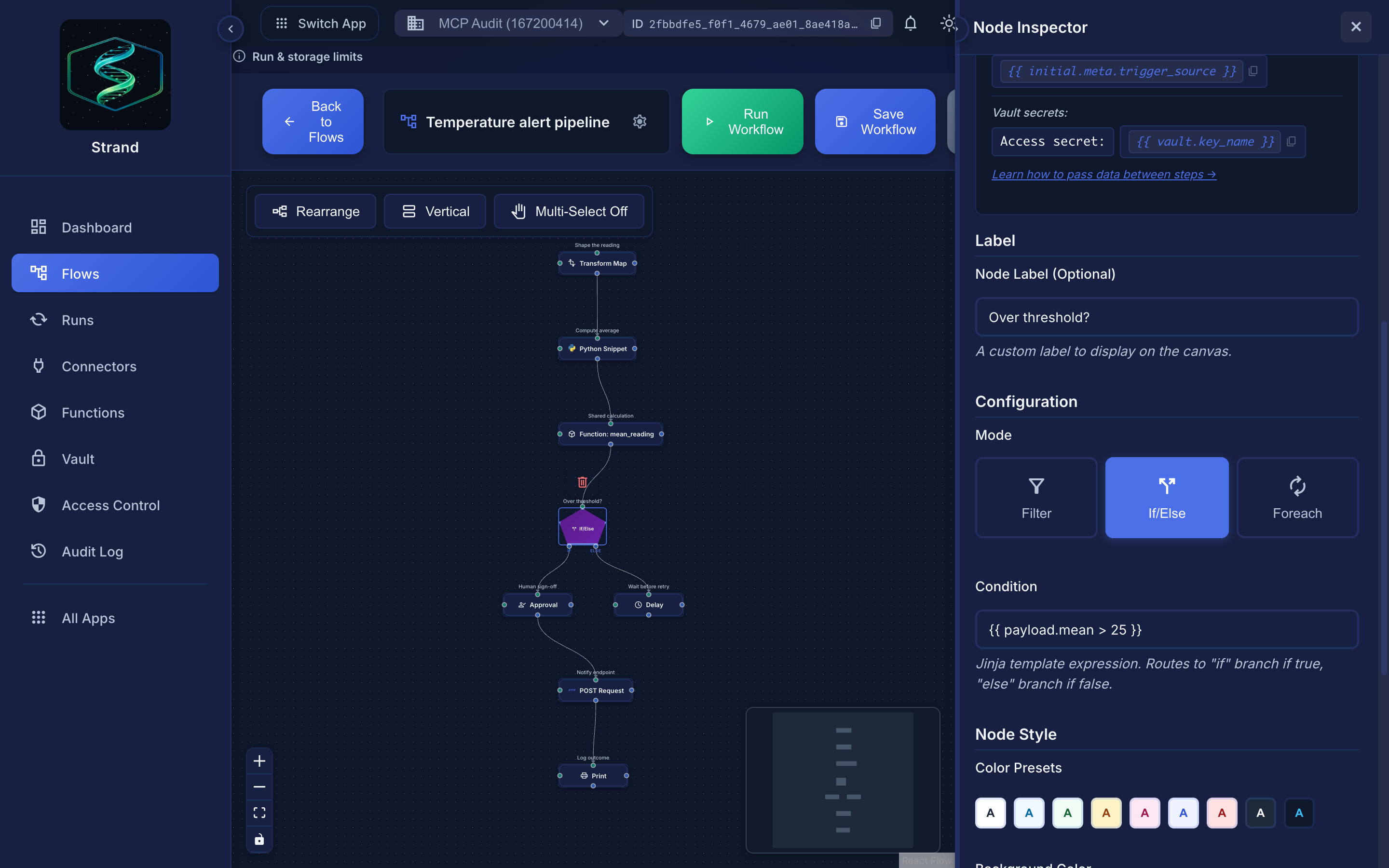 Mode is an explicit choice, not a default. If/Else routes on the
 if and else handles; Filter passes or drops the event; Foreach iterates on each and done.
Overview#
The Logic node combines multiple control flow operations in one configurable node:
- Filter - Allow or block events based on conditions
- If/Else - Branch execution into two paths
- Foreach - Iterate over arrays with batched execution
Modes#
Filter Mode#
Evaluates a condition and only allows events through if true.
Configuration:
| Field | Type | Description |
|---|---|---|
filter_code |
string | Python code that produces True (pass) or False (drop) |
Both styles work: return True/False or assigning result = True/False:
# Style 1: return the condition
return payload.get('value', 0) > 25
# Style 2: assign result
result = payload.get('value', 0) > 25
If the code returns nothing / leaves result as None, the event passes (is not filtered out). Non-boolean results are coerced to a boolean.
Handles:
- Input (top)
- Output (bottom) - only fires when condition is true
If/Else Mode#
Branches execution into two paths based on a Jinja2 condition.
Configuration:
| Field | Type | Description |
|---|---|---|
condition |
string | Jinja2 expression evaluating to true/false |
Example:
payload.temperature > 25
Handles:
- Input (top)
- if (bottom-left, blue) - fires when condition is true
- else (bottom-right, purple) - fires when condition is false
Foreach Mode#
Iterates over an array, calling a connected node for each item, then aggregating results.
Configuration:
| Field | Type | Default | Description |
|---|---|---|---|
array_path |
string | payload.items |
JSONPath or dot-notation path to array |
item_var |
string | item |
Variable name for current item in payload |
index_var |
string | index |
Variable name for current index |
batch_size |
number | 10 |
Items processed per batch |
batch_delay_ms |
number | 0 |
Delay between batches (ms) |
max_items |
number | 1000 |
Safety limit for array size (configurable, max 10,000) |
Handles:
- Input (top)
- each (bottom-left, orange) - connect to node to call per item
- done (bottom-right, green) - fires with aggregated results after all items processed
Foreach Execution Flow#
┌─────────────────────┐
│   Foreach Node      │
│   (array of 100)    │
└─────────┬───────────┘
          │
    ┌─────┴─────┐
    │           │
  [each]     [done]
    │           │
    ▼           │
┌─────────┐     │
│ HTTP    │     │
│ Request │     │
└────┬────┘     │
     │          │
     └──────────┤  (results aggregated)
                │
                ▼
        ┌───────────────┐
        │ Process       │
        │ All Results   │
        └───────────────┘
How It Works#
- The foreach node receives an event with an array
- For each item in the array:
- Creates an event that adds the current item and its index to the payload, under the keys named by
item_var(defaultitem) andindex_var(defaultindex) - Executes the node connected to the "each" handle
- Collects the result
- After all items are processed:
- Aggregates results into
_foreach_resultsarray - Emits a single event from the "done" handle
Batched Execution#
Items are processed in batches to control rate and memory:
- batch_size: How many items per batch
- batch_delay_ms: Wait time between batches (useful for rate-limited APIs)
Example: Processing 100 items with batch_size=10 and batch_delay_ms=1000:
- Processes items 0-9, waits 1 second
- Processes items 10-19, waits 1 second
- ... continues until all items processed
Output Format#
The "done" output contains:
{
  "payload": {
    "...original payload...",
    "_foreach_results": [
      { "index": 0, "input": "item1", "output": {...}, "success": true },
      { "index": 1, "input": "item2", "output": {...}, "success": true }
    ],
    "_foreach_failed": [
      { "index": 5, "input": "item6", "error": "Timeout", "success": false }
    ]
  },
  "meta": {
    "_foreach_complete": true,
    "_foreach_total": 100,
    "_foreach_processed": 100,
    "_foreach_success_count": 99,
    "_foreach_failed_count": 1
  }
}
Progress Tracking#
During execution, progress is tracked in the step run metadata:
foreach_total- Total itemsforeach_processed- Items completedforeach_batch_current- Current batch numberforeach_batch_total- Total batchesforeach_failed_count- Number of failures
This is visible in the Node Execution Details panel.
Examples#
Foreach: Process User List#
Scenario: Fetch details for each user ID in an array.
- Add Logic node, set mode to "Foreach"
- Set
array_pathtopayload.user_ids - Connect "each" handle to HTTP Request node
- Configure HTTP Request:
GET /api/users/{{ payload.item }} - Connect "done" handle to next processing step
If/Else: Route by Priority#
Scenario: High priority items go one way, others go another.
- Add Logic node, set mode to "If/Else"
- Set condition:
payload.priority == 'high' - Connect "if" handle to urgent processing
- Connect "else" handle to normal processing
Filter: Validate Data#
Scenario: Only process events with required fields.
- Add Logic node, set mode to "Filter"
- Set filter code:
   # Simple: return the condition
   return payload.get('email') and payload.get('name')
- Connect output to processing node
Best Practices#
Foreach batch_size
Start with 10, adjust based on API rate limits
Foreach max_items
Set appropriate limits to prevent runaway executions
Error handling
Check _foreach_failed array for items that failed
Memory
Very large arrays may need external storage for results
- Default limit of 1,000 items per foreach execution (configurable via
max_itemsin the foreach config, up to a hard maximum of 10,000) - Default
batch_sizeis 10,batch_delay_msis 0 - Results are held in memory during execution
- Long-running foreach operations may timeout
Related#
- Conditional Logic - Branching, filtering, and iteration
- Python Snippet - Custom code execution
- Function Call - Reusable functions
