 Tendrl
Function Call Node
Execute reusable functions from your function library within workflows.
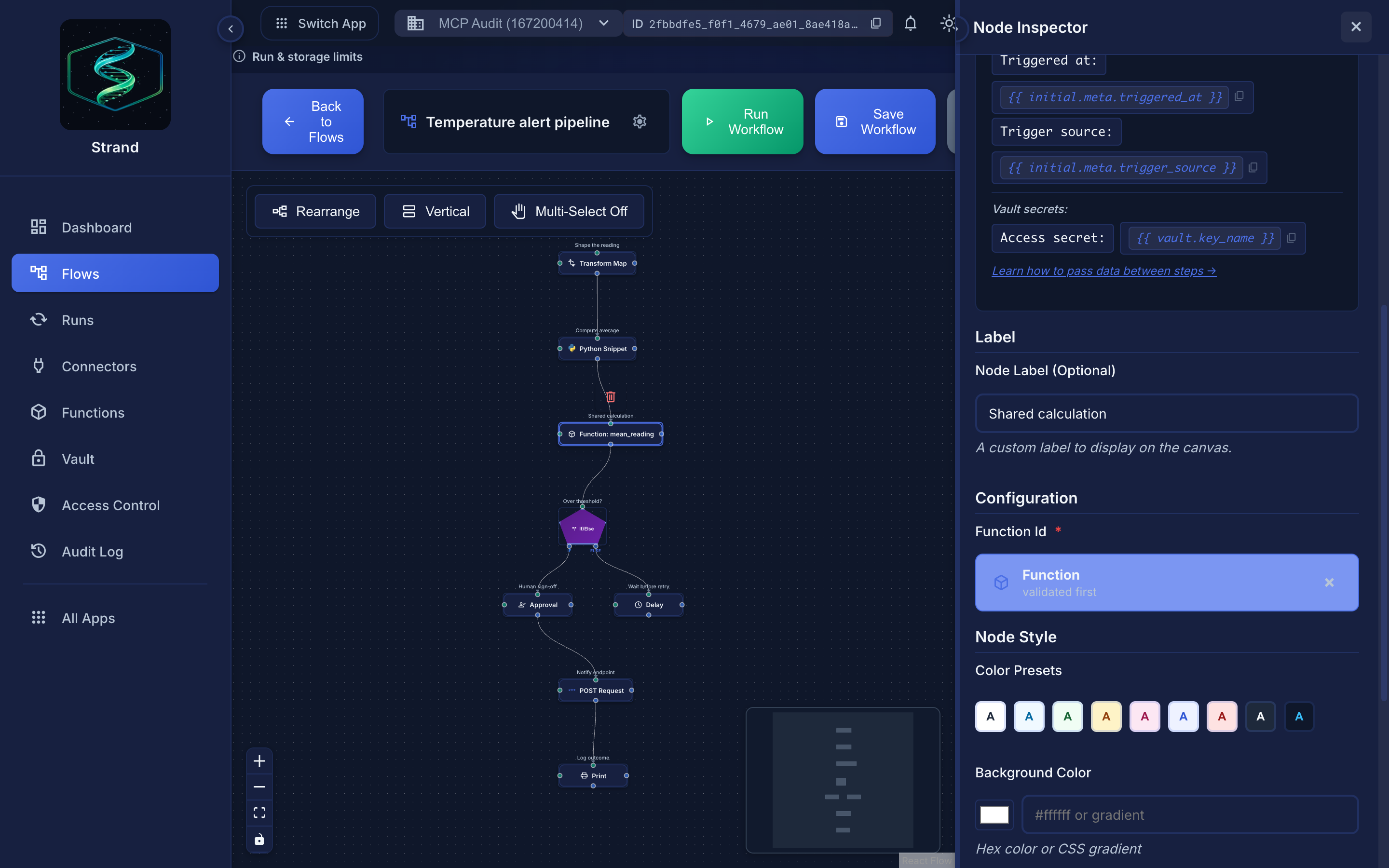 The node references a function by id; editing the function changes every workflow that calls it.
Overview#
Function Call nodes allow you to invoke pre-defined, reusable Python functions stored in your account's function library. This promotes code reuse and keeps workflows clean.
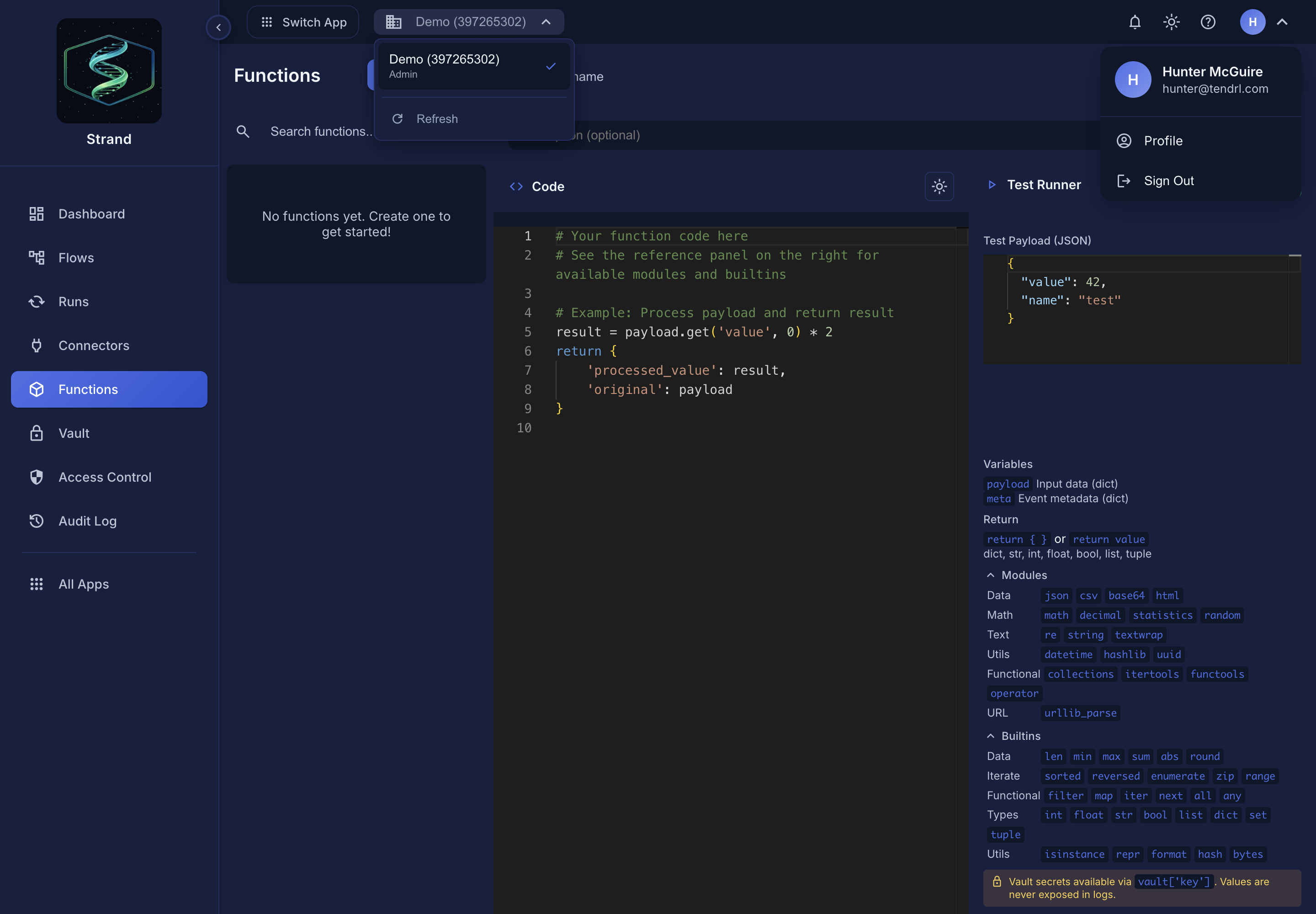 The function library editor under Functions. The reference panel on the right is the authoritative list of what the sandbox allows, and the Test Payload pane runs the function against sample input before you save it.
- Reusable data transformations
- Shared validation logic
- Common calculations across workflows
- Centralized business rules
Available Variables#
Functions use the same secure execution environment as Python Snippets:
Available in Functions#
payload(dict) - Input data from the previous nodemeta(dict) - Execution metadatavault(dict) - Encrypted secrets from the Global Vault (vault['key']orvault.get('key'))return- Return a dict to pass results to the next node
NOT Available in Functions#
variables- Use Jinja templatessteps- Use direct connections or Jinjacontext- Not accessible in Python
Functions are identical to Python Snippets in terms of:
- Available variables (payload, meta, vault)
- Execution environment (same sandbox)
- Allowed libraries and restrictions
The only difference is functions are reusable across multiple workflows.
Any vault values in output are automatically replaced with {{ vault.key }} placeholders.
Configuration#
| Field | Type | Required | Description |
|---|---|---|---|
function_id |
string | Yes | ID of the function to execute |
How It Works#
- Select a function from your function library
- The function receives the current event's
payloadandmeta - Function code executes in the same secure sandbox as Python Snippet nodes
- The function's return value becomes the next node's
payload
Creating Functions#
Functions are created and managed in the Functions page:
- Navigate to Functions from the sidebar
- Click New
- Give your function a name and description
- Write your Python code
- Save the function
Function Code Structure#
Function code follows the same structure as Python Snippet nodes:
# Access input data
user_id = payload.get('user_id')
email = payload.get('email', '')

# Process data
email_normalized = email.lower().strip()
is_valid = '@' in email and '.' in email.split('@')[1] if email else False

# Return result
return {
    'user_id': user_id,
    'email': email_normalized,
    'is_valid': is_valid
}
Available Libraries#
Functions can import the same safe libraries as Python Snippets:
| Category | Libraries |
|---|---|
| Data Formats | json, csv, base64, html |
| Math & Numbers | math, decimal, statistics, random |
| Date/Time | datetime |
| Text Processing | re, string, textwrap |
| Data Structures | collections, itertools, functools, operator |
| Utilities | hashlib, hmac, uuid |
| URL Handling | urllib.parse |
Using Functions in Workflows#
Adding a Function Call Node#
- Find your function under Functions in the left node palette
- Drag it onto the canvas
- The node is configured with that function automatically
Accessing Function Output#
The function's output is available to downstream nodes:
{{ payload.result }}
{{ payload.is_valid }}
Or when accessing from non-directly connected nodes:
{{ steps.function_call_node.output_payload.result }}
Examples#
Email Validation Function#
Function Name: validate_email
Code:
email = payload.get('email', '')

# Email regex pattern
pattern = r'^[a-zA-Z0-9._%+-]+@[a-zA-Z0-9.-]+\.[a-zA-Z]{2,}$'
is_valid = bool(re.match(pattern, email))

# Extract domain
domain = email.split('@')[1] if is_valid else None

return {
    'email': email,
    'is_valid': is_valid,
    'domain': domain
}
Usage in Workflow:
[HTTP Trigger] -> [Function: validate_email] -> [Logic: if_else] -> ...
Data Normalization Function#
Function Name: normalize_user_data
Code:
user = payload.get('user', {})

return {
    'id': user.get('id'),
    'full_name': f"{user.get('first_name', '')} {user.get('last_name', '')}".strip(),
    'email': user.get('email', '').lower(),
    'created_at': meta.get('received_at')
}
Calculate Order Total Function#
Function Name: calculate_order_total
Code:
items = payload.get('items', [])
tax_rate = payload.get('tax_rate', 0.08)

subtotal = sum(
    item.get('price', 0) * item.get('quantity', 1)
    for item in items
)
tax = subtotal * tax_rate
total = subtotal + tax

return {
    'subtotal': round(subtotal, 2),
    'tax': round(tax, 2),
    'total': round(total, 2),
    'item_count': len(items)
}
Function Call vs Python Snippet#
| Feature | Function Call | Python Snippet |
|---|---|---|
| Code Location | Stored in function library | Inline in workflow |
| Reusability | Reusable across workflows | Single workflow only |
| Maintenance | Update once, affects all uses | Update each workflow |
| Security | Same sandbox restrictions | Same sandbox restrictions |
| Performance | Same execution model | Same execution model |
- Use Functions when you need the same logic in multiple workflows
- Use Python Snippets for one-off transformations specific to a workflow
Security#
Function Call nodes execute in the same secure sandbox as Python Snippet nodes, with the same restrictions and resource limits. Vault secrets are accessible via the vault variable, but any vault values in output are automatically replaced with {{ vault.key }} placeholders.
Limitations#
- Same limits as Python Snippets - Execution time and memory constraints
- No external API calls - Use HTTP Request nodes instead
- No file I/O - Use connectors for file operations
- Function must exist - Deleted functions cause workflow failures
Best Practices#
Tips
Use descriptive function names
validate_email, calculate_total, not func1
Add descriptions
Document what the function does
Keep functions focused
Single responsibility principle
Handle missing data
Use .get() with defaults
Test functions
Verify with sample data before using in workflows
Version control
Track changes to important functions
Document inputs/outputs
Add comments explaining expected data
Related#
- Python Snippet Node - Inline Python execution
- Transform Node - Simple data transformations
- Logic Node - Conditional logic and loops
