 Tendrl
Strand
Welcome to the Strand documentation!
Strand is a powerful event-driven workflow orchestration platform that allows you to build complex data processing pipelines using a visual workflow editor.
What is Strand?#
Strand enables you to:
- Build workflows visually - Drag-and-drop interface for creating workflows
- Process events - Handle incoming events from various sources
- Transform data - Use powerful templating (Jinja2 + JSONPath) to transform data
- Connect services - Integrate with HTTP APIs, databases, and cloud services
- Schedule workflows - Run workflows on cron schedules with presets or custom expressions
- Nest workflows - Call workflows from other workflows for modular design
- Monitor execution - Track workflow runs, step execution, and performance
Key Features#
Visual Workflow Editor#
Create workflows by connecting nodes on a canvas. Each node represents a step in your workflow, and connections define the execution flow.
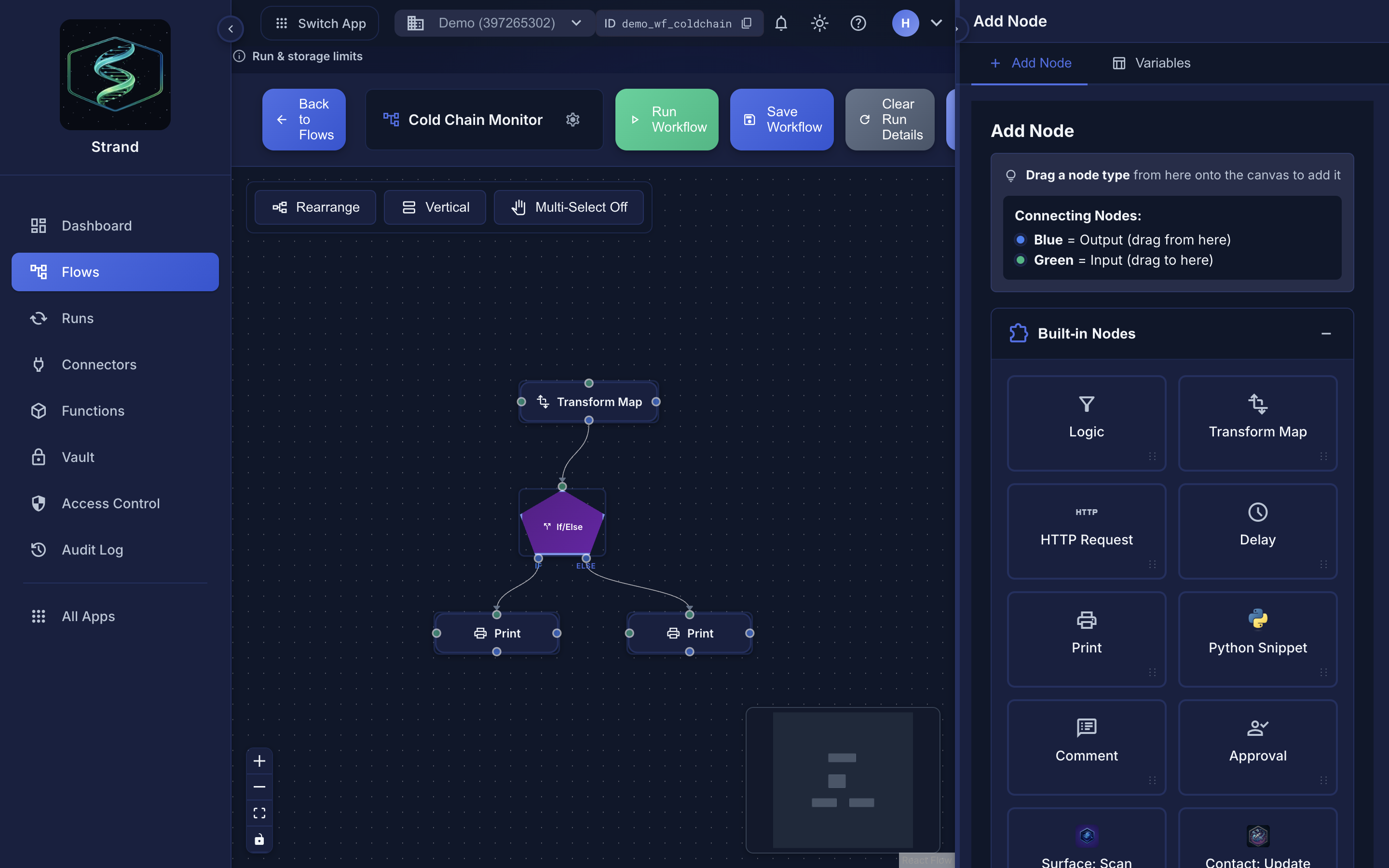 Nodes on a canvas, wired output to input.
Powerful Templating#
| System | Purpose | Best For |
|---|---|---|
| Jinja2 | Full-featured templating engine | String generation, conditionals, loops |
| JSONPath | Query language | Extracting and filtering JSON data |
| Combined | Use both together | Maximum flexibility |
Node Types#
| Node Type | Purpose |
|---|---|
| Logic | Filter, If/Else branching, Foreach loops |
| Transform | Map and transform event data |
| HTTP Request | Call external APIs |
| Flow Call | Execute nested workflows |
| Function Call | Execute reusable Python functions |
| Python Snippet | Run custom Python code in a secure sandbox |
| Delay | Add delays between steps |
| Debug and log data | |
| Connectors | AI/LLM, HTTP, MQTT, Cloud (AWS, Azure, GCP), Messaging (Slack, Discord, Telegram, Twilio), Databases (Redis, Kafka), Enterprise (Google Sheets, Home Assistant), Email, Contact, MCP |
Conditional Logic#
Create branching workflows with a Logic node. Its If/Else mode routes events to the if or else handle based on a data condition.
code
[Logic: temp > 25]
     |
     ├─[if]───→[Send Alert]
     |
     └─[else]─→[Log Normal]
Nested Workflows#
Call workflows from other workflows, enabling modular design and code reuse.
Quick Links#
Workflow Editor#
- Overview - Learn the editor
- Creating Workflows - Step-by-step guide
- Node Types - All available nodes
- Connecting Nodes - Edges and connections
- Conditional Logic - Branching workflows
- Workflow Variables - Reusable configuration values
Nodes & Connectors#
- Connectors Overview - All connector types
- Connector Output Format - Standardized response structure
- Logic Node - Filter, If/Else, Foreach
- Python Snippet - Secure Python execution
- Function Call - Reusable functions
- Contact Message - Contact entity messaging
- Tendrl Email - Managed email service
- SMTP Email - Your own SMTP server
- Slack - Slack messaging
Templating#
- Overview - Master data passing
- Jinja2 Syntax - Complete Jinja2 guide
- JSONPath - JSONPath features
- Passing Data - Data flow between steps
- Examples - Real-world examples
Advanced#
- Global Vault - Encrypted storage for secrets
- Nested Workflows - Calling workflows from workflows
- Error Handling - Handling errors gracefully
- Max Concurrency - How many workflow runs execute at once
- Performance - Optimizing workflows
