 Tendrl
Python Snippet Node
Execute secure Python code snippets within your workflows.
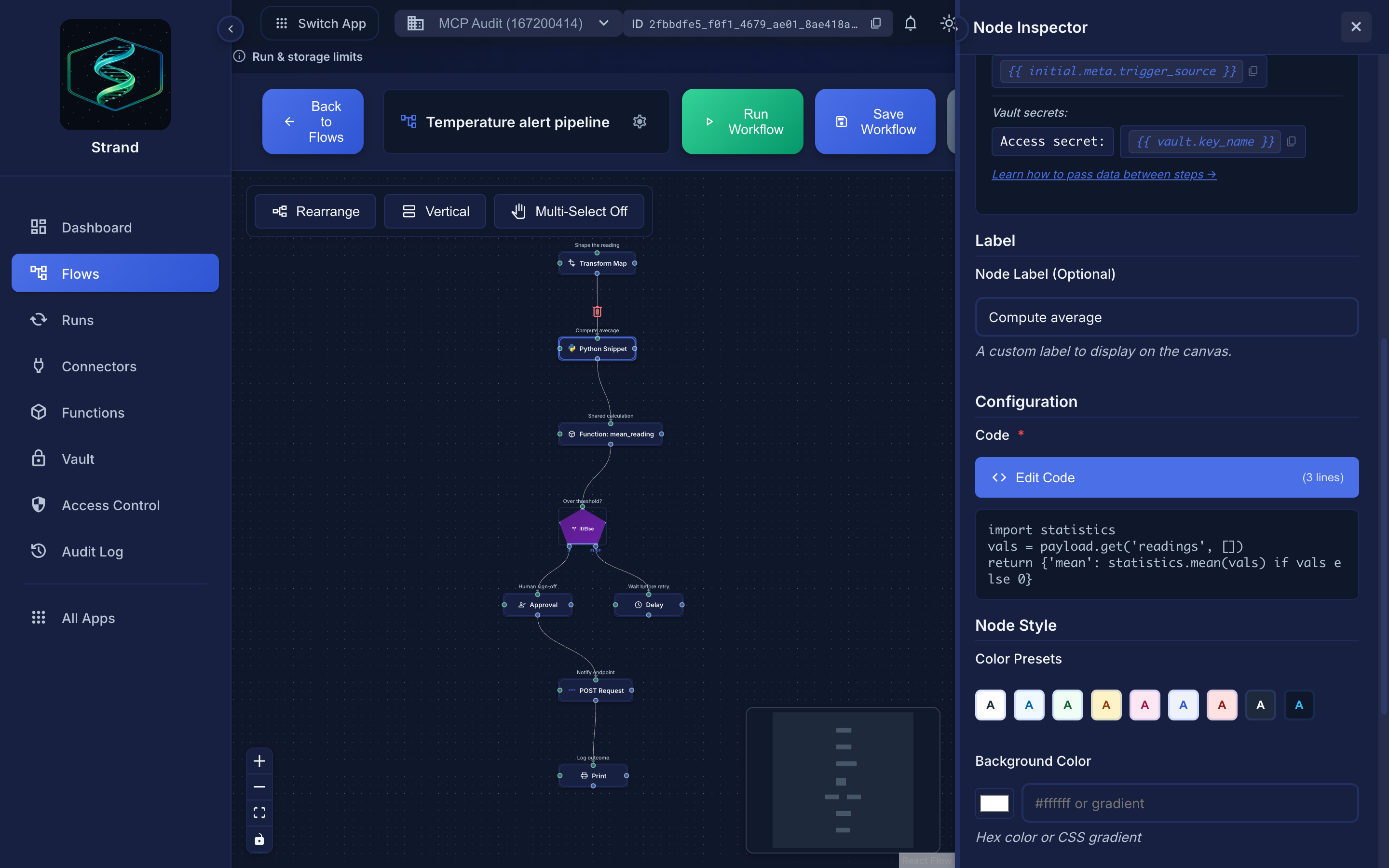 The inspector previews the code inline; Edit Code opens the full editor with the module reference.
Overview#
Python Snippet nodes allow you to write custom Python code to process and transform data. The code runs in a secure, sandboxed environment.
Use Python snippets for:
- Data transformation and calculations
- String processing and formatting
- Data validation and enrichment
- Simple business logic
Don't use Python snippets for:
- API calls (use HTTP Request or Connector nodes)
- File operations (use connectors)
- Long-running tasks
- Large data processing
Getting Started#
Your First Python Snippet#
When you create your first Python snippet, here's what to expect:
You'll see a code editor
Large, syntax-highlighted editor
Available variables are shown
payload, meta are documented
Libraries are ready
import json, math, datetime, re and more; no install step, just a standard import
Code executes quickly
Most snippets complete in < 1 second
Output becomes next node's input
Return a dict, it becomes payload for next node
Typical Workflow#
# Step 1: Access your input data
user_id = payload.get('user_id')
email = payload.get('email', '')

# Step 2: Process/transform the data
email_lower = email.lower()
is_valid = '@' in email and '.' in email.split('@')[1] if email else False

# Step 3: Return your result
return {
    'user_id': user_id,
    'email_normalized': email_lower,
    'is_valid': is_valid
}
What Happens When You Run#
Code is validated
Checked for disallowed patterns
Sandbox is created
Isolated execution environment
Code executes
Your Python code runs with resource limits enforced
Output is validated
Return value is checked
Result passed to next node
Your return value becomes next node's payload
Available Variables#
Your Python code has access to:
payload(dict) - Your main input data- Contains data from the previous node (if directly connected)
- Or contains the initial workflow input event
- Always a dictionary (empty
{}if no data)
meta(dict) - Execution metadatareceived_atis always present (ISO timestamp set when the worker picks up the event)workflow_id,workflow_name,trigger_sourceandtriggered_atare set on every trigger path.trigger_sourceismanual,scheduleorcontact_flow- Useful for timestamps and workflow context
vault(dict) - Encrypted secrets from the Global Vault- Access via
vault['key']orvault.get('key') - Read-only dictionary of your account's vault secrets
- Vault values in output are automatically replaced with
{{ vault.key }}placeholders
return/output- Pass results to the next node- Use either
return {...}or assignoutput = {...}; both work - If you don't set a result, the input
payloadis passed through unchanged - Must be a dictionary (non-dict values are wrapped as
{'result': your_value})
Any vault secret values that appear in your return data are automatically replaced with their {{ vault.key_name }} placeholder before being stored or displayed. Vault secrets are never exposed in run logs or step outputs.
Python vs Jinja: What's Available Where#
| Variable | Python Snippets | Jinja Templates | Notes |
|---|---|---|---|
payload |
Yes | Yes | Current event data |
meta |
Yes | Yes | Event metadata |
return / output |
Yes | No | Return a dict (or assign output) to pass data forward |
vault |
Yes | Yes | Encrypted secrets from Global Vault |
variables |
No | Yes | Workflow configuration values |
steps |
No | Yes | Previous step outputs |
initial |
No | Yes | Original workflow input |
Returning Output#
Use return (or assign output = {...}) to pass data to the next node. If you don't set either, the input payload is passed through unchanged.
# Process the payload
result = payload.get('value', 0) * 2

# Return your result
return {
    'processed_value': result,
    'original': payload,
    'timestamp': meta.get('received_at')
}
- Return value must be a dictionary
- If you return a non-dict value, it will be wrapped:
{'result': your_value} - Output size is limited to 1MB
- Nested structures are validated and sanitized
Available Libraries#
You can import the following safe libraries using standard Python import statements:
| Category | Libraries |
|---|---|
| Data Formats | json, csv, base64, html |
| Math & Numbers | math, decimal, statistics, random |
| Date/Time | datetime |
| Text Processing | re, string, textwrap |
| Data Structures | collections, itertools, functools, operator |
| Utilities | hashlib, hmac, uuid |
| URL Handling | urllib.parse |
Only the modules you actually import are loaded. Import only what you need:
from datetime import datetime
Examples#
Data Transformation#
# Transform user data
user_data = payload.get('user', {})
full_name = f"{user_data.get('first_name', '')} {user_data.get('last_name', '')}".strip()

return {
    'user_id': user_data.get('id'),
    'full_name': full_name,
    'email': user_data.get('email'),
    'processed_at': meta.get('received_at')
}
Data Validation#
# Validate and enrich data
email = payload.get('email', '')
is_valid = '@' in email and '.' in email.split('@')[1] if email else False

return {
    'email': email,
    'is_valid': is_valid,
    'domain': email.split('@')[1] if is_valid else None
}
Calculations#
# Perform calculations
items = payload.get('items', [])
total = sum(item.get('price', 0) * item.get('quantity', 0) for item in items)
tax = total * 0.08
grand_total = total + tax

return {
    'subtotal': total,
    'tax': tax,
    'total': grand_total,
    'item_count': len(items)
}
Using Libraries#
from datetime import datetime

# Parse JSON string
data = json.loads(payload.get('json_data', '{}'))

# Math operations
result = math.sqrt(payload.get('value', 0))

# Date operations
now = datetime.utcnow()
return {
    'processed_at': now.isoformat(),
    'result': result,
    'data': data
}
Security#
Python snippets run in a secure, sandboxed environment with multiple layers of protection. Code is validated, executed in isolation, and subject to resource limits. Vault secrets are accessible via the vault variable, but any vault values in output are automatically replaced with {{ vault.key }} placeholders.
Resource Limits#
Limits scale with your account plan:
| Resource | Free | Starter | Standard | Pro |
|---|---|---|---|---|
| Code Size | 10,000 chars | 15,000 | 25,000 | 50,000 |
| Execution Time | 5 s | 10 s | 30 s | 60 s |
| Memory | 50 MB | 128 MB | 256 MB | 512 MB |
| Output Size | 1 MB | 2 MB | 5 MB | 10 MB |
| Temporary File Size | 1 MB | 2 MB | 5 MB | 10 MB |
See Python Snippet Resource Limits for what happens when a snippet hits a limit, and tendrl.com/pricing for plan details.
Restrictions#
What's NOT Allowed#
- System module imports - Cannot import
os,sys,subprocess, etc. - File operations - No file system access
- Network access - No HTTP requests or sockets
- Code generation - No
exec,eval,compile - Augmented assignment -
+=,-=,*=and friends are rejected by the sandbox. Write the long form instead:total = total + 1
What IS Allowed#
- Safe builtins -
len,str,int,dict,list,tuple,set,bool,float,min,max,sum,abs,round,sorted,reversed,enumerate,zip,range,all,any - String operations - All standard string methods
- Math operations -
pow,divmod, plusmathlibrary functions - Safe libraries -
json,math,datetime,re,collections, etc. (see Available Libraries above) - Control flow -
if,for,while,try/except - Functions - Define and call functions
- List/Dict comprehensions - Full support
Error Handling#
Handle errors gracefully in your code:
try:
    value = payload.get('value', 0)
    result = 100 / value
    return {'result': result}
except ZeroDivisionError:
    return {'error': 'Division by zero', 'result': None}
except Exception as e:
    return {'error': str(e), 'result': None}
Troubleshooting#
Common Errors and Solutions#
"Import of 'X' is not allowed"
- You tried to import a module not in the allowlist
- Use one of the allowed libraries listed above
"Code execution exceeded time limit"
- Your code took longer than the time limit
- Optimize your code or process less data
- Check for infinite loops
"Code execution exceeded memory limit"
- Your code used too much memory
- Process data in smaller chunks
- Use generators instead of lists where possible
"Output size exceeds maximum allowed size"
- Your return value is larger than 1MB
- Return only necessary data
- Summarize instead of returning full datasets
Performance Expectations#
| Operation | Expected Time | Notes |
|---|---|---|
| Simple calculations | < 100ms | Very fast |
| String operations | < 500ms | Fast for reasonable strings |
| List processing (1000 items) | < 1s | Efficient |
| List processing (10,000 items) | 1-3s | May approach timeout |
| Regex on large text (1MB) | 1-2s | Depends on pattern complexity |
Best Practices#
Development Best Practices
Keep code simple
Focus on data transformation
Handle errors
Use try/except for robustness
Return output explicitly
Always return a dict
Test incrementally
Test with sample data first
Validate input
Check payload structure before processing
Limit output size
Keep return values reasonable (< 1MB)
Use descriptive variable names
Makes code easier to understand
No sandbox is 100% secure
Use with caution
Monitor execution logs
Watch for suspicious patterns
Limit access
Only allow trusted users to create Python snippets
Don't trust user input
Validate all data from payload
Keep code size reasonable
Stay well under 10KB limit
Related#
- Connector Nodes - Overview of all connector types
- Passing Data Between Steps - How data flows
- Transform Node - Alternative for simple transformations
- Error Handling - Error handling patterns
