 Tendrl
Python Snippet Security & Variable Access
Overview#
Python snippets provide powerful data processing capabilities while maintaining security through isolation.
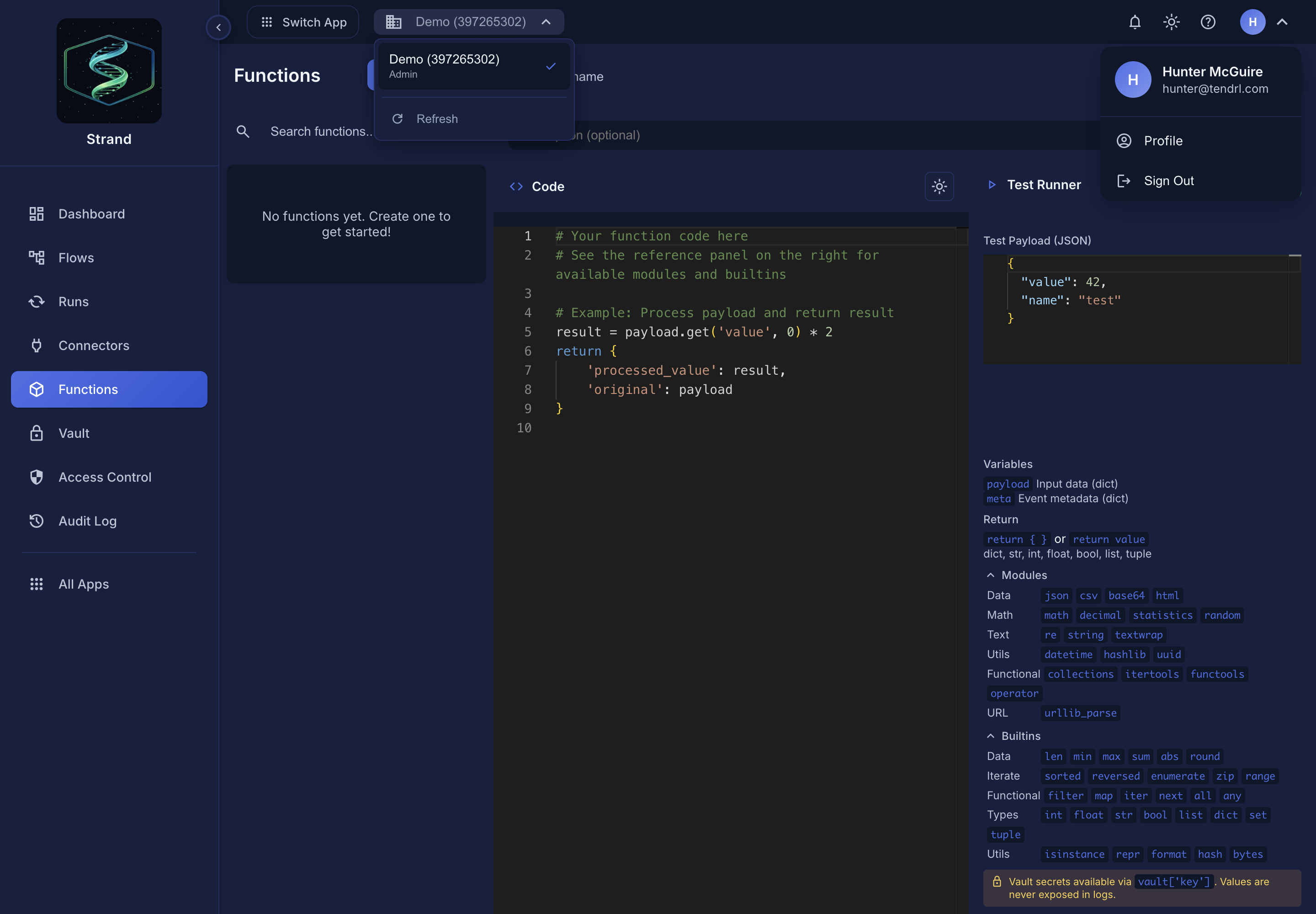 The editor lists exactly what is permitted, so you do not have to guess. Anything absent from this panel is blocked.
Security#
Python snippets run in a secure sandbox to ensure your secrets and system remain safe. Key aspects include:
- Variable Isolation - No access to variables, steps, or context (vault IS available as a read-only dict)
- Module Restrictions - Only safe, allowlisted libraries can be imported
- Resource Limits - Plan-based limits on code size, execution time, and memory
What Python Snippets Can Access#
✅ Available Variables#
# payload - Input data (dict)
user_id = payload.get('user_id')
email = payload.get('email', '')

# meta - Execution metadata (dict)
workflow_id = meta.get('workflow_id')
timestamp = meta.get('received_at')

# vault - Encrypted secrets from the Global Vault (read-only dict)
api_token = vault.get('api_token')

# Return a dict to pass results forward
return {
    'processed_data': result,
    'timestamp': timestamp
}
❌ NOT Available (By Design)#
# ❌ variables - Global config (use Jinja templates)
# base_url = variables.api_base_url  # Does not work!

# ❌ steps - Previous outputs (use Jinja or direct connection)
# user_data = steps.user_lookup.output_payload  # Does not work!

# ❌ context - Workflow context
# ctx = context.steps  # Does not work!
Resource Limits#
Python snippets have plan-based resource limits to ensure fair usage. Limits scale with your account plan:
| Resource | Free | Starter | Standard | Pro |
|---|---|---|---|---|
| Code Size | 10,000 chars | 15,000 | 25,000 | 50,000 |
| Execution Time | 5 s | 10 s | 30 s | 60 s |
| Memory | 50 MB | 128 MB | 256 MB | 512 MB |
| Output Size | 1 MB | 2 MB | 5 MB | 10 MB |
| File Size | 1 MB | 2 MB | 5 MB | 10 MB |
The File Size limit caps any temporary file your code writes during execution. See tendrl.com/pricing for current plan details.
Resource limits are enforced in the hosted runtime. A local development environment may not enforce them.
Why the Isolation?#
Security: Python snippets execute untrusted user code. To protect your system:
- Vault secrets are available as a read-only dict, but any vault values in output are automatically replaced with
{{ vault.key }}placeholders (secrets never appear in logs or step outputs) - Variables are isolated (only in Jinja for config)
- Context is isolated (prevents information leakage)
This means even malicious code cannot leak your secrets through output.
How to Access Vault Secrets#
Vault secrets are available in Python snippets via the vault dict, and also in Jinja templates:
✅ In Python Snippets#
# Python Snippet - vault is available as a read-only dict
api_token = vault.get('api_token')  # ✅ Works!
secret_key = vault['secret_key']    # ✅ Works!
✅ In Jinja Templates (HTTP Request Nodes)#
# HTTP Request Node
URL: https://api.example.com/data
Headers:
  Authorization: "Bearer {{ vault.api_token }}"  # ✅ Works!
Common Patterns#
Pattern 1: Vault + HTTP + Python#
[HTTP Request] → [Python Snippet]
Use {{ vault.key }} in HTTP node
Process response in Python
Example:
# Step 1: HTTP Request Node
URL: https://api.example.com/users
Headers:
  Authorization: "Bearer {{ vault.api_token }}"
# Step 2: Python Snippet (processes response)
users = payload.get('users', [])
active_users = [u for u in users if u.get('active')]
return {'active_users': active_users}
Pattern 2: Variables + Transform + Python#
[HTTP with {{ variables.base_url }}] → [Python process]
Use Jinja for config
Python for logic
Example:
# HTTP Request URL
{{ variables.api_base_url }}/users/{{ payload.user_id }}
# Python processes result
user_data = payload.get('user', {})
return {
    'name': f"{user_data.get('first')} {user_data.get('last')}",
    'email': user_data.get('email', '').lower()
}
Pattern 3: Steps Access via Direct Connection#
[Node A] → [Python Snippet]
Python gets Node A output automatically in payload
No need for steps.nodeA reference
Example:
# Previous node output is in payload automatically
user_id = payload.get('user_id')
email = payload.get('email')

# Process and return
return {
    'user_id': user_id,
    'email_normalized': email.lower()
}
Comparison Table#
| Variable | Python Snippets | Jinja Templates | When to Use |
|---|---|---|---|
payload |
✅ Yes | ✅ Yes | Both - current data |
meta |
✅ Yes | ✅ Yes | Both - metadata |
return |
✅ Yes | ❌ No | Python only - return a dict |
vault |
✅ Yes | ✅ Yes | Both - encrypted secrets (read-only dict in Python) |
variables |
❌ No | ✅ Yes | Jinja for configuration |
steps |
❌ No | ✅ Yes | Jinja for accessing other steps |
initial |
❌ No | ✅ Yes | Jinja for original input |
context |
❌ No | ✅ Yes | System context (reserved) |
Security Best Practices#
- ✅ Use HTTP nodes for API calls with vault secrets
"Authorization": "Bearer {{ vault.api_token }}"
- ✅ Use Python for data processing (calculations, transformations)
   result = sum(item['price'] for item in payload.get('items', []))
   return {'total': result}
- ✅ Use Jinja for templating (vault, variables, steps access)
{{ variables.api_base_url }}/users/{{ steps.lookup.output_payload.id }}
- ✅ Vault is available in Python (read-only dict, values are scrubbed from output)
   # Access vault secrets in Python snippets
   token = vault.get('api_token')  # ✅ Works!
   # Note: vault values in output are auto-replaced with {{ vault.key }} placeholders
- ❌ Don't store vault values in variables (bypasses encryption)
   # Wrong - don't do this!
   # Copying vault to variables bypasses security
Real-World Examples#
Example 1: User Lookup with Authentication#
graph LR
    A[HTTP: Get User] --> B[Python: Transform]
    B --> C[HTTP: Update]
Step 1: HTTP Request (Get User)
URL: {{ variables.api_base_url }}/users/{{ payload.user_id }}
Headers:
  Authorization: "Bearer {{ vault.api_token }}"
Step 2: Python Snippet (Transform)
user = payload.get('user', {})
return {
    'user_id': user.get('id'),
    'full_name': f"{user.get('first_name', '')} {user.get('last_name', '')}".strip(),
    'email': user.get('email', '').lower()
}
Step 3: HTTP Request (Update)
URL: {{ variables.api_base_url }}/users/{{ payload.user_id }}/update
Headers:
  Authorization: "Bearer {{ vault.api_token }}"
Body: {{ payload | tojson }}
Example 2: Data Validation Pipeline#
graph LR
    A[Trigger] --> B[Python: Validate]
    B --> C{Valid?}
    C -->|Yes| D[HTTP: Process]
    C -->|No| E[HTTP: Error]
Python Snippet (Validate)
email = payload.get('email', '')
phone = payload.get('phone', '')

# Validation
email_valid = '@' in email and '.' in email.split('@')[1] if email else False
phone_valid = len(phone) >= 10 if phone else False

errors = []
if not email_valid:
    errors.append('Invalid email')
if not phone_valid:
    errors.append('Invalid phone')

return {
    'email': email,
    'phone': phone,
    'valid': email_valid and phone_valid,
    'errors': errors
}
Example 3: Array Processing#
graph LR
    A[HTTP: Get Items] --> B[Python: Filter & Transform]
    B --> C[HTTP: Batch Update]
HTTP Request (Get Items)
URL: {{ variables.api_base_url }}/items
Headers:
  Authorization: "Bearer {{ vault.api_token }}"
Python Snippet (Filter & Transform)
items = payload.get('items', [])

# Filter active items and transform
active_items = [
    {
        'id': item['id'],
        'name': item['name'].upper(),
        'price': round(item['price'] * 1.1, 2)  # 10% markup
    }
    for item in items
    if item.get('active', False)
]

return {
    'items': active_items,
    'count': len(active_items),
    'total_value': sum(item['price'] for item in active_items)
}
Troubleshooting#
"NameError: name 'vault' is not defined"#
Problem: This error should not occur -- vault is available in Python snippets as a read-only dict. If you see this error, check that your workflow is running on an up-to-date version.
Usage:
# ✅ Correct - vault is a dict
token = vault.get('api_token')
secret = vault['my_secret']
"NameError: name 'variables' is not defined"#
Problem: Trying to access variables in Python snippet
Solution: Use Jinja template in HTTP URL or pass value through payload
# ❌ Wrong
base_url = variables.api_base_url

# ✅ Right - Use Jinja in HTTP URL
# HTTP Request URL: {{ variables.api_base_url }}/users
"NameError: name 'steps' is not defined"#
Problem: Trying to access steps in Python snippet
Solution: Use direct node connection or Jinja template
# ❌ Wrong
user_id = steps.lookup.output_payload.user_id

# ✅ Right - Direct connection means it's in payload
user_id = payload.get('user_id')

# Or use Jinja in node config
# HTTP URL: /users/{{ steps.lookup.output_payload.user_id }}
Available Modules#
Python snippets can import these safe modules:
Data Formats:
json- JSON parsing and encodingcsv- CSV parsing (in-memory strings only, no file access)base64- Base64 encoding/decodinghtml- HTML escaping/unescaping (in-memory strings only, no file access)
Math & Numbers:
math- Mathematical functionsdecimal- Decimal arithmeticstatistics- Statistical functionsrandom- Random number generation
Date/Time:
datetime- Date and time operations
Text Processing:
re- Regular expressionsstring- String utilitiestextwrap- Text wrapping
Data Structures:
collections- Advanced data structuresitertools- Iterator toolsfunctools- Functional programmingoperator- Operator functions
Utilities:
hashlib- Cryptographic hashinghmac- HMAC message authenticationuuid- UUID generationurllib.parse- URL parsing (no network access)
Note: Network access, file I/O, and system modules are not available for security reasons. Use HTTP Request nodes for API calls.
See Also#
- Python Snippet Node - Full documentation
- Global Vault - Secure secret storage
- Workflow Variables - Workflow configuration
- Templating Guide - Jinja templates
- HTTP Request Node - Making API calls
