 Tendrl
Webhooks
Webhooks are available on Starter and above. Setting a webhook URL on a profile while you are on the Free plan is refused with a 403 (code: "plan_required").
Webhooks let Surface push scan results to your server as soon as each scan finishes. Configure a webhook URL on any scan profile and Surface will POST the full result, so no polling is required. When the webhook has authentication configured, each request is signed with HMAC-SHA256 so you can cryptographically verify that it came from Surface.
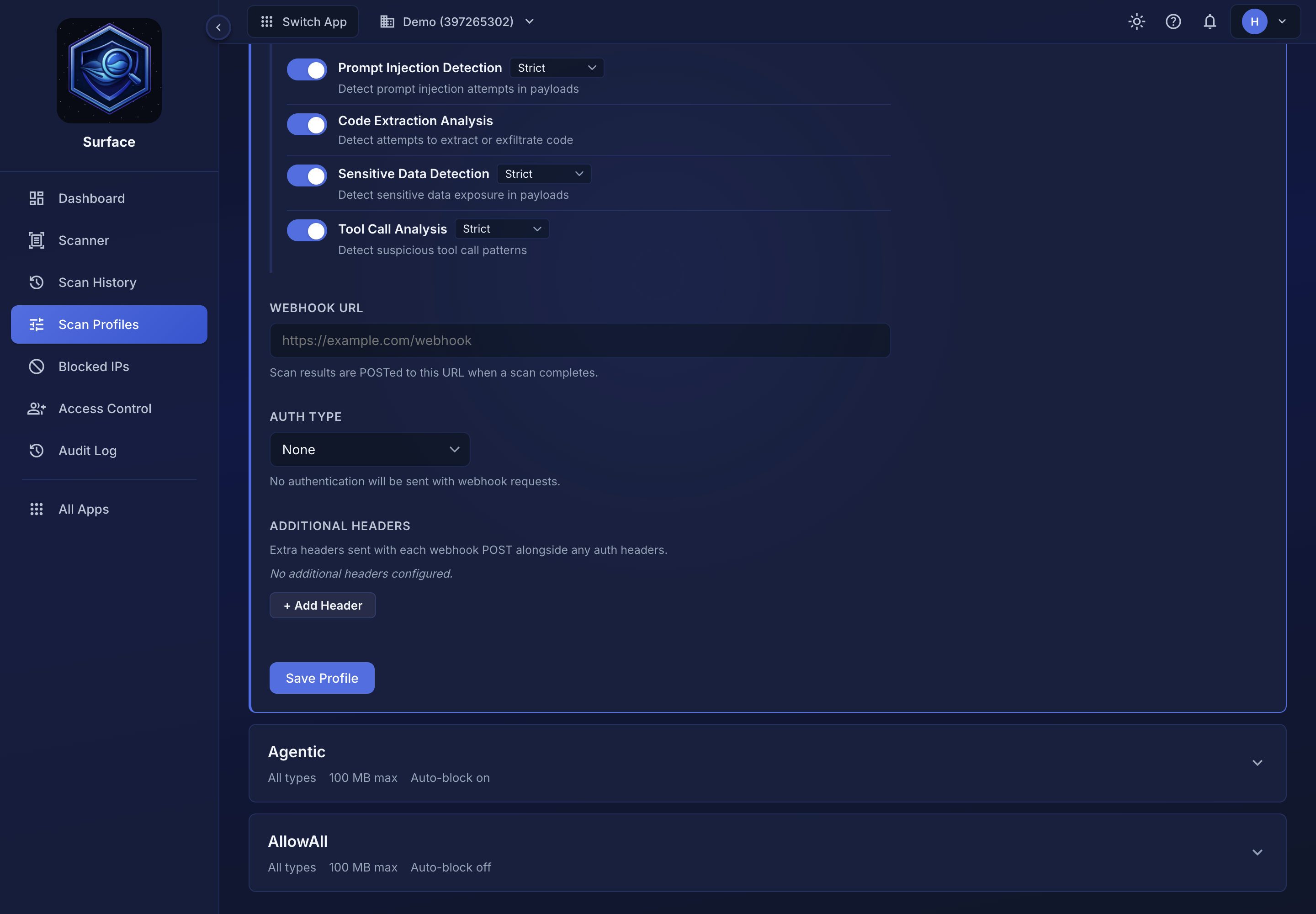 Webhooks are configured per scan profile, under Scan Profiles. Choosing an Auth type other than None reveals the credential field for it.
Webhook payload#
The POST body includes the requestId (matching the original scan response) for correlating results with your stored files, plus convenience booleans (isMalicious, isSuspicious) for simple branching logic.
{
  "requestId": "550e8400-e29b-41d4-a716-446655440000",
  "file": {
    "name": "upload.exe",
    "size": 102400,
    "hash": "abc123...",
    "contentType": "application/x-msdownload"
  },
  "scanResult": {
    "safetyScore": {
      "score": 15,
      "threatLevel": "Malicious",
      "primaryThreat": "Trojan.Generic",
      "recommendedAction": "Block",
      "coverage": "full"
    }
  },
  "threatLevel": "Malicious",
  "isMalicious": true,
  "isSuspicious": false,
  "isRisky": false,
  "timestamp": "2025-03-09T12:00:00Z",
  "scanDuration": "2.1s"
}
Key fields:
| Field | Description |
|---|---|
requestId |
Correlation ID matching the original scan response |
file.name |
Original filename |
file.hash |
SHA-256 hash of the scanned content |
scanResult.safetyScore.score |
0-100 safety score (higher is safer) |
scanResult.safetyScore.threatLevel |
Clean, Informational, Suspicious, Risky or Malicious, or Rejected / Error when nothing was scanned |
scanResult.safetyScore.recommendedAction |
Allow, Review, or Block |
scanResult.safetyScore.coverage |
full, partial, or minimal — how far analysis reached for this format (details) |
isMalicious |
true if the scan verdict is Malicious |
isSuspicious |
true if the scan verdict is Suspicious |
isRisky |
true if the verdict is Risky: an agent tool call blocked for what it would do, not for malware. isMalicious is false for these |
Signature verification#
When a webhook has authentication configured, each request includes an X-Surface-Signature header containing an HMAC-SHA256 digest of the raw request body. Always verify this signature before trusting the payload.
The signature format is sha256=<hex digest>. Use a timing-safe comparison to prevent timing attacks.
Which secret signs the webhook
The signing secret is the credential you configured on the profile — the API Key value, or the Bearer token — exactly as you typed it into the dashboard. For a Bearer token, sign with the token alone; the Bearer prefix Surface adds to the Authorization header is not part of the secret.
If you added extra headers under Additional headers, they play no part in signing. Only the credential from the Auth type field signs the payload.
If the webhook auth type is None (or no auth value is set), no X-Surface-Signature header is sent and there is nothing to verify. Configure an auth value if you want signed deliveries.
Node.js verification example#
const crypto = require('crypto');

function verifySurfaceWebhook(rawBody, secret, signatureHeader) {
  const expected = 'sha256=' + crypto
    .createHmac('sha256', secret)
    .update(rawBody)        // rawBody must be the raw Buffer, not parsed JSON
    .digest('hex');
  return crypto.timingSafeEqual(
    Buffer.from(expected),
    Buffer.from(signatureHeader)
  );
}
The rawBody parameter must be the raw request buffer, not a parsed or re-serialized JSON object. Parsing and re-serializing can change whitespace or key order, which will cause the signature check to fail. Use express.raw({ type: 'application/json' }) or equivalent in your framework to capture the raw bytes.
Authentication options#
In addition to signature verification, you can protect your webhook endpoint with an authentication header. Configure the auth type in your scan profile settings:
| Auth Type | What Surface sends |
|---|---|
| None | No auth headers, and no signature, since there is no secret to sign with |
| API Key | Authorization: Bearer your-key header |
| Bearer Token | Authorization: Bearer your-token header |
| Custom Header | A header name and value that you define |
Webhook credentials are encrypted at rest and are never displayed after you save them in the dashboard.
Example handler#
Here is a complete Express.js handler that processes webhook results and takes action based on the verdict:
app.post('/webhooks/scan', (req, res) => {
  const { requestId, file, isMalicious, isSuspicious, scanResult } = req.body;

  if (isMalicious) {
    quarantineFile(file.hash);
    notifyAdmin(file.name, scanResult.safetyScore.primaryThreat);
  } else if (isSuspicious) {
    flagForReview(file);
  } else {
    approveFile(file);
  }

  res.status(200).json({ received: true });
});
Return any 2xx status to acknowledge receipt. Webhook delivery is fire-and-forget: failures are logged but not retried. If your endpoint is critical, use async scanning and poll GET /api/scan/{scanId} as a fallback.
When the webhook has authentication configured, an X-Surface-Request-ID header echoes the scan's requestId so you can correlate webhook deliveries with the original scan response (or with a record you stored when you submitted the scan).
Using webhooks with async scanning#
Webhooks pair naturally with async scanning. Submit a scan with ?defer=true, get back a scanId and requestId immediately, and let the webhook deliver the full result when analysis completes. This avoids holding HTTP connections open for large files.
