 Tendrl
A fridge that averages 39°F can still be broken. If the door seal has gone or the compressor is short-cycling, the average barely moves; what moves is the shape of the signal, the swing between cycles and how often they happen. You cannot see that in the value a sensor is publishing right now, and you cannot see it in a mean.
Nearly every IoT tutorial builds an amnesiac: read a value, send it, forget it, repeat. Then you pay a cloud to keep the history the device threw away, and you send every reading up the wire to make sure the cloud has it.
There is a better arrangement available on a $5 board. The device keeps its own history, does the arithmetic that needs history locally, and sends a short summary. When something in the cloud wants the detail, it asks the device, and the device still has it.
What you'll build
- A Seeed Studio XIAO ESP32C3 sampling a fridge every 5 seconds into MicroTetherDB, a real BTree store on the chip: TTLs, tags, operators and a rolling 30-minute window, not a JSON file
- One summary message a minute that carries 30-minute statistics: temperature swing and compressor cycle count, computed on the board
- A Contact service validating those fields at ingress, and a dashboard built from the same rules
- A round trip in the other direction: ask the board for its raw window and it answers from local storage, then push a new threshold down and it keeps that through a power cut
Why this board
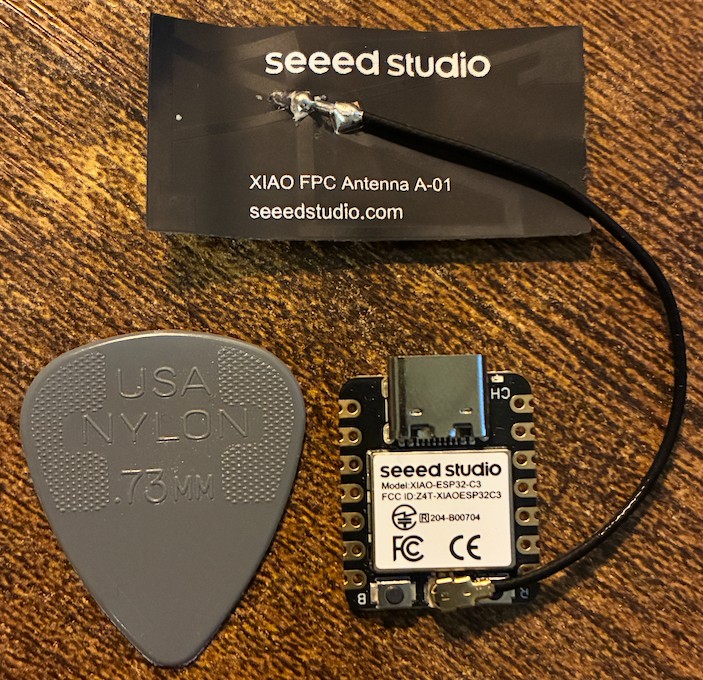
The Seeed Studio XIAO ESP32C3 is 21 × 17.5 mm, costs about $5, and carries a RISC-V ESP32-C3 with 400 KB of SRAM and 4 MB of flash. USB-C, no extra programmer, and a board small enough to sit outside a fridge gasket: that is why it is this board and not a development kit. The size is still the part I keep putting next to things.
What the chip does in this post is a different question, and it comes down to btree, a storage module compiled into MicroPython itself. Our local database, MicroTetherDB, is built on it. Whether a board has it is decided per port, upstream, not by how capable the chip is: in MicroPython's own tree MICROPY_PY_BTREE is switched on for the ESP32 port (every ESP32 board) and the larger-flash ESP8266 builds, and left off in the rp2, stm32, alif, mimxrt, samd, nrf and renesas-ra ports. So a Raspberry Pi Pico W doesn't have it, boards with far more RAM on those other ports don't have it, and a $5 XIAO does.
Here is what the board has left after the client is installed, measured on the XIAO that this post was built on: MicroPython 1.28.0, using the ROMFS install that provisioning picks automatically on ESP32 hardware. Every figure is a gc.collect() then gc.mem_free() over a serial REPL:
| XIAO ESP32C3, measured | |
|---|---|
| Free heap at boot | 172.3 KB |
| Held by the Tendrl client | 25.5 KB |
| Free for your application | 146.8 KB |
| SDK import time | 152 ms |
| Local database available | Yes, btree present |
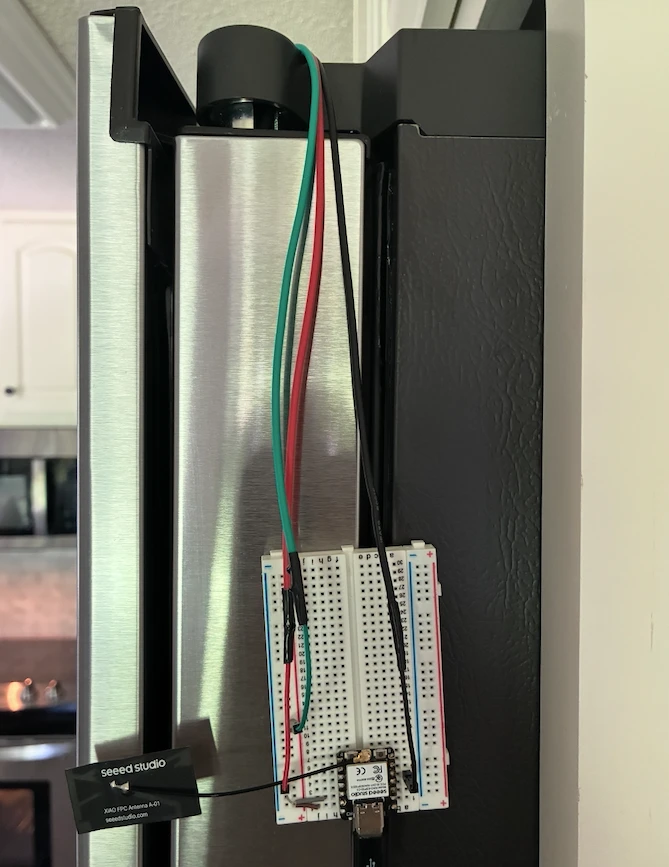
Everything else is a DHT22 on D3 (GPIO 5) and a USB-C cable. No carrier board, no separate programmer. Call it $10 all in.
This is a database, not a file
Before the code, the thing that makes this build possible. The usual way to keep history on a microcontroller is to append lines to a file and parse them back later, and that works right up until the moment you ask it a question.
MicroTetherDB is a BTree store with TTLs, tag indexes, a query language and an eviction policy. Same operations, both approaches:
| A JSON or CSV file | MicroTetherDB | |
|---|---|---|
| Add one reading | Append, or rewrite the file | A BTree insert |
| Keep only the last 30 minutes | Read it all, slice it, write it back | max_records: oldest evicted first, lazily, on insert |
| Expire one alert after an hour | Walk every record checking timestamps | A min-heap checks only the next record due |
| “Above 40°F, tagged reading, at most 20” | Parse everything, then loop in Python | One query, with operators |
| A second store on a different backend | A second file and a second parser | A second instance; RAM or flash per instance |
| What it costs to store | The whole file, in RAM, to parse | 11.4 KB of heap for a 60-record window, measured, and capped |
The client exposes put, get, query and delete on its own database; a standalone MicroTetherDB handle adds TTLs and batch operations if you want a second store.
The query language is the part that changes how you write firmware. Conditions combine, tags are queryable, nested fields work with dot notation, operators cover $gt, $lt, $ne, $in, $exists and $contains, and $limit bounds a result before it can bounce off a 146 KB heap:
# Everything above 40°F still in the window
warm = client.db_query({"f": {"$gt": 40}})

# Tag-scoped, and capped so a big result can't exhaust the heap
alerts = client.db_query({"_tags": "alert", "$limit": 20})

# Conditions combine; dot notation reaches nested fields
client.db_query({"sensor.shelf": "door", "f": {"$gte": 34, "$lte": 46}})

# TTLs and batches come from a standalone MicroTetherDB handle
db.put({"defrost_seen": True}, ttl=3600, tags=["alert"])
The honest limit: there are no secondary indexes, so a query is a full scan of the store. This is a small-to-medium data structure, not something to point at a million rows, which is why max_records matters as much as it does here: the cap that bounds your memory is also the cap that bounds every scan.
Step 1: give the device a memory
The client ships with a local database and a hard record cap. Set the cap and it becomes a rolling window: oldest records are evicted first, newest data is always kept, and the memory cost is bounded no matter how long the thing runs.
So: two stores, and the split between them is the whole design. A ring buffer of floats in RAM holds every 5-second reading for half an hour (360 floats, 1.4 KB), and the per-minute arithmetic runs over it in place, allocating nothing. The database takes every sixth reading, so 30 minutes is 60 records and 11.4 KB measured, and that is the durable copy the cloud can ask for by time range.
Why not just query the database every minute and skip the ring? Because a query is expensive in a way that has nothing to do with how much you ask for; the next section is about the version of this code that died learning it.
import gc, json, time
from array import array
from machine import Pin
from dht import DHT22
from tendrl import Client

SAMPLE_S = 5        # read the sensor this often
STORE_EVERY = 6     # ...and store every 6th reading (30 s)
WINDOW_S = 1800     # keep 30 minutes of history

RING_SLOTS = WINDOW_S // SAMPLE_S                  # 360 floats = 1.4 KB
DB_RECORDS = WINDOW_S // (SAMPLE_S * STORE_EVERY)  # 60 records = 11.4 KB

sensor = DHT22(Pin(5))    # D3 on the XIAO (GPIO 5)

client = Client(
    client_db=True,
    client_db_max_records=DB_RECORDS,   # oldest-first eviction
    offline_storage=True,               # survives a drop *and* a reboot
)

# One threshold, on flash. Not the client database: db_put() takes no key, so
# there is no stable row to overwrite, and persisting it would put every
# reading on flash to save one number.
LIMITS_PATH = "/limits.json"

def load_limits():
    try:
        with open(LIMITS_PATH) as f:
            return json.load(f)
    except (OSError, ValueError):
        return {"swing_f": 7.0}   # matches the service rule

limits = load_limits()

ring = array("f", bytearray(4 * RING_SLOTS))
_head = 0
_filled = 0
The helpers are in the full file: record() pushes a reading into the ring and the per-minute totals, reset_minute() clears them, status_for() maps a swing onto ok/warn/crit, and window_stats() does the arithmetic (shown below, if you're curious).
Then the loop. Read every 5 seconds, store every sixth reading, publish once a minute, and never query the database on the way past.
client.start()
next_summary = time.time() + 60
tick = 0

while True:
    # A DHT22 raises OSError on a checksum miss. That is normal, and not
    # worth dying over at 3 a.m.: skip the sample, take the next one.
    try:
        sensor.measure()
        f = sensor.temperature() * 9 / 5 + 32   # the DHT22 reports Celsius
        record(f)                               # ring + per-minute totals
        tick += 1
        if tick % STORE_EVERY == 0:
            client.db_put({"t": time.time(), "f": f}, tags=["reading"])
    except OSError:
        pass

    if time.time() >= next_summary:
        stats = window_stats()
        if stats and _m_n:
            lo, hi, mid, cycles, n = stats
            swing = round(hi - lo, 2)
            client.publish({
                "mean_f": round(_m_sum / _m_n, 2),
                "min_f": round(_m_min, 2),
                "max_f": round(_m_max, 2),
                "swing_30m": swing,
                "cycles_30m": cycles,
                "samples": n,
                "status": status_for(swing),
            }, tags=["fridge", "summary"], write_offline=True)
            reset_minute()
        next_summary = time.time() + 60
        gc.collect()

    time.sleep(SAMPLE_S)
Look at what is in that one-minute message: swing_30m and cycles_30m are thirty-minute statistics. No cloud query produced them, no time-series database was involved, and no history had to be uploaded for anyone to compute them. A $5 microcontroller did it from data it already had.
One thing the full file adds that isn't shown above: a run of failed sensor reads publishes a sensor_fault status with a count, rather than nothing at all. A loose sensor lead once made this board look perfectly healthy for half an hour: heartbeats fine, no summaries, nobody any the wiser. Silence and a working fridge are indistinguishable from the outside, so the device says so.
The cadence arithmetic is worth stating plainly. Sampling every 5 seconds is 17,280 readings a day. Publishing one summary a minute is 1,440 messages a day: 92% fewer, and the detail hasn't gone anywhere. It's on the device.
Why the code looks like that
The obvious version of that loop (no ring buffer, every reading straight into the database, a db_query each time it publishes) ran for five and a half minutes on my bench and then died of a MemoryError. The cause is one number: a query costs about 23 KB of transient heap no matter how few rows it returns, because the scan is sized by the database rather than the result. The application only has ~58 KB to play with.
That is the whole reason for the ring buffer, and the file you download already handles it. Read every 5 seconds into a small ring of floats, store every sixth reading, publish once a minute, and query the database only when the cloud actually asks for history. The rewritten version has run flat for hours.
Step 2: validate at the door
Create a service so bad data is caught as it arrives rather than after it has polluted a chart. Validation in Contact is passive by design: a failing message is still stored, marked validation_status: "failed", with per-rule results attached, and it can carry tags that route it somewhere.
Four rules cover it: mean_f between 34 and 46°F, swing_30m between 0 and 7, cycles_30m between 0 and 6, and status one of ok / warn / crit, declared best-to-worst, because that ordering is what colours the status widgets. Assign it to the entity and every message from the XIAO is checked before it lands.
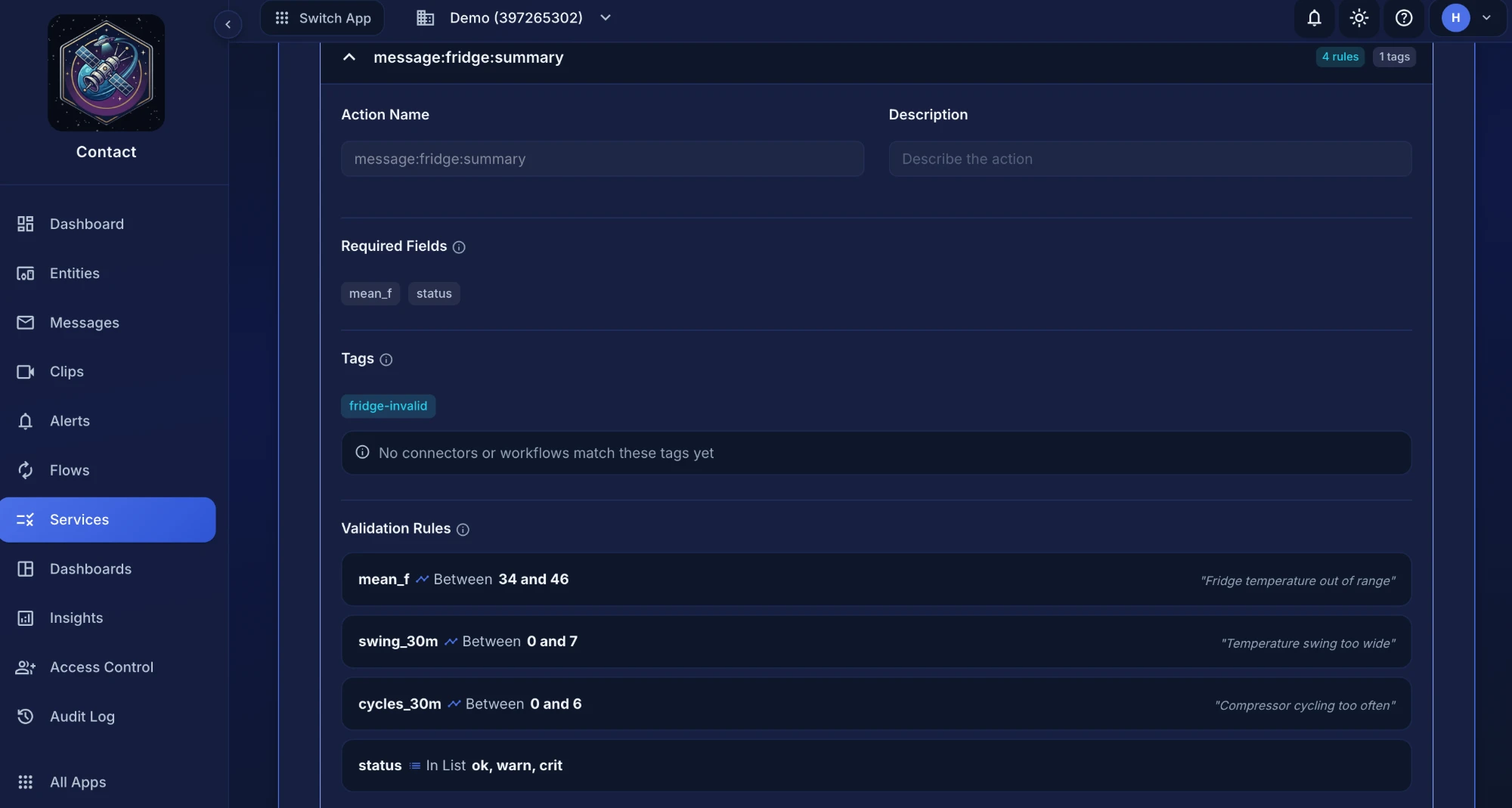
Here is one failing, which is what the bench run produced all afternoon: the board was sitting in open air at 72.5°F, nowhere near the 34–46°F a fridge should hold. The message is still stored; it is marked, attributed to the rule that caught it, and tagged so a flow can route it:
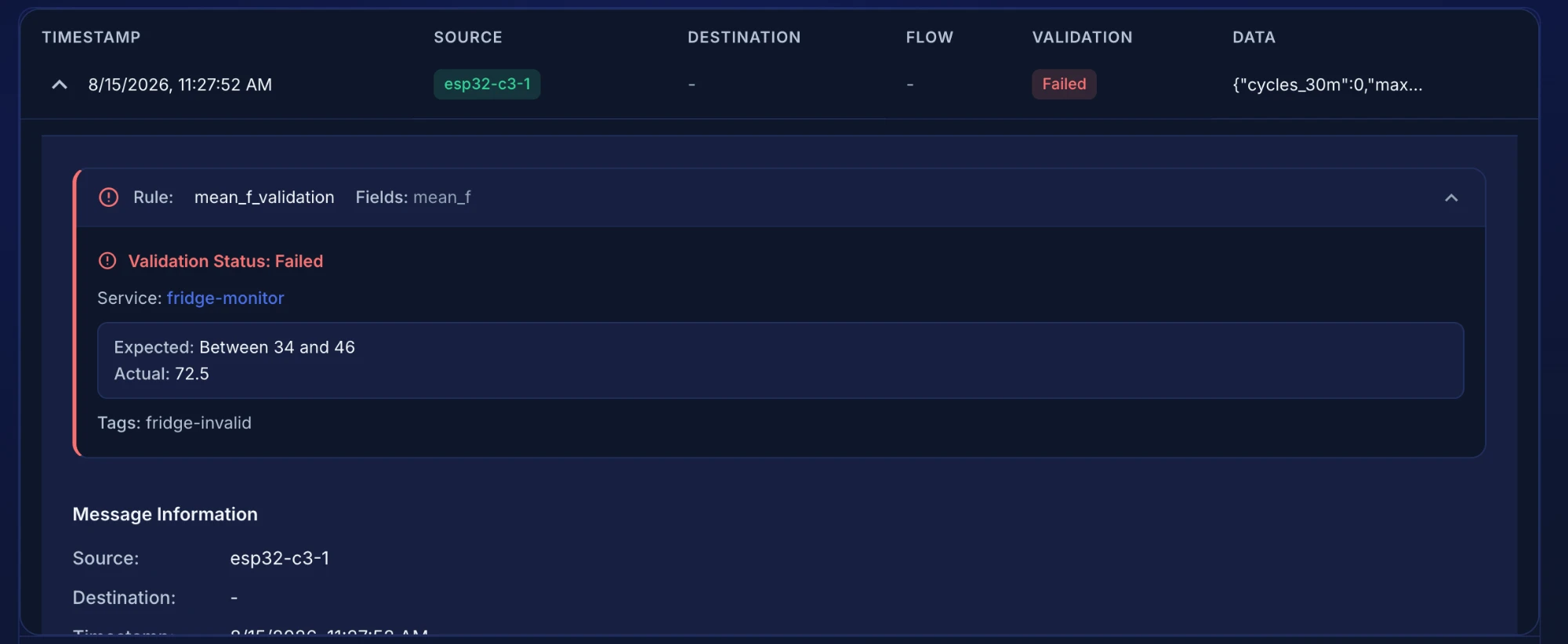
fridge-invalid is attached for routing.Step 3: the dashboard builds itself from those rules
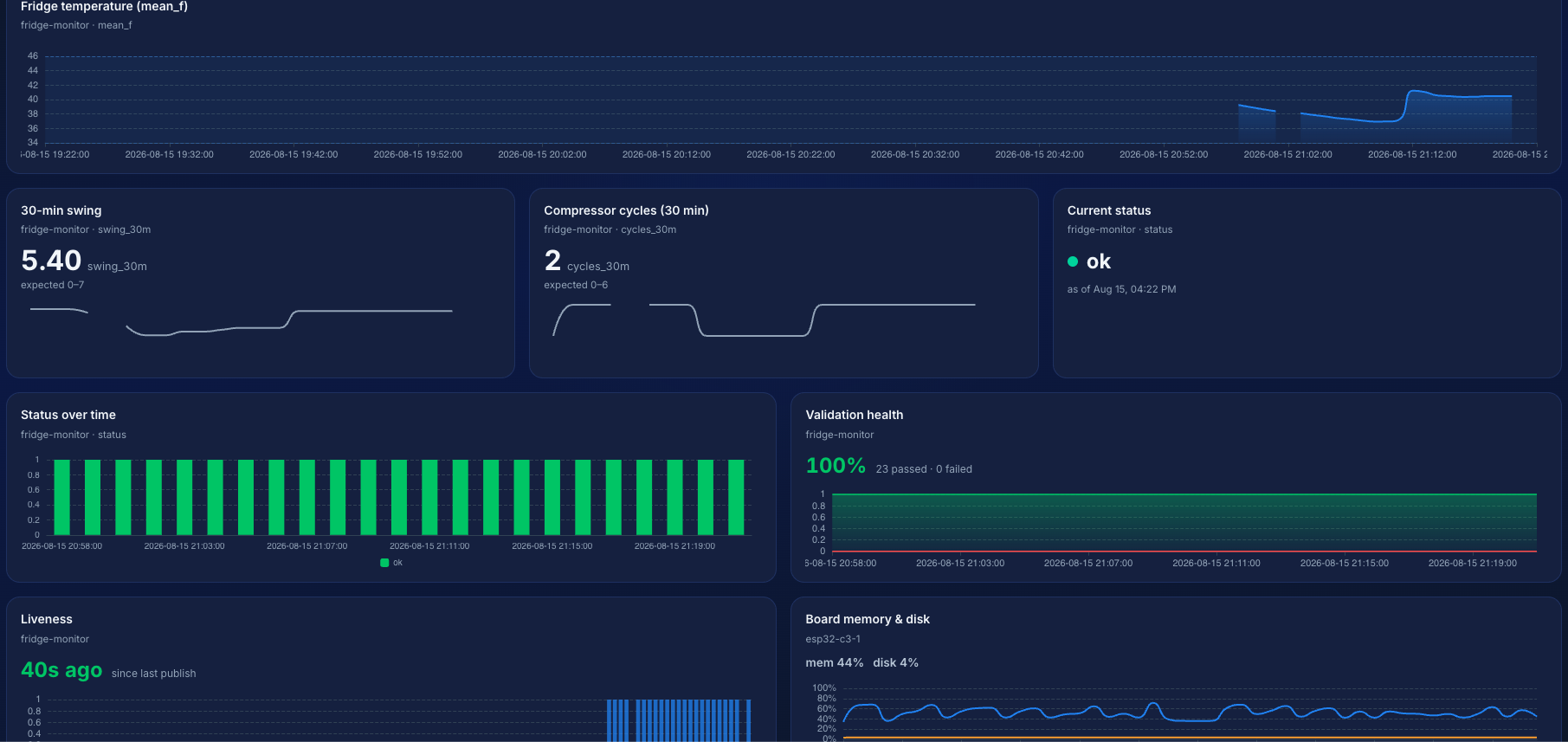
This is the part that surprises people. Those rules are not only a filter, they are a declaration of what the data means, and the dashboard builder reads them. A field with a between rule offers range-aware charts. A field with an in rule offers status tiles. You pick a field, not a chart type:
- Line chart on
mean_f, with the 34–46°F expected range drawn as a shaded band - Stat tile on
swing_30m, which turns red the moment it leaves its declared range - Current status and distribution on
status, coloured from the declared value set - Validation health and liveness, available on any service without configuring anything
- Device health from the heartbeat: free heap and disk on the XIAO itself
Four validation rules, eight widgets, no chart configuration.
The dashboard at the top of this post is that one, built from those rules and nothing else.
Step 4: ask the device what happened
The summary says the swing widened. It doesn't say what the last half hour looked like, and the device is the only thing that knows. So ask it. A message addressed to the board, tagged history-request, is the whole mechanism; anything holding an entity API key can send one, whether that's a script, a scheduled job, or a person clicking in the dashboard.
curl -X POST https://app.tendrl.com/api/entities/message \
  -H "Authorization: Bearer $API_KEY" \
  -H "Content-Type: application/json" \
  -d '{
    "msg_type": "publish",
    "dest": "fridge-01",
    "data": { "seconds": 1800 },
    "context": { "tags": ["history-request"] }
  }'
One thing to get right: dest is a top-level field, not something inside context. Nested, the message is accepted with a 200 and never routed to the device.
The device is listening. Inbound messages route by tag with @client.on(), the mirror image of publishing. These two handlers go in main.py above the client.start() call from Step 1:
@client.on(tag="history-request")
def send_history(message):
    secs = message.get("data", {}).get("seconds", WINDOW_S)
    temps = window(secs)
    if not temps:
        return
    client.publish({
        "t0": time.time() - len(temps) * SAMPLE_S,
        "step_s": SAMPLE_S,
        "df": [int(t * 10) for t in temps],   # tenths of a degree, as ints
    }, tags=["fridge", "history-reply"])

@client.on(tag="set-limits")
def set_limits(message):
    limits.update(message.get("data", {}))
    with open(LIMITS_PATH, "w") as f:     # to flash, not RAM
        json.dump(limits, f)
    client.update_state({"swing_limit_f": limits["swing_f"]})
The df encoding is not decoration: Contact caps a payload at 5 KB, and the device is the only thing positioned to decide what shape to send. A real reply off the wire: 87 bytes for 13 points, about 0.4 KB for a full window, against 9–10 KB for the same half hour sent as objects at full resolution, which would be rejected.
The same mechanism runs the other way: send {"swing_f": 7.0} tagged set-limits and the board writes it to a small JSON file on flash. Pull the plug, plug it back in, and it still knows what normal looks like for the appliance it is bolted to. A file rather than the database because half an hour of readings you query by time range is a database problem, and one value is not.
What the loop actually bought you
| Publish every reading | Keep history on the device | |
|---|---|---|
| Messages per day | 17,280 | 1,440 |
| 30-minute statistics | cloud query | on the board |
| Raw detail | always uploaded | on request |
| Network drops | data lost | buffered to flash |
| Thresholds | reflash to change | pushed, and persisted |
| Hardware | n/a | $5 + a sensor |
Where this stops
Four limits worth knowing before you build it.
The database is ESP32-only. btree is compiled into the firmware, enabled upstream for the ESP32 port (and larger-flash ESP8266 builds), not for the rp2, stm32, alif, mimxrt, samd, nrf or renesas-ra ports. The client degrades cleanly there and history stays cloud-side. See the supported boards comparison.
Reading the database costs more than filling it. Storage is predictable: about 88 bytes of key and JSON per record, and 11.4 KB of heap for the 60-record window once btree pages and the TTL index are counted — budget against the second number, not the first. A query is ~23 KB of transient heap at 60 records and ~40 KB at 120, near enough regardless of rows returned. Size client_db_max_records against the query you intend to run, not the space the records occupy.
A history request needs the device online, and this is a plugged-in build; a 5-second duty cycle with Wi-Fi up is not a battery project. Sample slowly and deep-sleep between summaries if you need months on a cell; the database survives the sleep.
Every number above came off the board on my desk rather than a datasheet, and the SDK ships the measuring script as tests/measure_board.py so you can reproduce them.
Try it
The device side is one file, and it's the file this post was written from: xiao_fridge.py. Upload it as main.py.
Provisioning is a browser tab: the Device Console flashes MicroPython, installs the client and writes the config, no CLI required. Everything else is a service with four rules and a dashboard with eight widgets, and if you would rather not click any of it, both Contact and the flashing tool speak MCP, so an assistant can do the whole setup while you hold the board.
The broader point has nothing to do with fridges. A device that remembers can answer questions later. That single property is what turns a sensor into something worth asking, and it fits on a $5 XIAO.