 Tendrl
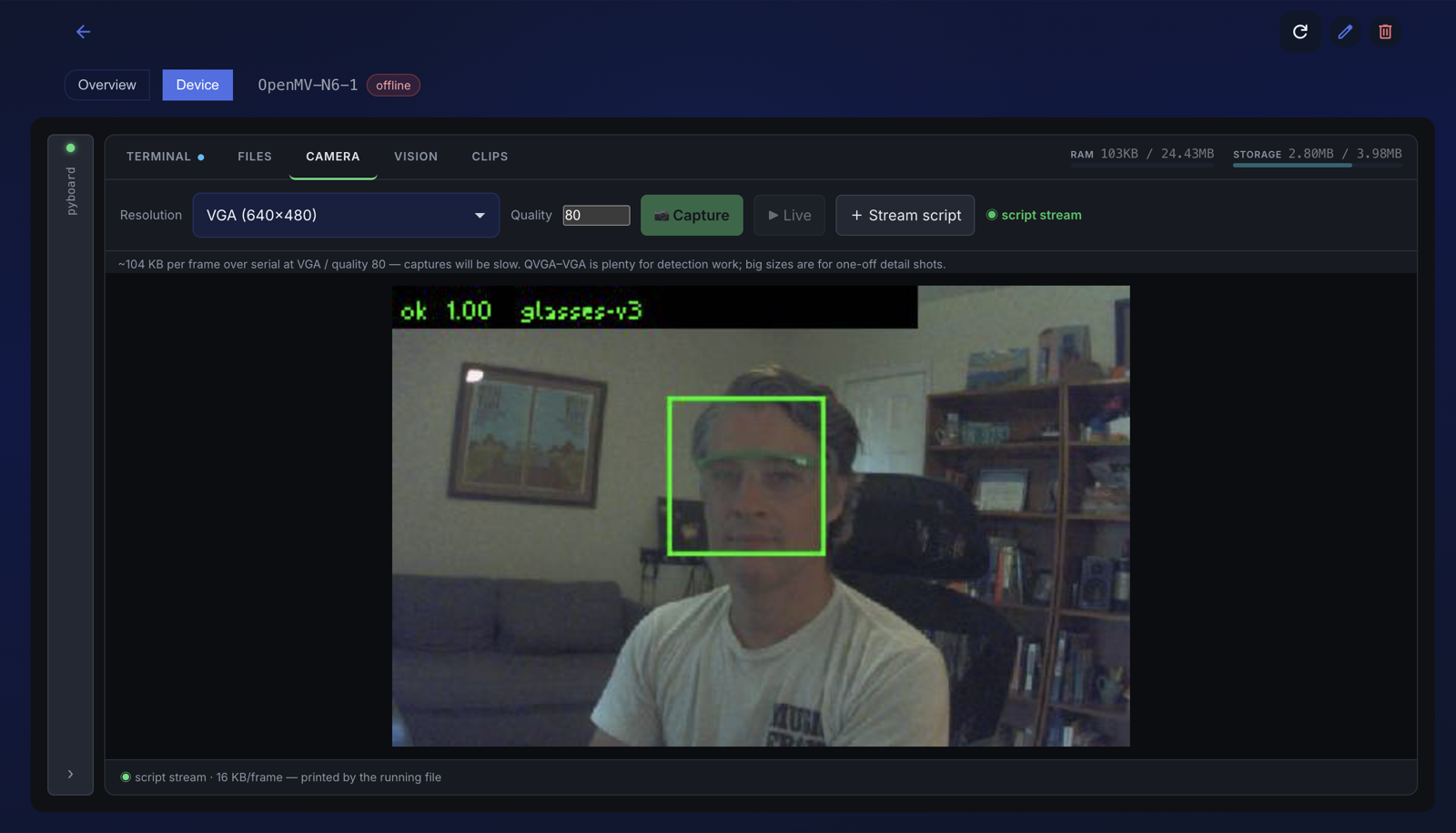
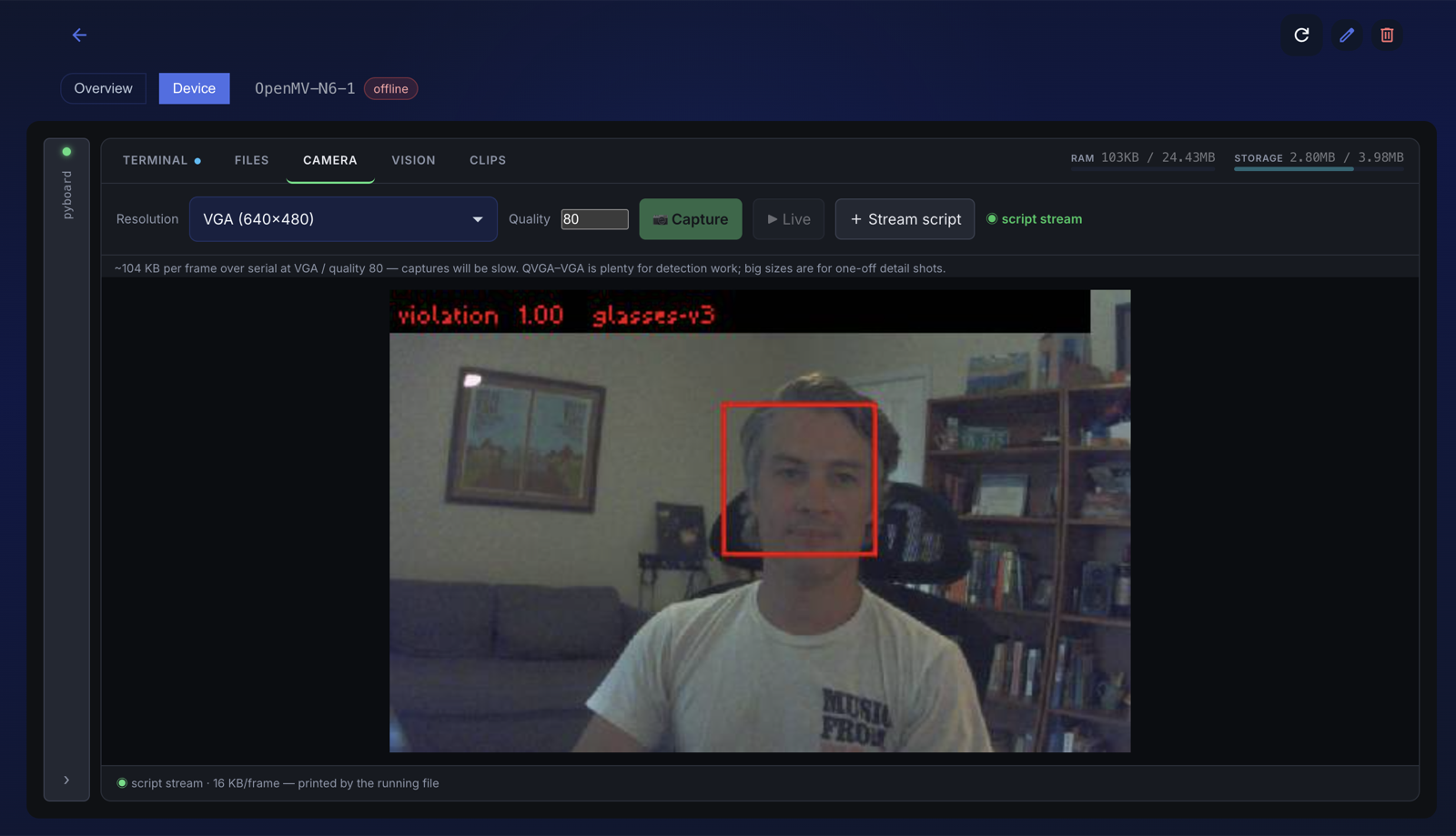
"In a day" means an evening and a morning. What made it possible was two things: tendrl-dev-mcp, which let Claude work on the actual board (look through its camera, run code on it, copy files, measure) instead of relaying through me, and the Tendrl client, which already had the parts a camera product needs and are hard to get right on a microcontroller. My job was the idea, the chair, and deciding what "good enough" means. Here is what those two things did, then the day itself, with the numbers.
What did the heavy lifting
Two things, named precisely, because they are the difference between "a day" and "a fortnight".
The client already knew how to be a camera product
Camera, face_boxes (BlazeFace with eye keypoints, from the ROM), Watch (debounce, publish-on-transition, cooldown), preview.frame() (that live view in the browser), send_file() with kind="clip" (the violation clip, transcoded on the server), and a managed MQTT loop. The station script is about 600 lines and most of them are the state machine, the clip buffer and configuration; the parts that are hard to get right on a microcontroller were already there.
dev-mcp made the board something Claude could operate
tendrl-dev-mcp is a single Go binary, no runtime to install, that speaks MCP over stdio to Claude (or Cursor, or any MCP client) and drives a MicroPython board over USB with the same raw-REPL code as the browser console. I did not open an IDE, a serial terminal or a file manager all day. Every measurement in this post was taken by Claude over USB from a chat window, most of them through these tools, while I sat in the chair being the dataset:
| Tool | What it did in this build |
|---|---|
detect_board, diagnose_device | Found the N6, its firmware, 24 MB of heap, Wi-Fi state and the SDK version before I typed anything. |
capture_frame | Looked at the desk before writing a line of ROI code; checked whether the glasses were on before every capture burst; pulled the exact crops the model had just misjudged. |
run_script | The workhorse: well over a hundred calls. Every timing, heap figure and probe; the JPEG-size bug; the model-load failure and its workaround; each 25-crop capture burst; each live run with per-frame scores. |
upload_file, list_files, read_device_file | Scripts and model files on and off the board between iterations; the sidecar read back to check what the board would actually load. |
reset_device, serial_monitor | Clean state between experiments; watching a run without holding the port. |
provision_device, upload_sdk | Had already put the SDK, the vision extension and the OTA updater on the board, which is why "start" meant "start on the product", not on plumbing. |
The part I did not expect to matter as much as it did is that dev-mcp also serves resources: a guide to how the four Tendrl MCP servers fit together, and a set of skills (vision-build, dev-debug, dev-files, dev-provision, tendrl-orchestrate) Claude reads before it touches the hardware. The vision-build skill says, in so many words: look through the lens, write the detector against what you actually see, run it, then look again. Do not write detection code blind. That is not advice; on a camera board it is the only workflow that converges. It is what turned "the model is wrong" into "here is the crop it saw, here is what the desktop model says about the same pixels, they disagree by this much", in one round trip, about two hundred times.
That is the honest framing of "a day": the product existed as capabilities; Claude existed; dev-mcp was the connective tissue that let the two work on the actual board without me in the loop as a copy-paste relay.
What it is
A station is anywhere eye protection is the rule: the bench by the grinder, a lab table, the 3D-printer corner. Point an OpenMV N6 at where a head is when someone works there. On the chip: an in-flash face detector finds the person and their eyes; a small classifier I trained looks at a square around the eyes; a debounced state machine decides ok, violation, unknown or nobody; and only when that changes does the camera publish about a hundred bytes. On a violation the message also carries an event id:
{"station": "ST-01", "running": true, "ppe": "violation", "conf": 0.93, "model": "glasses-v3", "event": "ST-01-840377858"}That message lands in Contact tagged ppe-violation (or ppe for everything else), gets validated against the station's service, and shows up in the entity's messages, and on a dashboard if you have built one. Then, because a verdict without a picture is an argument waiting to happen, the camera uploads a six-second clip of the operator, three seconds before the moment and three after, to the entity's Clips gallery, tagged with the same event id, so whoever reads the message can see exactly what the camera saw. That's the whole product: a camera that tells Contact when someone at the bench isn't wearing their glasses, shows you the moment, and says nothing otherwise. What you do with the tag from there (a Slack workflow, a light, a log) is ordinary Contact plumbing and not this post.
event id as the violation message, so the two find each other.The order matters: the alert goes out first, in the same second as the decision, and the clip follows a few seconds later, so nothing about the notification waits on a recording. Clips are one per station per minute, and a single setting turns them off for a verdicts-only deployment, which is what a classroom would run.
The custom model, in five steps
The face detector comes with the board; the part that says glasses or not is a small classifier trained for this bench. There is nothing exotic in it, and the docs walk through each step in detail. This is the shape of it:
- Capture on the camera itself. A short script saves the exact crop the runtime will use, a square around the eyes from the face detector's keypoints, to the board's storage, in short alternating on/off bursts. Capture crops on the camera.
- Train on your laptop. A MobileNetV2 head on ImageNet weights, brightness-normalized inputs, int8 quantization calibrated on your own images, and the int8 model scored next to the float one so nothing hides. About two minutes. Train locally.
- Compile for the N6. The N6's NPU wants ST's compiled binary rather than a raw
.tflite; the compiler ships inside the OpenMV IDE and takes about ten seconds. Compile for the N6. - Load it with the client.
tendrl.vision.load_model()opens a model file from/flash, an SD card or/app; a small sidecar (model.json) tells the runtime the labels, the crop rule, the normalization and the output type so the board does exactly what training did. Load it on the board. - Ship it like code. A deployment can carry the model files next to the entry module, up to 2 MB each, verified, staged, swapped and rolled back exactly like code, so a retrain reaches every camera the same way a bug fix does. Deploy the model over the air.
The day, honestly
| When | What happened |
|---|---|
| Sat 5:30 PM | Plugged the N6 in. Claude detected it, read its memory and firmware, took a picture of my desk, and measured the face detector at 11–14 ms before I had said a word. |
| 6:15 PM | Trainer written and proven; classifier running on the NPU at 2–4 ms; the full loop (camera → verdict → Contact) working with a stand-in model. |
| 7:45 PM | First crops of me, first real model. Good numbers on paper. Bed after ten. |
| Sun 8:00 AM | Live in the console: it called my bare face "ok". Tested honestly, trained on one session and tested on the other, it was a coin flip. The good numbers had been leakage. |
| 8:30 AM | Two changes: crop the eyes instead of the head, and capture on/off in alternating bursts. Eight minutes in the chair, cued burst by burst from the chat. |
| 9:00 AM | Retrained: 250 of 250 across every held-out condition, float and int8. Compiled for the NPU, copied to the board. |
| 9:30 AM | Device Console, live view, green box on, red box off. It works. |
The board pushed back a few times along the way (a brand-new NPU board has opinions about model formats and memory) and every one of those was found, worked around and written up for OpenMV without leaving the chat. They're in the docs page for anyone who hits them; they're not this post.
Three things worth stealing
Never let the label be correlated with time. Capture "on" and "off" in short alternating bursts so both classes see the same light and posture, and validate across sessions, never on shuffled frames. My first dataset broke this rule and learned my Saturday instead of my glasses.
Crop what changes. The face detector hands you the eyes; a square around them holds only what eye protection alters. A head crop holds a hoodie and a bookshelf, and a classifier will use them.
Let Claude look. Every good decision in this build came after capture_frame, and every bad one came before it. Write detectors against what the camera actually sees.
Numbers
| OpenMV N6, measured | |
|---|---|
| Face detect (BlazeFace, ROM) | 11–14 ms |
| Classifier on the NPU | 4–5 ms |
| Verdicts per second (paced) | ~5 |
| Model, .tflite / N6 binary | 610 KB / 511 KB |
| Free heap with everything resident | ~24 MB |
| Verdict payload | ~110 bytes, on transitions only |
| Dataset that worked | 125 + 125 eye crops, 8 minutes |
| Train + compile for the NPU | ~2 min + ~10 s on a laptop |
| Live view to the browser | 320×200 every 350 ms ≈ 21 KB/s |
What it is not, yet
It is a ten-minute model of one person. It works well now, in this room. Cross-session accuracy is the number that has to grow, and the way it grows is boring: two minutes of interleaved capture a day, different light, other faces, retrain, re-test across sessions. The loop is cheap now; that is the point of the loop.
It is a reminder today, not yet a safety system. Models miss, and the cloud path has seconds of latency. The next phase, below, is what it takes to be more than a reminder, and it does not go through the cloud.
Retraining a fleet is the next post. Deployments can carry the model files next to the code, so a retrain can go to every camera over the air. That is built and tested at the API level, not yet exercised end to end. Retrain, deploy the bundle, watch model: glasses-v4 flip on every camera: that's the follow-up.
Next phase: the relay
The camera at the bench is a reminder. The next phase makes it a permissive: a power relay on a machine like the drill press, so the machine only gets power while the person at it is wearing eye protection. Same camera, same model, one more wire, and a few rules that matter more than the wiring:
- The decision stays on the camera. The N6 drives the relay from a GPIO on its own verdict; Contact still receives every transition, but nothing about the interlock waits on Wi-Fi or a server. A safety loop with the cloud in it is not a safety loop.
- Permit the start, don't yank the run. A verdict of
okis what enables power; a lost verdict while the machine is running gives a warning and a grace period before power drops, so a bit is never left engaged by a surprise stop. Fail-safe by default: no verdict, no power. - Gate on the machine, not just the person. The station script already has an optional running gate (motion over the chuck); with a relay in the loop it doubles as the "is anything actually happening" check.
- Hardware. A contactor or relay module rated for the machine's current, switched by a low-voltage line from the camera, with a physical override for the person standing at it. Rated parts, an electrician's eyes on the mains side, and it is not a substitute for the guard, the training, or the sign.
Beyond that, the loop the whole design exists for: retrain on more sessions and more faces, and push the model to every camera over the air. If you want to build something like it, the pieces are the ones named above: the Tendrl MicroPython client on the board, tendrl-dev-mcp between the board and Claude, and Contact on the other end of the message.
