 Tendrl
Use Case
From bare board to live device, in a browser tab
Plug a microcontroller into USB and open a tab. Flash it, provision it, edit its code, watch its camera, and tune a detector against your real scene, with no toolchain to install. Nothing leaves your machine.
Getting a board online is the hard part
Not the code. The code is twenty lines. It's everything that has to happen before the code runs.
The toolchain tax
A Python environment, esptool, a USB-serial driver, a serial monitor, and a firmware .bin you have to go find. An afternoon before you print "hello".
Credentials by hand
Hand-editing a JSON file over a serial terminal to paste an API key and a Wi-Fi password, hoping you didn't fat-finger either one.
Then it doesn't work
No output, no clue. Was it the key, the network, the firmware, the cable? Every guess costs another reflash.
All of it, in the tab you already have open
The Device tab on any MQTT entity talks to the board over WebSerial. That means it runs locally: your key and your Wi-Fi password go from the form straight down the USB cable.
Plug it in and connect
Pick the port in the browser's own dialog. The board is asked what it is (platform, machine, free heap, and on camera boards the sensor chip), and the install is sized to fit the RAM it actually has.
Flash MicroPython if it needs it
A bare ESP32 gets firmware straight from the live micropython.org build list, or your own .bin, written from the browser. No esptool, no Python environment, no driver hunt.
Provision it to an entity
Paste the entity's API key, add Wi-Fi, pick an install path. Contact validates the key belongs to that entity, then the browser writes it to the board and installs the SDK. Uncheck an add-on later and it's actually removed, without touching your on-device databases.
Work on it live
A file tree and editor on the device itself, a terminal on the REPL, and ▶ Run with output streaming back. Save, run, watch the traceback, fix, run again. Seconds, not reflashes. Secrets in config.json are masked so a screen share doesn't leak your key.
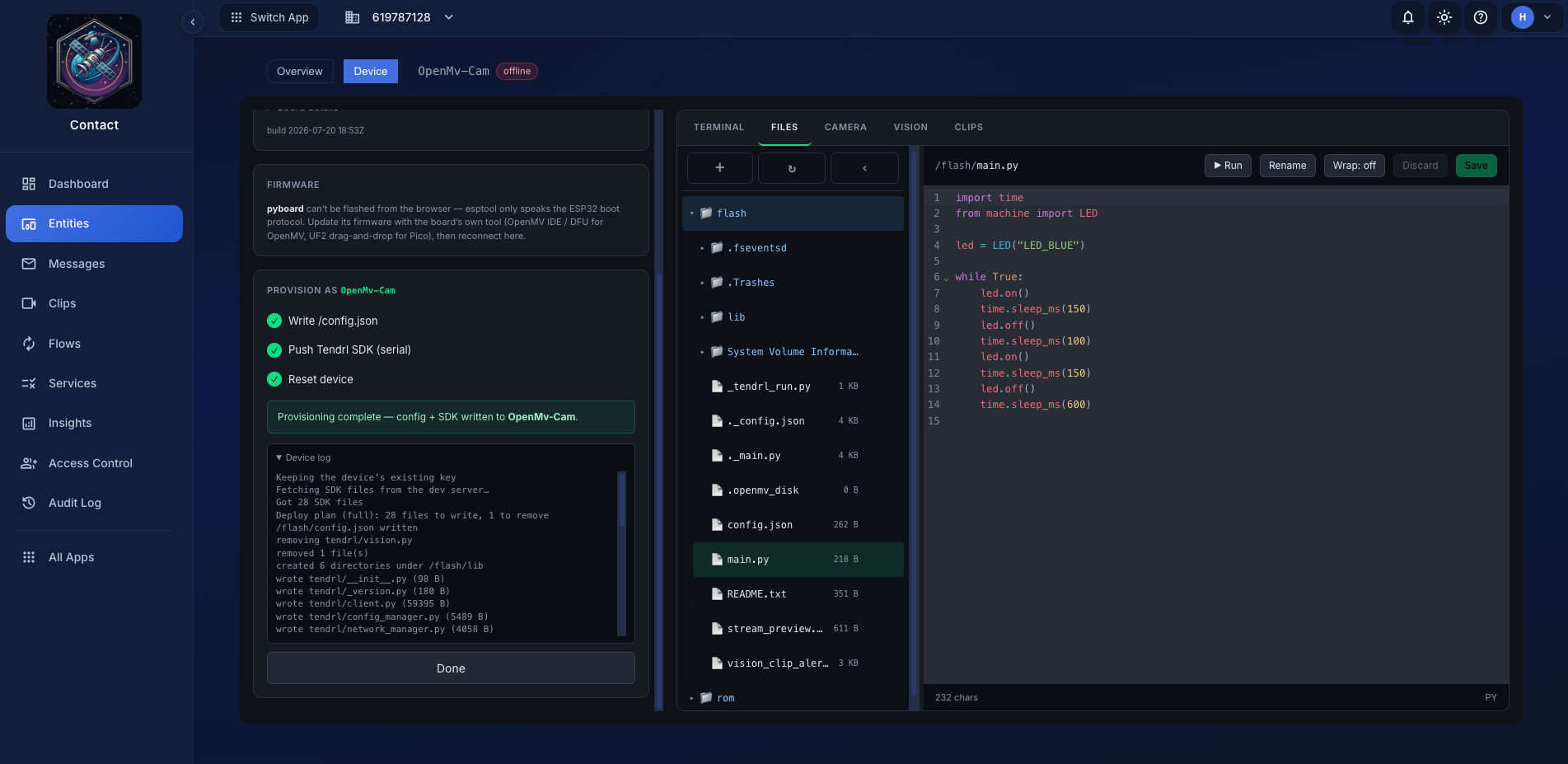
Edit a script on the device and run it with output streaming back live
Install paths
The SDK fits, even when the RAM doesn't
On a 4 MB ESP32 the thing that runs out first is heap, not flash. So the install form offers two paths, and both ship the SDK as compiled bytecode rather than source.
Tendrl firmware: the lowest-RAM path
The SDK is deployed to a read-only flash partition and executed in place, so the code never gets copied into the heap. If the board isn't running a ROMFS-capable build, the browser flashes one first (with one replug), then writes the image.
- 19.1 KB resident, vs 64.7 KB from the filesystem
- 26.5 KB peak during import, vs 76.7 KB
- 0.1 KB at boot, because nothing is copied into the heap
- ESP32 only, and it's the right default when heap is tight
Existing firmware: keep what's on the board
Pushes the SDK into the filesystem by tier, Full or Minimal, with file transfer, streaming, and vision as optional add-ons. Nothing is reflashed, so whatever else you have on the board stays put.
- Works on every supported board, not just ESP32
- A heap guardrail refuses an install too big for the board's RAM
- The only path on OpenMV; its ROM partition already holds the ML models
Every path ships precompiled .mpy
The board never parses source at import. Compiling on the host instead is the difference between a boot you wait for and one you don't.
79 ms, not 524 ms
Measured import on an OpenMV AE3: bytecode against the same modules as source.
511 ms, not 1136 ms
Running from flash against the same bytecode on the filesystem, on an ESP32-C3: peak during import drops from 76.7 KB to 26.5 KB.
It checks before it writes
Bytecode is version-coupled, so the form reads the board's .mpy format and refuses rather than installing something it can't import. Needs MicroPython 1.19 or newer.
Vision playground
Tune a detector by eye, not by guessing
Writing a detector is easy. Knowing what threshold to use is not; it depends on what your scene looks like, at this angle, in this light. The usual loop is edit, flash, wait, guess, repeat.
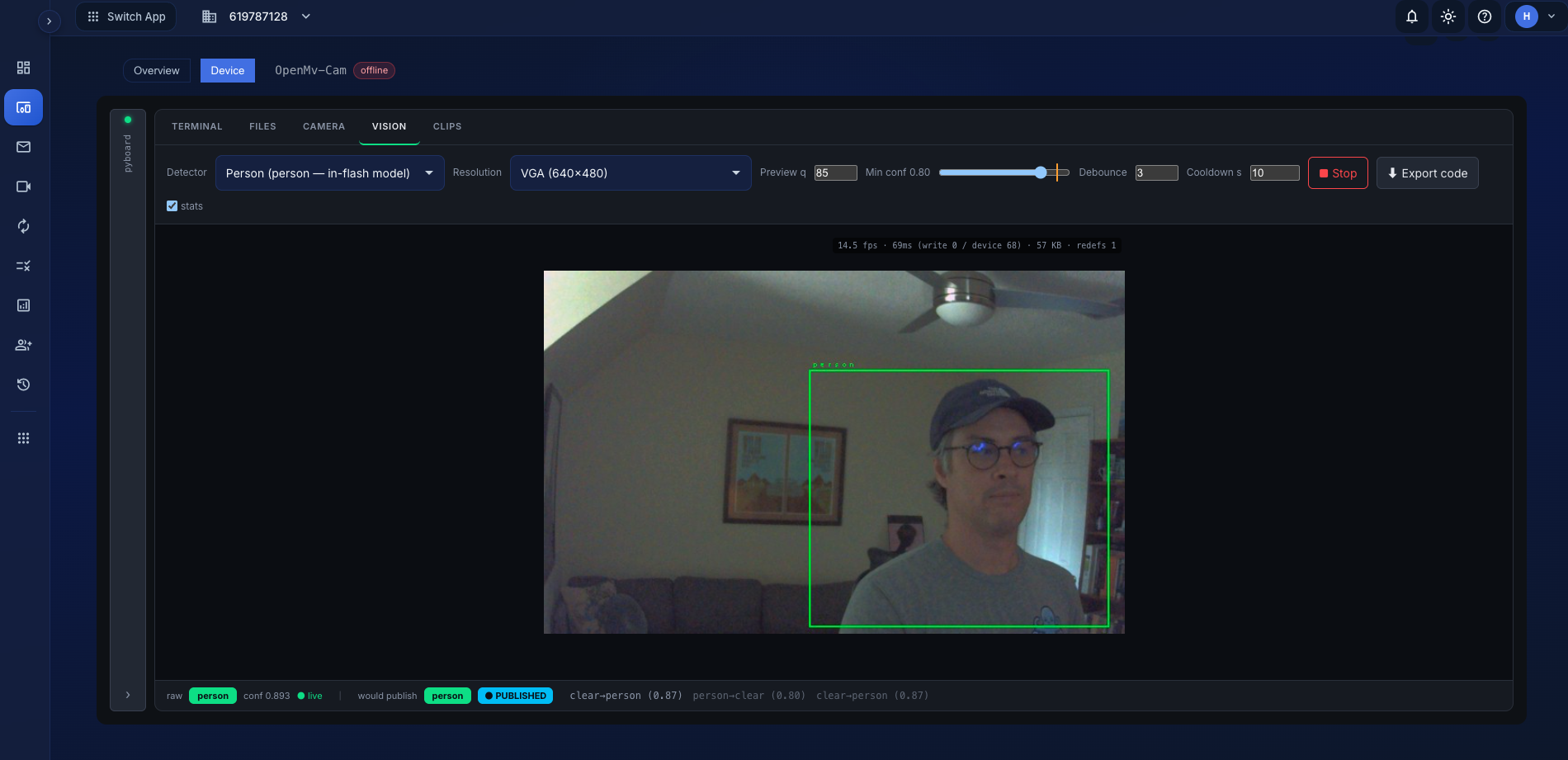
Drag an ROI, move the threshold, and watch what would actually publish
It's the real detector
The detectors run on the board: the actual tendrl.vision code, not a browser reimplementation. Every tick returns the verdict and the exact frame it judged.
Pick a number you measured
Drag a box around the thing. Cover it, uncover it, watch the value move against the marker. Put the threshold in the gap between two numbers you saw.
See what would publish
A simulator mirrors Watch exactly: debounce, cooldown, transitions only. Tune until the event list looks like something you'd happily receive for a year.
Then Export writes the finished watcher into the editor with every setting
baked in: detector, threshold, ROI, framesize, debounce, cooldown. Save it as
main.py, reset the board, and it runs on boot.
# Generated by the Tendrl Vision playground, tuned on real hardware.
import time
from tendrl import Client
from tendrl.vision import Camera, Watch, roi_brightness

cam = Camera(framesize="VGA")
client = Client(mode="sync")
client.start()
time.sleep(5)

watch = Watch(
    client,
    detect=roi_brightness(roi=(120, 80, 60, 90),
                          threshold=0.45,
                          states=("full", "empty")),
    debounce=3,
    cooldown_s=10,
    tags=["my-watcher"],   # routes to a flow / Strand workflow
)

# Publishes only when the state changes; nothing while the scene is stable.
while True:
    watch.update(cam.snapshot())
    time.sleep_ms(500)
All of it works with no network at all
The browser is talking to a USB port, not to us. That has consequences worth spelling out.
Your key stays yours
The API key is checked for identity against the entity, then written to the board over serial. The secret itself never reaches our servers. Nor does the Wi-Fi password; it's session-only and never stored.
Preview costs nothing
Camera frames and clip previews are assembled in the browser from serial data. No upload, no storage, no scan against your quota, and no Wi-Fi required on the device to see them.
Bench-friendly
Provisioning a batch away from the dashboard? The same workbench runs standalone from tendrl-dev-mcp web, on your own machine.
What you need
A supported browser
Chrome, Edge, Opera, or Firefox 151+; they implement WebSerial. Safari and iOS don't; there's a CLI for those.
A MicroPython board
ESP32 family, Pico W, or an OpenMV camera. Firmware flashing is ESP32-only; everything else works everywhere. Camera and vision need OpenMV.
An MQTT entity
Create one in Contact and you get the Device tab on its page. Edit permission required, since provisioning writes credentials.
Plug in a board. Open a tab. That's the setup.
